AI Intranet Page Builder for SharePoint
Generate complete, on-brand SharePoint intranet pages with AI in under 3 minutes. 80+ design elements, interactive components, automatic brand theming — then refine with follow-up edits. No code required.





















What Is ShortPoint AI Designer — the AI Intranet Builder for SharePoint?
ShortPoint AI Designer is an AI intranet page builder for SharePoint that turns prompts into complete, on-brand intranet pages. Describe the page you want, or upload a mockup, and generate a full SharePoint page in minutes.
Built inside ShortPoint, it uses the same 80+ design elements and 100+ pre-built page designs teams already rely on — now powered by AI.
In Page Builder, AI Designer is a third way to start: not from a blank layout, not from a template, but from intent. Prompt it once, get a structured AI-powered intranet page, then refine any part with follow-up edits or manual controls.
< 3 min
Prompt to page
4 inputs
Text, voice, image, clipboard
100+
pre-built page designs
80+
Design elements
100%
On-brand, by default
Live
Auto-connects to M365 data
98% satisfaction · 15-day free trial · No credit card required
Start Free TrialHOW IT WORKS · WAY 1
How to Build a SharePoint Intranet with AI in 3 Steps
AI Designer lives inside ShortPoint Page Builder. Generate a full SharePoint page with AI, refine specific sections, and publish — without switching tools or starting over.
Open AI Designer in Page Builder
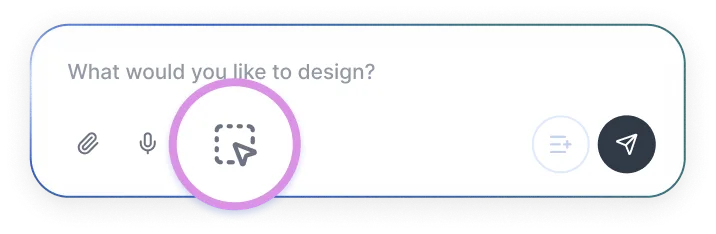
In ShortPoint Page Builder, click the green AI icon. You’ll see the AI prompt panel pop-up alongside the SharePoint page canvas — ready for AI page design.
AI Designer
Describe Your Intranet — or Upload a Mockup
Type, speak, or upload an image — AI Designer builds complete SharePoint intranet pages from text and visual inputs.
→ "Create an HR portal with onboarding, leave requests, and job openings."
or
📎 homepage-inspo.png — "Build something like the image attached for our team"
Refine Elements and Publish
Click any element on the AI-generated page to select it, then prompt changes for just that piece. Switch to Live Mode anytime to design manually — the classic ShortPoint way. Save when you’re happy with the result.
SEE IT IN ACTION
SharePoint Intranet Pages You
Can Build in Minutes
Here's a full SharePoint page generated from a single prompt — and ready-to-copy prompts for any team.
"Build an HR portal with onboarding, leave requests, team directory, and documents."
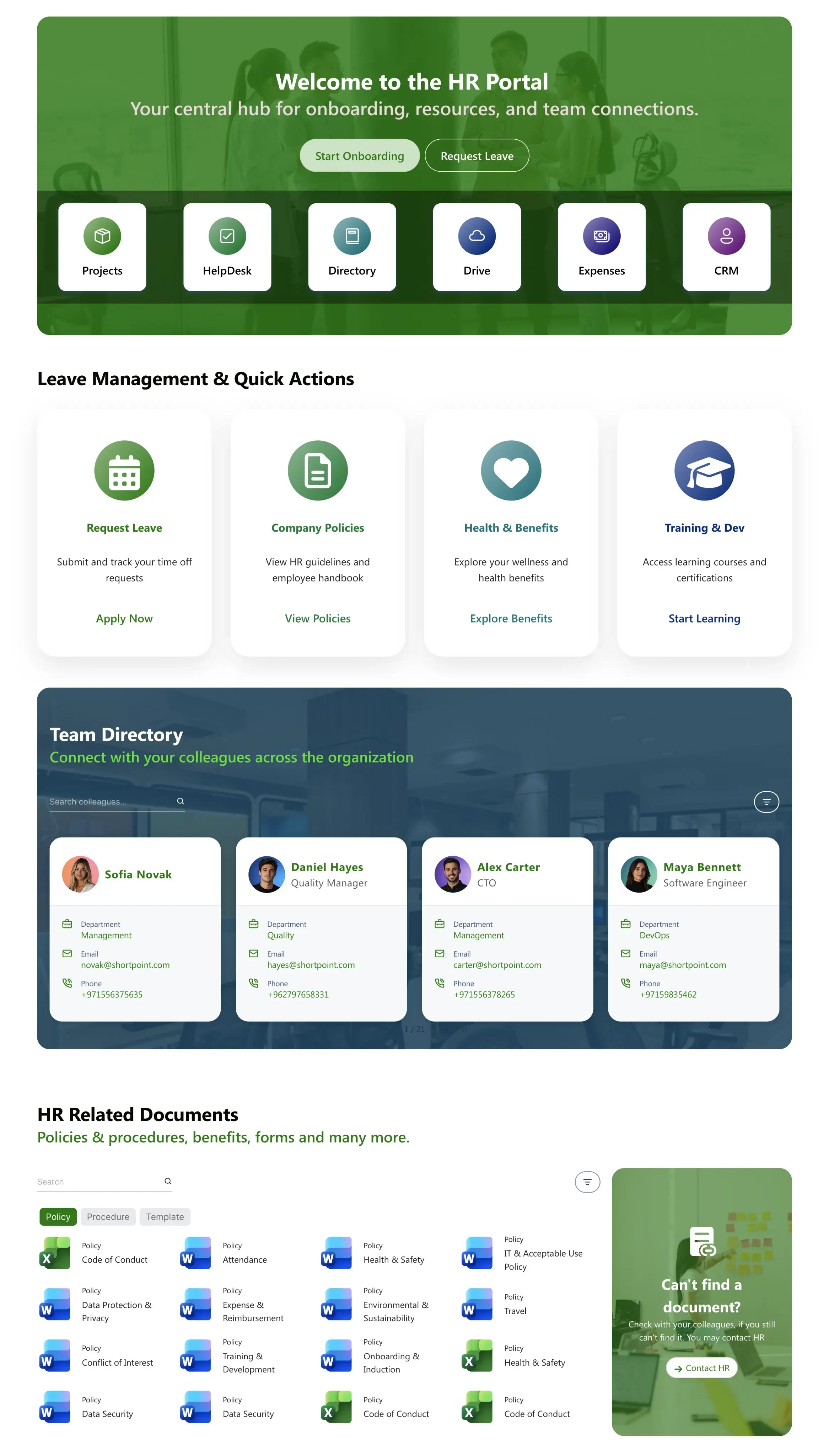
Anatomy of an AI-generated page
One prompt produces a complete, on-brand SharePoint page — multiple sections, interactive elements, and brand styling. Hover any number to find it on the page.
- 1Hero banner with CTA
- 2Quick links and key resources
- 3Quick actions
- 4Team directory with person cards
- 5Document Hub
Or try a prompt for another team
Build an HR portal with onboarding, leave requests, and a team directory.
Create an IT helpdesk with ticket submission, status tracker, and FAQs.
Design a project hub with KPI dashboard, milestone timeline, and team contacts.
Build a company news page with featured stories, event calendar, and a CEO message.
Pre-built Designs · WAY 2
Start from a Proven Design
Not sure where to start? Browse ShortPoint's library of pre-built page designs — HR, project, news, knowledge base, and more. Describe your team, brand, and content needs, and AI reshapes the design around them in minutes.
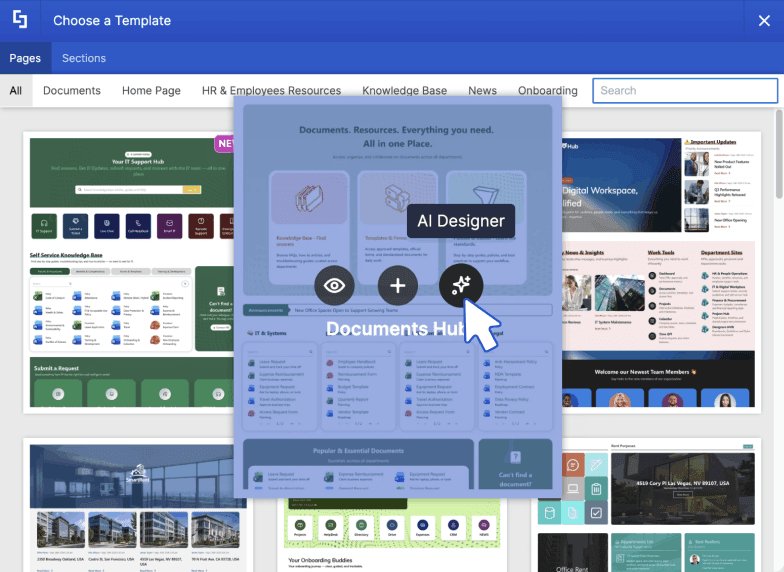
Browse the library
Choose any design template from our library, then click AI Designer.
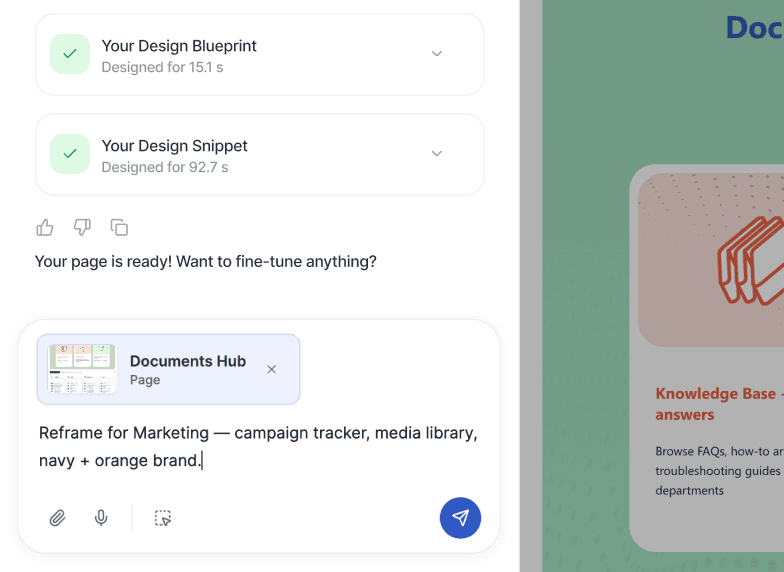
Prompt the AI designer
Describe your team, brand, and content — AI Designer reshapes everything.
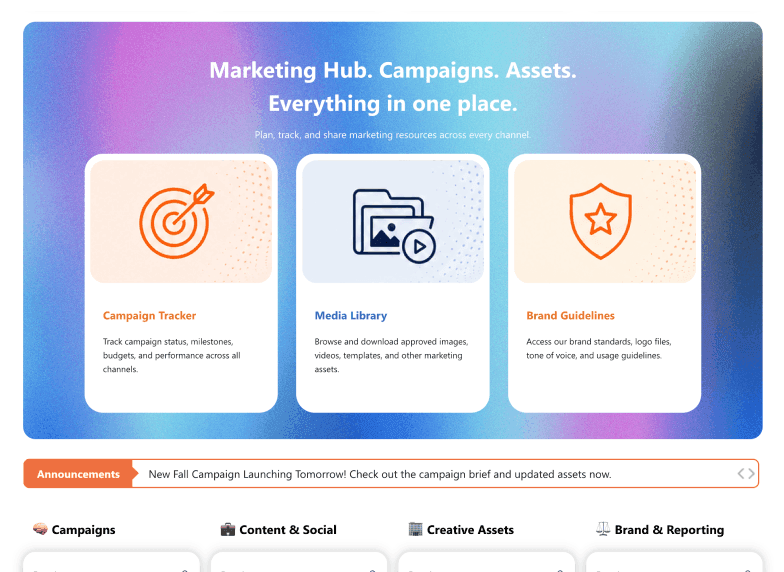
Review your custom layout
Fine-tune the layout, swap copy, adjust the brand — until it's exactly right.
AI Intranet Prompts
AI Intranet Design Prompts
Ready-to-use AI prompts for SharePoint intranet design — from full page generation to single-section refinement. Copy, paste, and customize.
Four prompt types, one AI tool
Copy any prompt and paste it directly into ShortPoint AI Designer
Department homepage
Create a homepage for Marketing with a hero banner, campaign calendar, brand asset library, and team directory.
Company intranet home
Build a company-wide intranet homepage with CEO message, news, quick links, upcoming events, and org announcements.
New hire onboarding
Build an onboarding hub for new hires with a 30-60-90 day checklist, training resources, and manager contacts.
IT helpdesk
Create an IT helpdesk page with a ticket submission form, live status tracker, known issues list, and FAQ accordion.
Section layout
Make this quick links section a 2×3 grid with icons instead of a list. Use the company's blue and white colors.
Hero section
Change the hero to a full-width image with white overlay text. Add a search bar below the heading.
News feed
Replace the news list with a card grid. Show 3 per row with featured image, title, date, and a read-more link.
Navigation section
Add a sticky top navigation bar with links to each section on this page. Use our primary brand color as the background.
Old intranet screenshot
Here's a screenshot of our old intranet. Recreate this layout in ShortPoint with a modern look and updated branding.
Design team mockup
I'm attaching a mockup from our design team. Build this page and add interactive filtering to the news section.
Competitor reference
Here's a page I like from another company's intranet. Use it as style inspiration — same structure but with our branding.
Brand guidelines PDF
I'm uploading our brand guidelines. Apply the color palette, typography, and logo placement rules to this page.
Brand application
Apply our branding: navy header, white background, Segoe UI font, and orange accent color for CTAs.
Visual feel
Make the page feel more modern and spacious. Card-based layouts, more padding, and subtle shadows.
Dark mode variant
Switch this page to a dark theme — deep navy background, white text, and teal accent colors throughout.
Accessibility
Increase text contrast, enlarge body font to 16px minimum, and make all interactive elements meet WCAG AA standards.
Key Capabilities
AI Intranet Page Builder: Key Capabilities
AI Designer doesn't replace what you already love about ShortPoint — it gives you a radically faster way to build AI-powered intranet pages. From prompt to published SharePoint page in under 3 minutes, with 80+ design elements, interactive components, and automatic brand theming.
Generate & Refine with Prompts
Generate a complete page from a single prompt. Refine with follow-up edits ("make the hero bigger", "change the color scheme"). Select any element to modify just that piece. Pick a template and describe how to customize it.
Multi-Modal Inputs
Type prompts, dictate with voice, attach images and mockups, or paste from clipboard.
Auto Brand Theming
Pulls colors and typography from your ShortPoint Theme Builder, so every AI-generated page stays on-brand automatically.
Conversation History & Version Control
Your full prompt history stays with the page in SharePoint, so you can pick up where you left off. Browse, preview, and revert to any previous version. Queue multiple prompts while one is generating.
80+ Design Elements
AI Designer assembles pages using ShortPoint's full element library — sliders, cards, tabs, search, filterable tables, progress bars, and more.
Search & Filters Toolbar
Six built-in widgets that turn long lists, tables, and directories into searchable experiences.

What Our Users Say
Trusted by 12M+ Users Across 86 Countries
The ease of Use and not need to have a coding background to use this software is a godsend! It has already paid for itself in the first year.


ShortPoint eases the setup and orchestration of Intranets and complex intranet structures and pages.

They are on top with the latest releases, I always look for the additional features that are added, very easy to navigate and understand.

ShortPoint is a Must Buy Product for Easy Web Design.

If you aren't using ShortPoint, you're missing out.
WATCH THE FULL DEMO
See the AI Intranet Page Builder in Action
See AI Designer in action — a full walkthrough demo of building a complete, on-brand SharePoint intranet page with AI. Describe the page you need, refine it with follow-up prompts, and publish in minutes. No code, no migrations.
FAQ
Frequently Asked Questions
Everything you need to know about ShortPoint AI Designer.
What is an AI-powered intranet?
An AI-powered intranet uses artificial intelligence to help teams create and manage intranet content. With an AI intranet page builder like ShortPoint AI Designer, you can generate complete SharePoint intranet pages from a text, voice, or image prompt — with layouts, interactive elements, and brand styling applied automatically.
Does AI Designer replace templates and layouts?
No — AI Designer works alongside ShortPoint's 100+ templates and 80+ design elements. It's a third way to start: from intent and description, rather than from scratch or a blank template. You can still use templates and manually edit layouts at any time.
Can I edit the page after AI generates it?
Yes. After AI generates your page, you can click any element to select it and make changes — either by prompting the AI to adjust that specific element, or by switching to Live Mode for manual editing. Full control is always available.
Can I upload an image or page and have AI recreate it?
Yes. AI Designer supports image input — you can upload a screenshot, mockup, or photo of an existing page, and the AI will generate a structured SharePoint intranet page based on the visual layout you provided.
Is my data safe?
Yes. ShortPoint AI Designer is built for enterprise environments and operates within your Microsoft 365 tenant. Your content and prompts are not used to train AI models. ShortPoint follows strict data privacy and security standards.
How is this different from Microsoft Copilot?
Microsoft Copilot for SharePoint is a content assistant — it helps you write text, draft emails, and summarize documents inside Microsoft 365. ShortPoint AI Designer is a page builder. You describe the SharePoint intranet page you want — an HR portal, IT helpdesk, project hub, or company homepage — and AI Designer generates the full layout, sections, and components in under 3 minutes. SharePoint Copilot doesn't design or build intranet pages; ShortPoint AI Designer does. Many SharePoint teams use both: Copilot for writing and content tasks, ShortPoint AI Designer for AI-powered intranet page design. The two work side by side inside the same SharePoint environment.
Which plans include AI Designer?
AI Designer is available on ShortPoint Pro and Enterprise plans. View pricing plans or start a free 15-day trial — no credit card required.
Why SharePoint Teams Are Adopting AI Intranet Tools
An AI intranet helps teams create and improve internal portals faster by using artificial intelligence to generate layouts, structure content, and simplify page design. Instead of building every section manually, teams can move from idea to published page in a fraction of the time.
For organizations using SharePoint, this matters even more. Intranet projects often slow down because every page requires planning, layout decisions, design work, and multiple review rounds. With an AI intranet builder for SharePoint, much of that work becomes immediate.
Built for Real SharePoint Intranet Workflows
Most teams do not need another standalone platform. They need a faster way to build inside the Microsoft 365 environment they already use. ShortPoint AI Designer works directly inside SharePoint, so teams can generate pages without migrating content, learning a new tool, or managing separate systems. Unlike SharePoint Copilot, which focuses on content and writing assistance, ShortPoint AI Designer is built specifically for intranet page design — generating complete layouts, not just text.
Because it works within ShortPoint Page Builder, AI Designer uses the same 80+ design elements and 100+ templates already available to your team. The result is a faster workflow, not a disconnected one.
From Manual Intranet Design to Prompt-Based Creation
Traditional intranet design usually follows a slow cycle: gather requirements, create a mockup, build the page, review it, revise it, and repeat. That process creates bottlenecks for HR, internal communications, and IT teams managing dozens of pages.
With an AI-powered intranet workflow, the process changes. Describe the page you need, generate a structured layout, refine sections with follow-up prompts, and publish. What used to take days or weeks can now happen in one session.
Who Benefits Most from an AI Intranet Builder?
Internal communications teams, HR departments, IT administrators, and intranet consultants benefit most from AI intranet tools because they are usually the ones responsible for keeping pages current, useful, and on-brand.
Common use cases include department homepages, onboarding portals, IT helpdesks, company news hubs, policy centers, project dashboards, and leadership communication pages. These are exactly the kinds of pages that need to be launched quickly and updated often.
Why ShortPoint AI Designer Fits the AI Intranet Category
ShortPoint AI Designer is built specifically for SharePoint page design. It generates complete intranet pages from prompts, mockups, or examples, then lets teams refine individual sections without losing control of the final result.
That makes it more than a writing assistant or SharePoint Copilot alternative. It is an AI intranet page builder designed for teams that want to create professional, on-brand SharePoint intranet pages faster, without relying on developers or agencies for every change.
Start a free 15-day trial and see how quickly your team can build an AI-powered SharePoint intranet page.
