


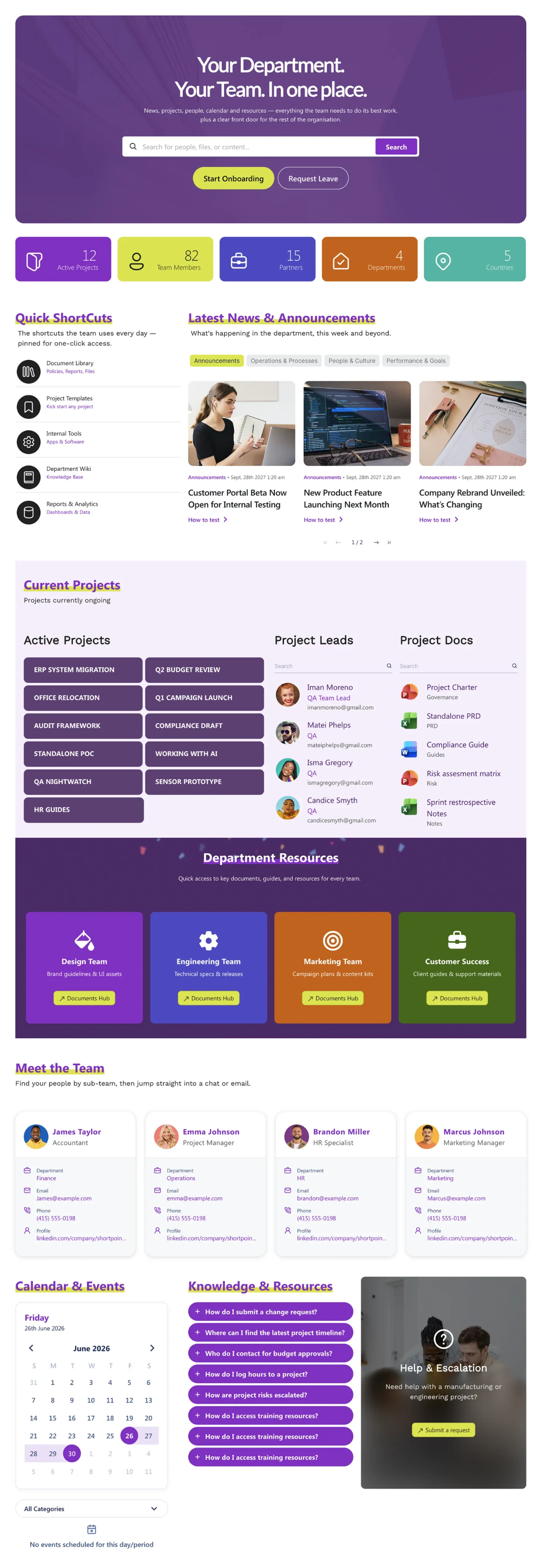
About this Template
Self-contained hub for each team (IT, Marketing, Sales, Operations, HR). Pre-built sections for department news, current projects with leads/docs, goals and OKRs, team directory, calendar/events, and knowledge base. Customizable colors per department.
Template Features
Break down cross-team communication barriers with custom-fit department spaces. These flexible design capabilities give you the total freedom to adjust layouts, showcase active goals, and organize team-specific knowledge without standard platform restrictions.
Design structured operational layouts and project tracking views visually with zero code.
Lock in division-specific accent colors while preserving global company brand rules.
Stream live project files and metrics instantly from core Microsoft 365 libraries.
Transfer optimized team layouts and custom lists across separate department sites.
Ensure internal training updates and task deadlines remain legible for every worker.
Centralize regional tools, data metrics, and third-party task platforms seamlessly.
Deploy pre-configured cards and team directories to launch your hub quickly.
Use high-visibility metric counters, event timelines, and functional search panels.
Provide on-the-go managers clear access to departmental timelines on mobile screens.
Instantly draft tailored division portals and information pages using text prompts.
Get Started With Everyday Home In Three Simple Steps
Launch a branded sharepoint department site template in under an hour - no coding required.
- 1
Activate your trial: Click “Start a Trial,” verify with Microsoft 365, and install to your site. Or use the manual installer - quick setup, no credit card required.
- 2
Insert a Template: Edit the page, add the ShortPoint web part, open Templates Library, and insert Team Home (or any ShortPoint intranet template).
- 3
Customize & Publish: Replace sample content, connect your SharePoint libraries with metadata and filters, set permissions, apply Theme Builder styling, and publish your team or department site.
Frequently Asked Questions
Within hours. The entirely visual editing experience completely eliminates the traditional development and testing bottleneck. You simply import the layout, drop in your text, link your files, and hit publish the same afternoon.
It adapts flawlessly to both cloud ecosystems and local servers. You can deploy it natively within modern SharePoint Online via M365 or maintain structural parity across supported On-Premise SharePoint 2019 and Subscription Editions (SE) environments.
The Theme Builder gives you micro-control over local site accents, icons, and buttons to give your specific department its own unique identity while strictly locking in the parent organization's typography and color codes.
No, it adapts automatically. The template is built on a responsive framework that instantly detects the user's screen size, reflowing text columns, resizing metric cards, and adjusting navigation bars for an optimal mobile experience.
The underlying design elements are completely modular. While initially styled for a department home, you can easily swap out elements, rearrange rows, and change titles to transform the page into an onboarding portal, product launch hub, or event space.
Through native data integration. Using ShortPoint Connect, you can link the page elements directly to secure backend sources like SharePoint lists, shared Outlook calendars, and Planner boards, ensuring the dashboard updates itself automatically when data changes.
You gain immediate, unrestricted access to our visual workspace software, our expanding template ecosystem, interactive data integration tools, and dedicated engineering support to ensure your sites function perfectly.
Related Templates
See all Templates









We were spending a lot of development dollars, but things still weren’t how we wanted and every day wasted was a day closer to our deadline.

ShortPoint has enabled us to create internal SharePoint sites that are user-friendly and attractive for our multi-generational group of Associates.

Before using ShortPoint, I’d never have expected that a small team such as ours could deliver a product that looks as good as our portal does today.
ShortPoint reduced the time it took to rebuild our intranet from 3 months to just 2 weeks. It really is a must-have for every company that uses SharePoint.


Building and customizing sites in SharePoint was a very heavy lift. We needed a developer on every project and it felt like we were always doing things the hard way.


I had no idea intranet consultancy would become so big for us! And none of it would have been possible without ShortPoint’s incredible software and support team.


It was hard to find solutions to beautify customers’ SharePoint installations and give customers a visual impression of how a new intranet could look.


Thanks to ShortPoint, the intranet isn’t a pain point for us anymore. I couldn’t put a price on how much happier we are working with ShortPoint as opposed to our previous vendor.

Working with ShortPoint was one of the smoothest projects I’ve ever been involved in. What they created for us is fantastic, and we never felt an ounce of stress.