


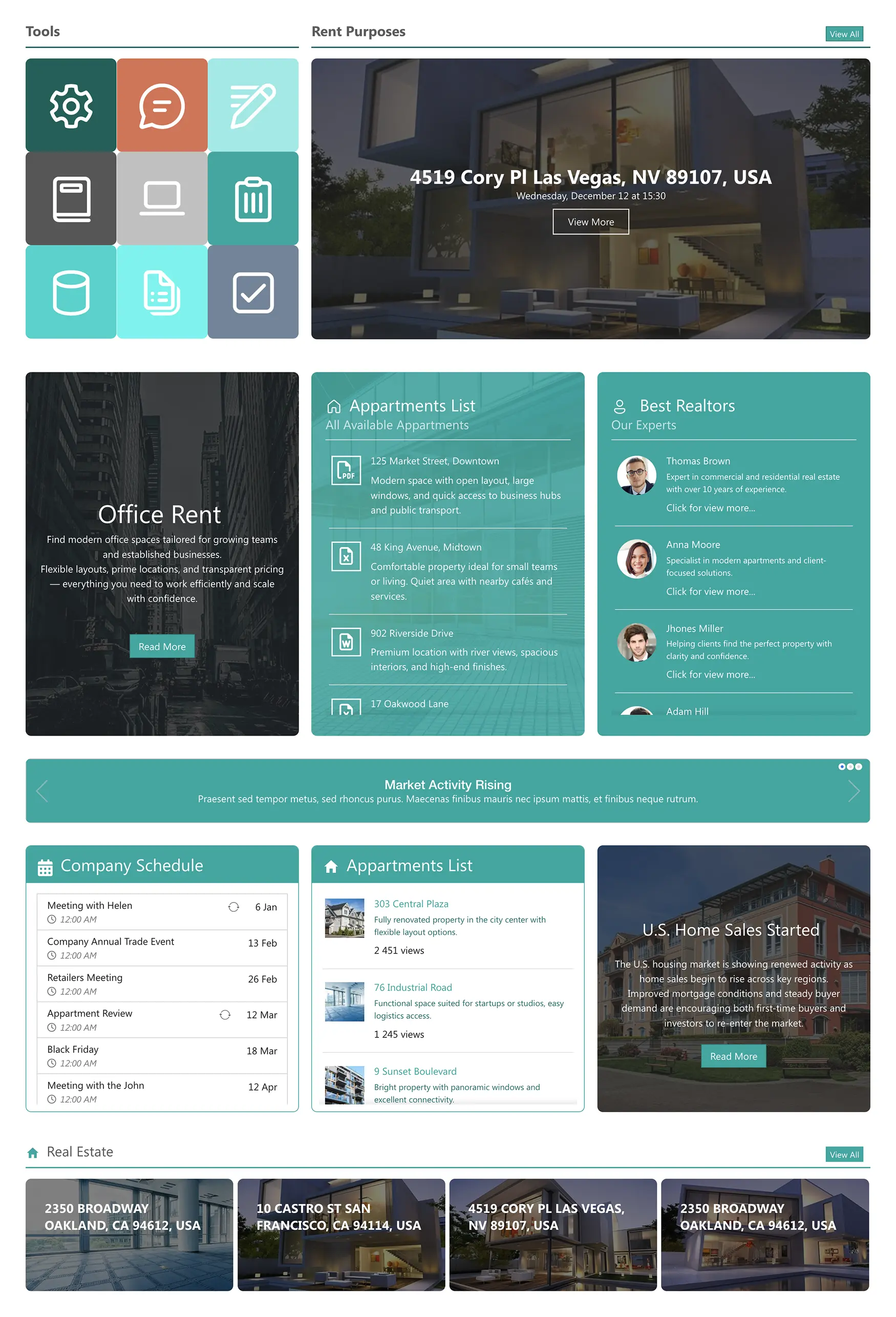
About this Template
A rental-focused layout with tools, property details, apartment lists, top realtors, news updates, schedules, and property availability. Ideal for real estate companies that manage both rentals and internal team operations.
Template Features
ShortPoint empowers you to build a sophisticated property rental portal that looks and feels like a custom web application. Use these intuitive tools to create a high-performance environment where your agents can find exactly what they need to close deals faster.
Improve your template with AI. Describe changes and see them in minutes.
Build and style pages visually in minutes. Drag, drop, and publish fully on-brand content.
Customize SharePoint site themes, colors, fonts, and spacing with real-time preview.
Connect to SharePoint lists and Microsoft 365 data sources for real-time content updates.
Multiply productivity: copy web parts, paste, customize site settings, and publish.
Readable and operable: high-contrast elements with clear, descriptive controls.
Easily integrate enterprise tools to publish updated content across your SharePoint intranet.
Choose from hundreds of expertly designed template pages to kickstart your project confidently.
Design your way with 60+ design elements, clean controls, and quick results.
Layout adjusts instantly to any device width - no manual changes needed.
Get Started With Everyday Home In Three Simple Steps
Launch a branded SharePoint Real Estate Rental template in under an hour - no coding required.
- 1
Start free trial & add ShortPoint to your site : Click "Start a Trial" and get access to ShortPoint instantly. No credit card needed—just sign in with your Microsoft 365 credentials or download ShortPoint manually and activate your trial.
- 2
Insert a Template : Edit your SharePoint page, insert the ShortPoint web part, and select the Real Estate 4 template (or any preferred template page) from the Templates Library
- 3
Customize & Publish : Replace sample content with your own, connect your SharePoint data sources, apply your company branding, and publish your new SharePoint Real Estate Rental Template for immediate use.
Frequently Asked Questions
You can go live in no time. Because the template is pre-configured with listing layouts and schedules, you simply connect your data and hit publish, no long development cycles required.
It is. ShortPoint works natively within SharePoint Online (M365) and maintains full compatibility with SharePoint On-Premise and Subscription Edition (SE) environments.
Completely. Using the ShortPoint Theme Builder, you can inject your specific brand colors and typography across the entire template to ensure a seamless corporate identity.
Yes. The template is built with a mobile-first philosophy, ensuring that your property listings and schedules remain clear and actionable on any screen size.
Easily. You can save your customized version of this template and deploy it across multiple site collections, allowing different branches or regions to maintain a unified look.
Definitely. ShortPoint Connect allows you to link your calendar elements directly to Outlook or SharePoint calendars, so your team’s meetings and viewings stay updated automatically.
You receive a full license to our no-code builder, unlimited access to our templates library, regular feature updates, and expert support to help you build the perfect intranet.
Related Templates
See all Templates









We were spending a lot of development dollars, but things still weren’t how we wanted and every day wasted was a day closer to our deadline.

ShortPoint has enabled us to create internal SharePoint sites that are user-friendly and attractive for our multi-generational group of Associates.

Before using ShortPoint, I’d never have expected that a small team such as ours could deliver a product that looks as good as our portal does today.


ShortPoint reduced the time it took to rebuild our intranet from 3 months to just 2 weeks. It really is a must-have for every company that uses SharePoint.


Building and customizing sites in SharePoint was a very heavy lift. We needed a developer on every project and it felt like we were always doing things the hard way.


I had no idea intranet consultancy would become so big for us! And none of it would have been possible without ShortPoint’s incredible software and support team.


It was hard to find solutions to beautify customers’ SharePoint installations and give customers a visual impression of how a new intranet could look.


Thanks to ShortPoint, the intranet isn’t a pain point for us anymore. I couldn’t put a price on how much happier we are working with ShortPoint as opposed to our previous vendor.


Working with ShortPoint was one of the smoothest projects I’ve ever been involved in. What they created for us is fantastic, and we never felt an ounce of stress.