


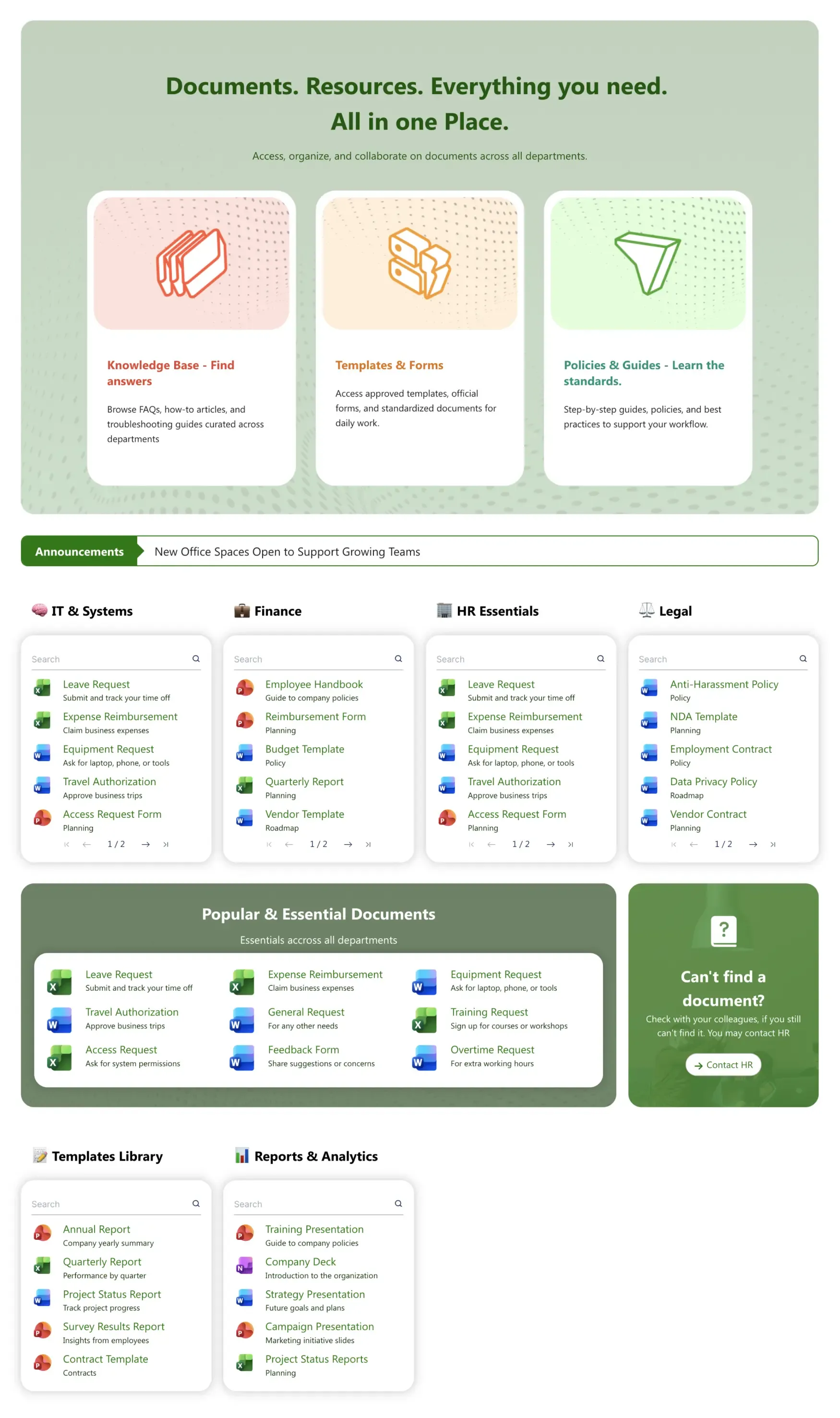
About this Template
Organizes your knowledge base, templates and forms, policies and guides, and popular documents across IT, Finance, HR, and Legal in a single searchable view. Pre-built filters, recently-updated indicators, and quick links.
Template Features
Transform static file directories into dynamic resource centers. These built-in design tools give you the power to customize layout structures, streamline navigation, and style your information architecture to make critical company documentation effortlessly discoverable.
Instantly draft optimized designs for knowledge bases and resource hubs.
Structure document grids and knowledge base sections visually without code.
Align file directories and resource hubs with your corporate color scheme.
Pull live files and metadata directly from SharePoint libraries dynamically.
Replicate successful resource layouts across multiple department sites instantly.
Keep corporate policy text and file lists accessible for all employees.
Centralize external training links and cloud files into a single dashboard.
Launch your Document Hub rapidly using pre-designed layouts tailored for content hubs.
Embed functional search bars, download icons, and file lists seamlessly.
Give your on-the-go workforce instant, readable access to critical documents.
Get Started With Everyday Home In Three Simple Steps
Launch a branded sharepoint document management template in under an hour - no coding required.
- 1
Activate your trial: Click “Start a Trial,” verify with Microsoft 365, and install to your site. Or use the manual installer - quick setup, no credit card required.
- 2
Insert a Template: Edit the page, add the ShortPoint web part, open Templates Library, and insert Document Hub (or any ShortPoint intranet template).
- 3
Customize & Publish: Replace sample content, connect your SharePoint libraries with metadata and filters, set permissions, apply Theme Builder styling, and publish your Document Hub.
Frequently Asked Questions
In just a few clicks. You can link your existing SharePoint document libraries directly to the interface, instantly sorting your files into clean, searchable tabs.
es. The template features built-in search bars for individual departments, allowing team members to filter down to the exact document they need instantly.
Because it integrates natively with SharePoint, it respects all your existing Microsoft 365 permission settings and security groups automatically.
Yes. The design includes a prominent support callout box that you can easily route to your HR desk, IT helpdesk, or internal ticketing system.
The layout is pre-configured with dedicated panels for IT, Finance, HR, and Legal, making it easy to host and categorize company-wide assets.
Not at all. ShortPoint’s visual builder lets you update text, reorder departments, and swap icons without touching HTML or CSS.
Your page updates automatically. Because it is connected directly to your underlying libraries, it always serves the most current live version.
Related Templates
See all Templates









We were spending a lot of development dollars, but things still weren’t how we wanted and every day wasted was a day closer to our deadline.

ShortPoint has enabled us to create internal SharePoint sites that are user-friendly and attractive for our multi-generational group of Associates.

Before using ShortPoint, I’d never have expected that a small team such as ours could deliver a product that looks as good as our portal does today.


ShortPoint reduced the time it took to rebuild our intranet from 3 months to just 2 weeks. It really is a must-have for every company that uses SharePoint.


Building and customizing sites in SharePoint was a very heavy lift. We needed a developer on every project and it felt like we were always doing things the hard way.


I had no idea intranet consultancy would become so big for us! And none of it would have been possible without ShortPoint’s incredible software and support team.


It was hard to find solutions to beautify customers’ SharePoint installations and give customers a visual impression of how a new intranet could look.


Thanks to ShortPoint, the intranet isn’t a pain point for us anymore. I couldn’t put a price on how much happier we are working with ShortPoint as opposed to our previous vendor.

Working with ShortPoint was one of the smoothest projects I’ve ever been involved in. What they created for us is fantastic, and we never felt an ounce of stress.