


About this Template
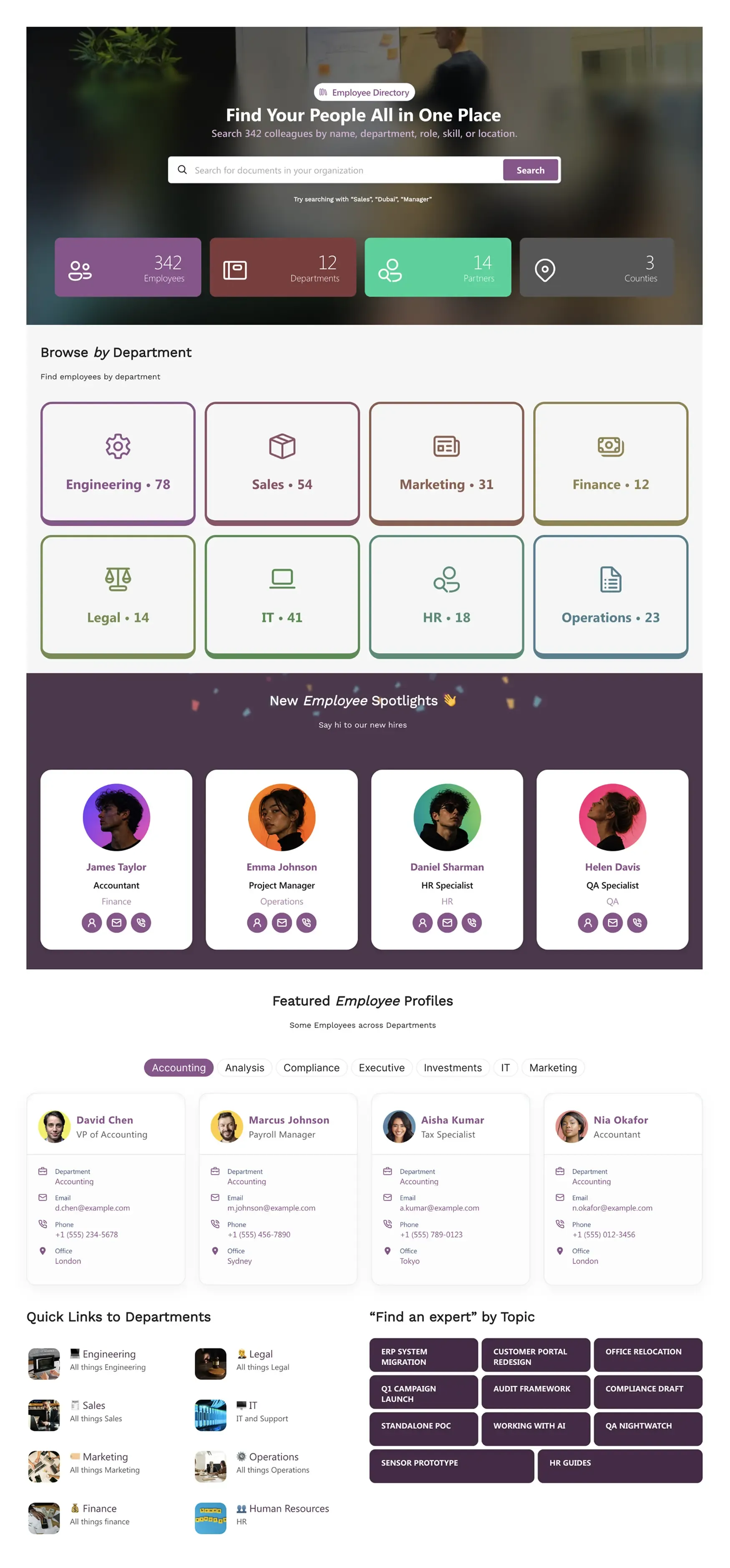
Find the right person by name, department, role, skill, or location. Browse-by-department cards, new-hire spotlights, profile cards with email/phone/LinkedIn/chat, and "Find an expert by topic" section. Connects to Microsoft Graph.
Template Features
Stop settling for generic, rigid corporate directories that hurt user engagement. These specialized design capabilities allow you to build an intuitive, visually rich staff directory that highlights new hires, organizes departments, and makes internal expertise easily discoverable across your entire organization.
Generate specialized people directories and skill-mapping blocks using text prompts.
Construct dynamic staff pages and search bars visually without writing code.
Build directory profiles and category badges with corporate brand colors.
Pull live employee profiles and contact details directly from Microsoft 365 data.
Duplicate high-performing profile layouts and team lists across sites instantly.
Ensure employee details and contact cards remain fully readable for all users.
Link employee profile cards seamlessly to Outlook email and Microsoft Teams chat.
Deploy pre-built staff spotlight templates to skip complex intranet setups.
Use interactive filter tabs, clean search bars, and high-visibility statistic cards.
Provide instant access to employee contact numbers on any smartphone or tablet.
Get Started With Everyday Home In Three Simple Steps
Launch a branded sharepoint employee directory template in under an hour - no coding required.
- 1
Activate your trial: Click “Start a Trial,” verify with Microsoft 365, and install to your site. Or use the manual installer - quick setup, no credit card required.
- 2
Insert a Template: Edit the page, add the ShortPoint web part, open Templates Library, and insert People Net (or any ShortPoint intranet template).
- 3
Customize & Publish: Replace sample content, connect your SharePoint libraries with metadata and filters, set permissions, apply Theme Builder styling, and publish your employee directory page.
Frequently Asked Questions
Within a few hours. The layout is ready to use, so you only need to drop the template into your site, connect your existing user directories, and launch.
Yes, completely. Using ShortPoint Connect, it syncs natively with your Azure Active Directory or SharePoint User Profiles to display real-time employee information.
Absolutely. The template features interactive filter widgets and tabbed profiling, allowing users to drill down by specialties, offices, or departments.
Clean and fully readable. The layout scales down automatically for mobile devices, making click-to-call and email buttons simple for staff to use.
Yes. There is a built-in "New Employee Spotlights" visual section designed specifically to introduce fresh team members and boost organizational onboarding.
You have complete creative control. You can use the global Theme Builder to instantly apply your brand fonts, department-specific colors, and custom iconography.
No manual editing is required. Because the directory connects directly to your live Microsoft ecosystem, changes to user accounts reflect on the page automatically.
Related Templates
See all Templates









We were spending a lot of development dollars, but things still weren’t how we wanted and every day wasted was a day closer to our deadline.

ShortPoint has enabled us to create internal SharePoint sites that are user-friendly and attractive for our multi-generational group of Associates.

Before using ShortPoint, I’d never have expected that a small team such as ours could deliver a product that looks as good as our portal does today.

ShortPoint reduced the time it took to rebuild our intranet from 3 months to just 2 weeks. It really is a must-have for every company that uses SharePoint.


Building and customizing sites in SharePoint was a very heavy lift. We needed a developer on every project and it felt like we were always doing things the hard way.


I had no idea intranet consultancy would become so big for us! And none of it would have been possible without ShortPoint’s incredible software and support team.


It was hard to find solutions to beautify customers’ SharePoint installations and give customers a visual impression of how a new intranet could look.


Thanks to ShortPoint, the intranet isn’t a pain point for us anymore. I couldn’t put a price on how much happier we are working with ShortPoint as opposed to our previous vendor.

Working with ShortPoint was one of the smoothest projects I’ve ever been involved in. What they created for us is fantastic, and we never felt an ounce of stress.