Stay Ahead of the Curve: Why It's Time to Move Your SharePoint 2019/SE Classic Pages to Modern
At ShortPoint, we're passionate about helping you create intranets that your teams genuinely love. We believe that the future of SharePoint intranet design is modern, flexible, and fast — and we want you to get the best experience getting there.
To keep enjoying our latest features and access upcoming ShortPoint Modern On-Prem versions, we highly recommend moving your SharePoint 2019/SE classic pages over to Modern SharePoint pages. Starting from ShortPoint SPFx version 9.5.0.0 and up, all our new features — Design Elements, templates, AI design tools, and much more — will be built exclusively for Modern pages.
Need to stay on classic pages? No problem. Your SharePoint 2019/SE classic pages will continue to run smoothly as usual. You will miss out on a lot of new features, though.
Quick Answer: What Is Actually Changing?
- From ShortPoint SPFx 9.5.0.0 onwards, every new ShortPoint feature ships for Modern SharePoint pages only.
- Grid Mode is being discontinued for new releases — Live Mode replaces it on modern pages.
- Your classic pages keep working. They continue to receive critical bug fixes and security patches.
- The recommended move is to convert your SharePoint 2019/SE classic pages to modern pages so you keep getting new features.
Note: While you aren't strictly required to migrate your entire SharePoint site infrastructure to modern, we recommend it to maximise all the perks ShortPoint will bring in future releases. For more information, see Microsoft's guide on Modernize your classic SharePoint sites.
By Magdalene Mojica, Content Writer at ShortPoint • Last Updated: August 2026
Why We're Making the Shift to Modern
ShortPoint is evolving to leverage modern SharePoint architecture fully. To help us build next-generation features, Grid Mode will soon be discontinued for new releases starting from ShortPoint SPFx version 9.5.0.0 onwards.
Grid Mode served as a reliable foundation for classic pages for a long time. However, intranet designs are evolving. To get the best experience possible, they now require a more dynamic, responsive foundation. Modern SharePoint pages allow us to build richer, faster, and far more dynamic components natively. Moving away from Grid Mode lets our team dedicate 100% of our innovation and creativity towards new features that will make intranet design faster and easier for you.
Want to see more of what's in store when you shift to modern? Read ShortPoint Says Goodbye to Grid Mode: Welcome to a Faster, Seamless Live Mode Experience.
What You're Missing Out On With Classic Pages
Here's a quick look at the experiences that are already available on Modern SharePoint pages — and that classic pages cannot access.
-
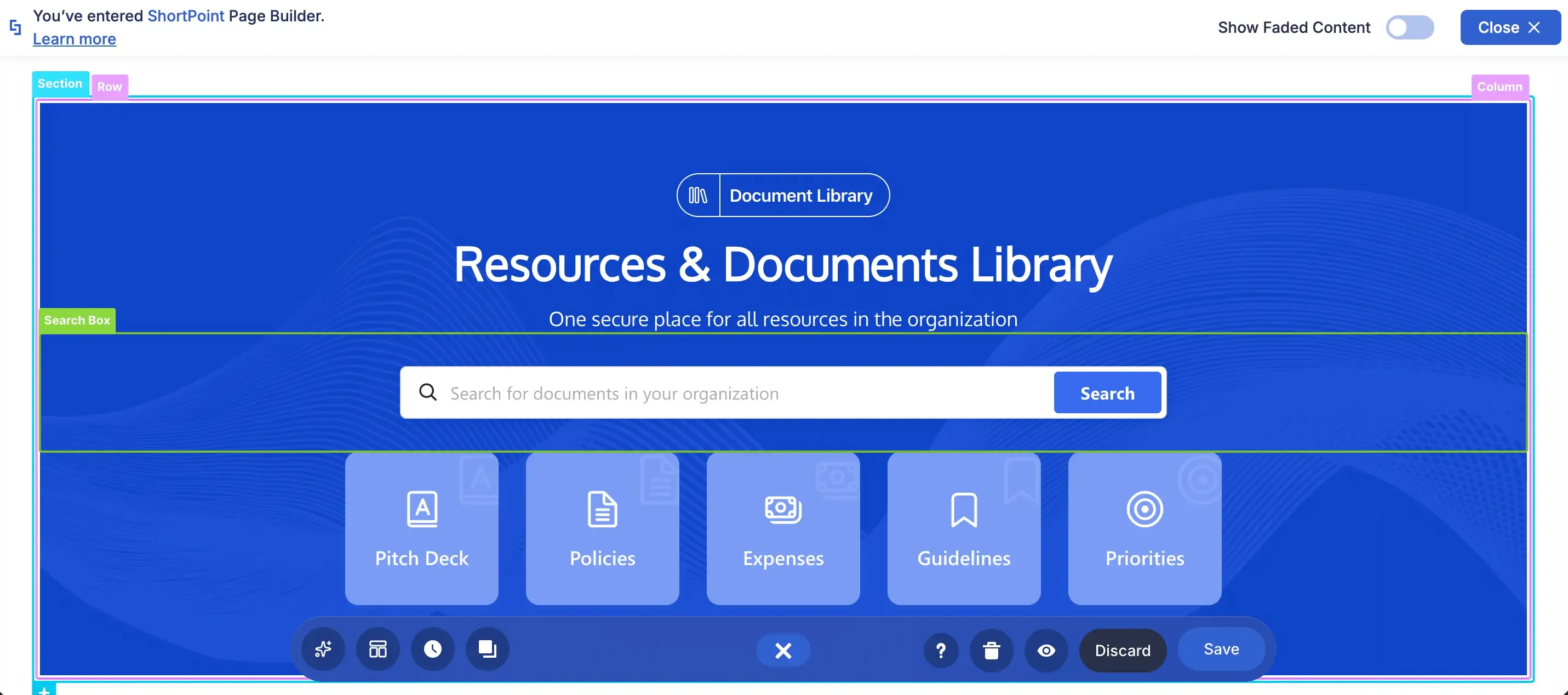
Live Mode
A visual, real-time editing experience
Live Mode lets you build and edit directly on the page and see every change as it happens — no switching between an editor and a preview, no guessing how the layout will render for your users.
-
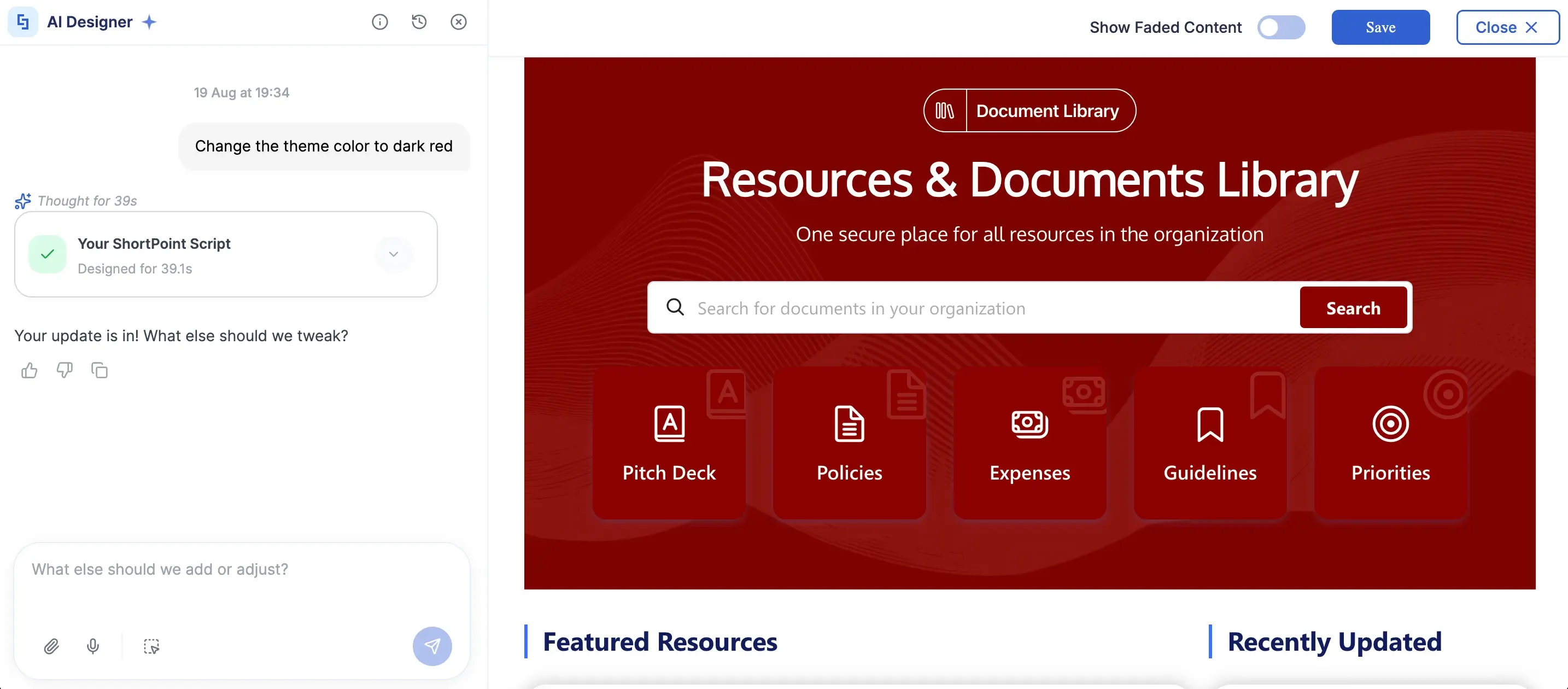
AI Designer
AI-assisted design from a single prompt
Describe what you want — a theme colour, a new section, a different layout — and ShortPoint AI Designer applies it to the page for you. What used to take an afternoon of manual styling now takes a sentence.
-
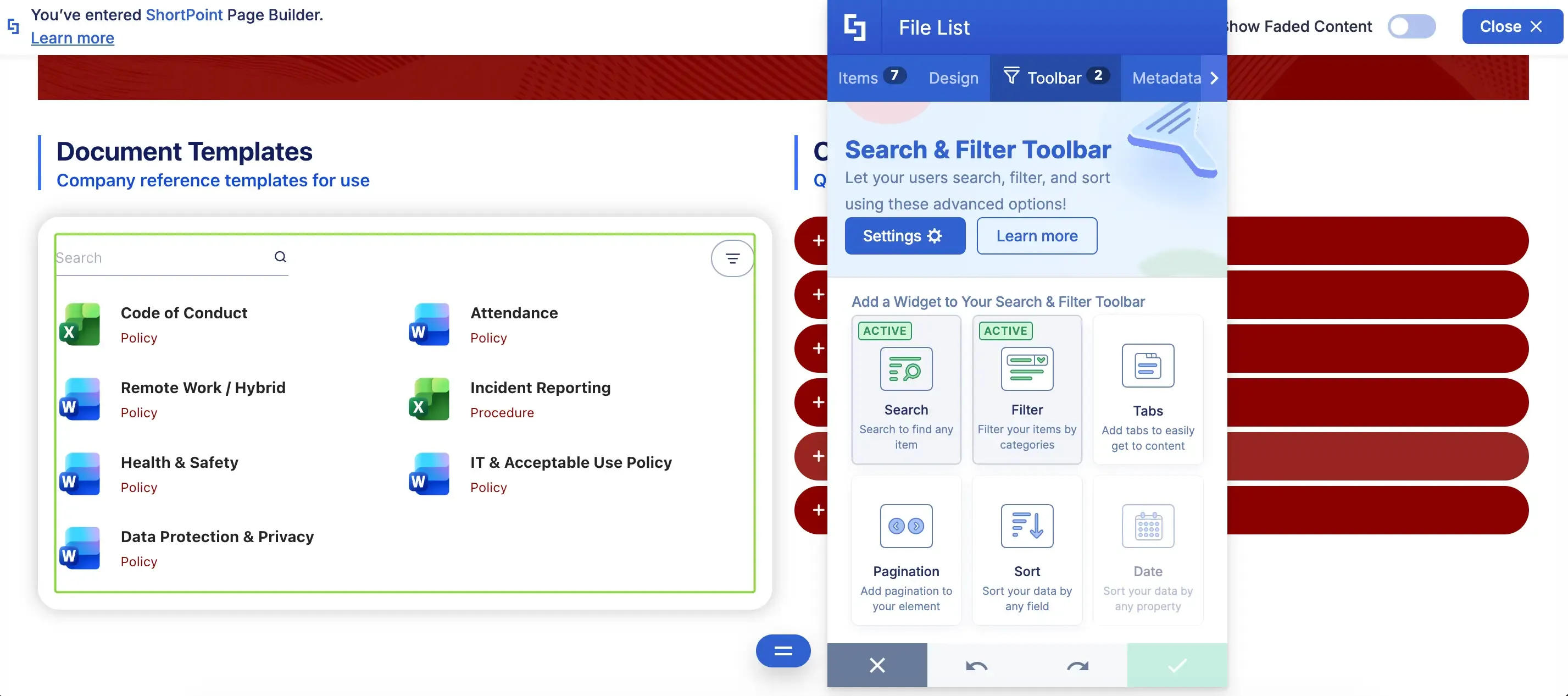
Search & Filter
An intuitive way to search, sort, and filter data
The Search and Filter Toolbar gives your users a fast way to find what they need inside document libraries and lists — configured visually, with no code and no custom development.
-
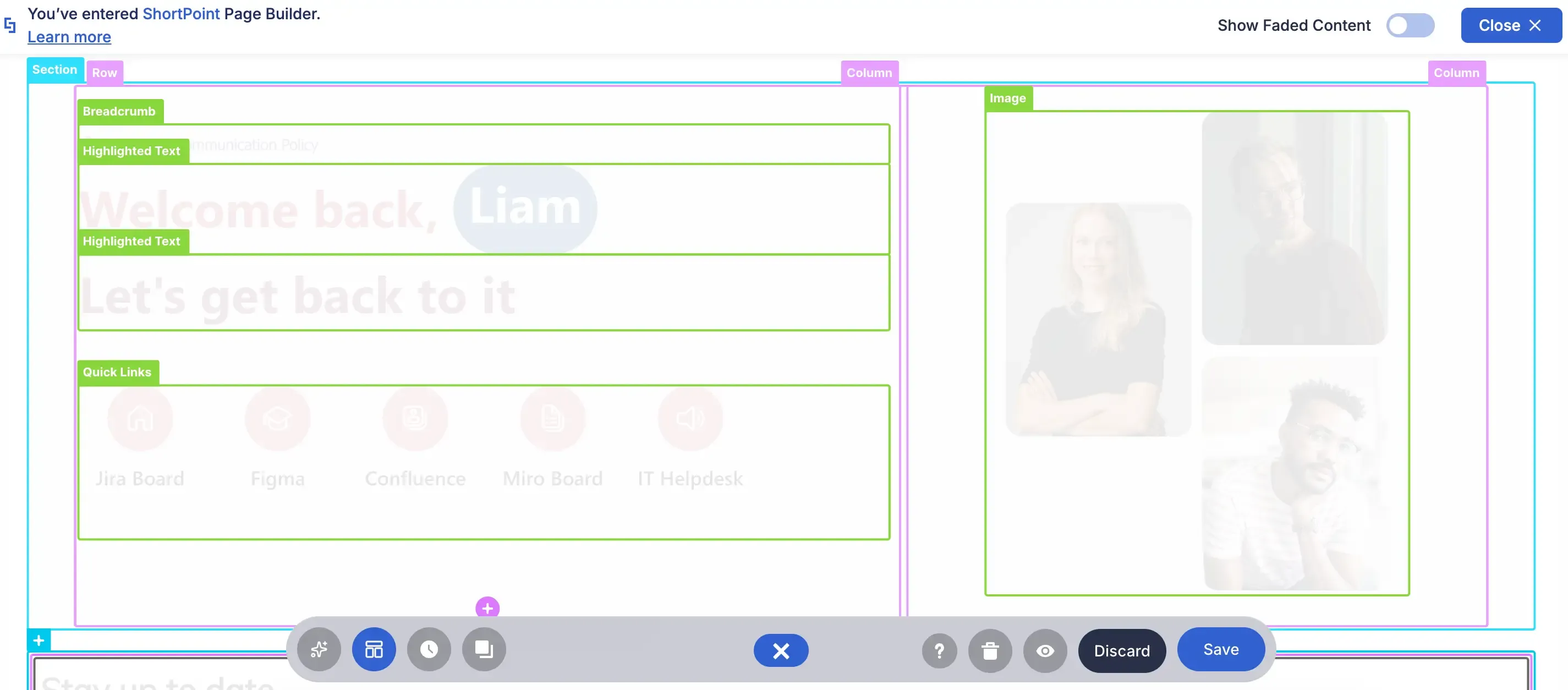
Wireframe Mode
The familiar wireframe view, rebuilt
Once ShortPoint SPFx version 9.5.0.0 rolls over, the wireframe experience you know comes right back — with a cleaner visual outline of your sections, rows, and columns for structural editing.
None of this is available on SharePoint 2019/SE classic pages — and the gap widens with every release after ShortPoint SPFx 9.5.0.0. If you want to see what modern pages look like when they're fully designed, browse our SharePoint intranet template library .
Explore ShortPoint intranet templates →What This Means for Your Team
1. All New Features Will Be Modern-Only
Starting from ShortPoint SPFx version 9.5.0.0, all new ShortPoint design elements and features will be built exclusively for modern pages. Only critical bug fixes and security patches will be supported for classic pages.
2. Classic Pages Will Remain Functional, But Will Miss Out on Innovations
While ShortPoint features on your existing classic pages will continue to work as intended, new ShortPoint features cannot be accessed. You will not be able to add new design elements, try our new features (and we have a lot in the pipeline), or experience a smoother way to design your intranet. Hint: drag-and-drop.
3. A Better Overall Experience for Your Users
Outside of ShortPoint updates and features, Modern SharePoint pages simply give your users a better experience: native mobile responsiveness, cleaner rendering, and noticeably faster page loading speeds out of the box.
Our Continued Commitment to SharePoint 2019/SE Classic Pages
We understand that migrating your environment infrastructure takes time and careful planning. If your organisation is not yet ready to make the leap, you don't have to worry.
ShortPoint will continue to support SharePoint classic pages with critical bug fixes and security patches. Your existing classic pages will run as usual. All Design Elements and other functional integrations will remain intact.
However, once ShortPoint SPFx version 9.5.0.0 lands, you will not be able to access new features and design elements on those pages.
Classic vs Modern at a Glance
| Classic Pages (SharePoint 2019/SE) after v9.5.0.0 | Modern On-Prem Pages (Recommended) after v9.5.0.0 | |
|---|---|---|
| New ShortPoint Features | Maintenance only. No new features added | Full access to all new features |
| Security & Bug Fixes | Critical bug fixes and security patches only | Fully supported |
| Editing Experience | Limited to the old Grid Mode interface | No Grid Mode. Full Live Mode experience and all its improvements |
Ready to Plan Your Move?
Upgrading to modern pages opens up a whole new world of design possibilities for your intranet. To make the transition as easy as possible, we created a detailed guide for you. Follow the steps below and you're on your way:
If you have questions or want a hand getting started, our Support team is here for you every step of the way. Reach out to support@shortpoint.com or submit a ticket.
Talk to ShortPoint SupportFrequently Asked Questions
ShortPoint recommends moving to Modern SharePoint Pages so you can keep enjoying the latest features and upcoming ShortPoint Modern On-Prem versions. Modern pages offer a more dynamic, responsive foundation for intranet design, enabling richer, faster, and more dynamic components.
After version 9.5.0.0, all new ShortPoint features and design elements will be built exclusively for Modern pages. Classic pages will receive only critical bug fixes and security patches, with no new features added.
Yes. Classic Pages will continue to function with their existing features and critical support, but you will miss out on new innovations and design improvements available only on Modern pages.
Modern pages provide a better overall experience with native mobile responsiveness, cleaner rendering, faster page loading speeds, and access to new ShortPoint features and AI-assisted design tools.
No. Your existing Classic Pages will continue to run smoothly with critical bug fixes and security patches, but no new ShortPoint features will be available on them.
ShortPoint offers a detailed guide to help you convert your SharePoint 2019/SE Classic Pages to Modern pages. You can also reach out to ShortPoint Support at support@shortpoint.com or submit a ticket for assistance.

Magdalene Mojica
Content Writer, ShortPoint
Magdalene is a Content Writer at ShortPoint. With more than three years of experience dedicated to customer education, she crafts a wide range of resources—from Knowledge Base support articles to insightful blog posts and newsletters. She details what you need to know about ShortPoint to help you build stunning, engaging, and user-friendly SharePoint intranets.
Ignite your vision. Install ShortPoint directly on your site, or play in sandbox mode. No credit card required.