Best SharePoint Homepage Templates for Your Intranet in 2026
Six ready-to-use intranet homepage examples you can install today—with modern designs for news, search, quick links, and events. No coding required.
Your intranet homepage is the page every employee sees first. It's the front door to your digital workplace—and if it's cluttered, outdated, or hard to navigate, people will avoid it entirely. That's the SharePoint paradox: the world's most popular intranet platform is also the one employees complain about most.
The problem isn't SharePoint. It's the design. Out-of-the-box SharePoint pages look generic and offer limited layout flexibility. That's why organizations searching for SharePoint home page examples and intranet homepage examples consistently land on the same frustration: pages that look like document dumps, not digital workplaces.
A well-designed SharePoint homepage template solves this. It gives you a production-ready layout—balanced, branded, and built for daily use—that you can deploy in hours, not months. The best intranet homepage designs share common traits: a prominent search bar, personalized content, news and events feeds, quick-access tiles, and responsive layouts that work on any device.
Now, teams are also expecting something else: faster ways to build and improve pages without starting from scratch. That's where ShortPoint AI Designer comes in—an AI-Powered Intranet Page Builder for SharePoint that helps you generate full pages from a prompt, refine them via conversation, and update specific elements without rebuilding the layout.
This guide showcases six SharePoint homepage templates representing the best of modern intranet design. Each one is a real, deployable template built with ShortPoint—covering everything from executive communication dashboards to action-first operational homepages.
For a broader look at all intranet template types — from onboarding to knowledge bases — explore our full SharePoint templates library.
By Luisa Silva, Growth Manager at ShortPoint • Last Updated: March 30, 2026 • 9 min read
What Makes an Effective Intranet Homepage Design
Before choosing a template, it helps to understand the intranet design best practices that separate great homepages from forgettable ones. Based on what we've seen across hundreds of ShortPoint deployments, five principles consistently drive adoption:
1. Search First, Everything Else Second
The most effective intranet homepage designs lead with a prominent search bar. Employees don't come to your homepage to browse—they come to find something specific. If the search function isn't visible within the first fold, you've already lost engagement. Modern intranet design puts search front and center, often as the hero element.
2. News That's Actually New
A stale homepage is a dead homepage. The best SharePoint intranet templates dynamically pull news, announcements, and events from SharePoint lists and Microsoft 365 apps. This keeps content fresh without requiring someone to manually update the page every week. Use ShortPoint's Connect feature to pipe in live data from Outlook calendars, SharePoint news, and Planner tasks.
3. Quick Access to Daily Tools
Your homepage should reduce the number of clicks between an employee and their most-used tools. Tile-based navigation—linking to HR, IT, payroll, the employee handbook, and department sites—is a proven company intranet design pattern. The best templates place these above the fold alongside search.
4. Personalization, Not One-Size-Fits-All
In 2026, corporate intranet design has moved beyond static pages. With Microsoft 365 audience targeting and ShortPoint's conditional visibility, your homepage can show different content to different departments, roles, or locations. An engineer in Berlin and a salesperson in Chicago should see relevant content without switching sites.
5. Mobile-First and Accessible
Over 40% of intranet visits now happen on mobile devices—especially for frontline workers. Every homepage template should be fully responsive and WCAG 2.1 compliant. If your intranet breaks on a phone, you've excluded a significant portion of your workforce.
6 Best SharePoint Homepage Templates
Each template below is a fully designed, production-ready SharePoint page built with ShortPoint . These are real intranet design templates you can deploy today—on Microsoft 365, SharePoint Online, SE, 2019, 2016, and 2013.
-
1. Annual Report — Intranet Homepage Template
Drive internal communication and corporate transparency instantly.
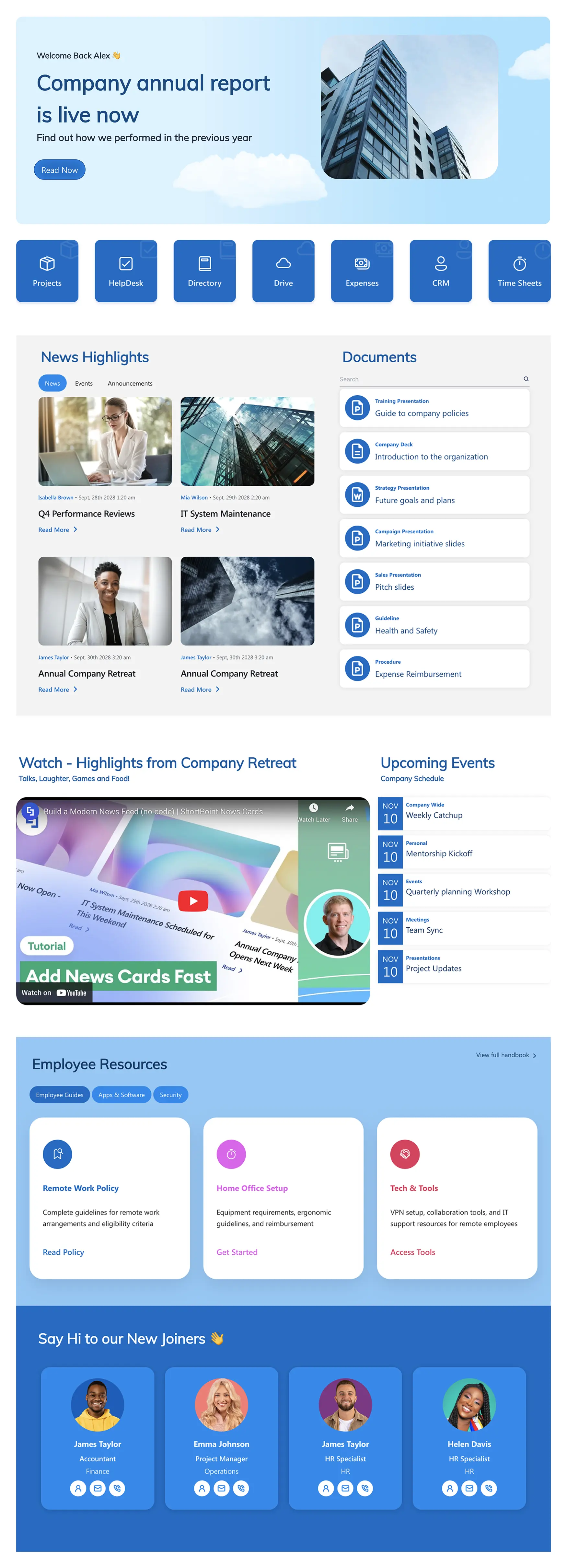
This intranet homepage template is designed for organizations that need their front page to communicate big-picture strategy and company performance. It uses a magazine-style editorial layout to present annual highlights, leadership messages, financial milestones, and strategic priorities in a format employees actually want to read.
What makes this homepage design stand out is its narrative structure. Instead of the typical grid of links and widgets, it tells a story—guiding employees through key achievements, team spotlights, and forward-looking goals. ShortPoint's Connect feature can pipe in live data from SharePoint lists, so metrics and news stay current without manual updates.
Best for: Enterprise organizations that use their intranet homepage as a leadership communication channel and culture-building tool.
Improve with ShortPoint AI Designer: Generate a leadership dashboard from a prompt ("Create an executive update homepage with KPIs + milestones + CEO message"), then refine sections through conversation—without redesigning the page.
Standout feature: Magazine-style editorial layout that turns corporate updates into engaging content.
View Template -
2. Intranet Layout 2 — Intranet Homepage
Modern homepage for news, tools, people, and events.
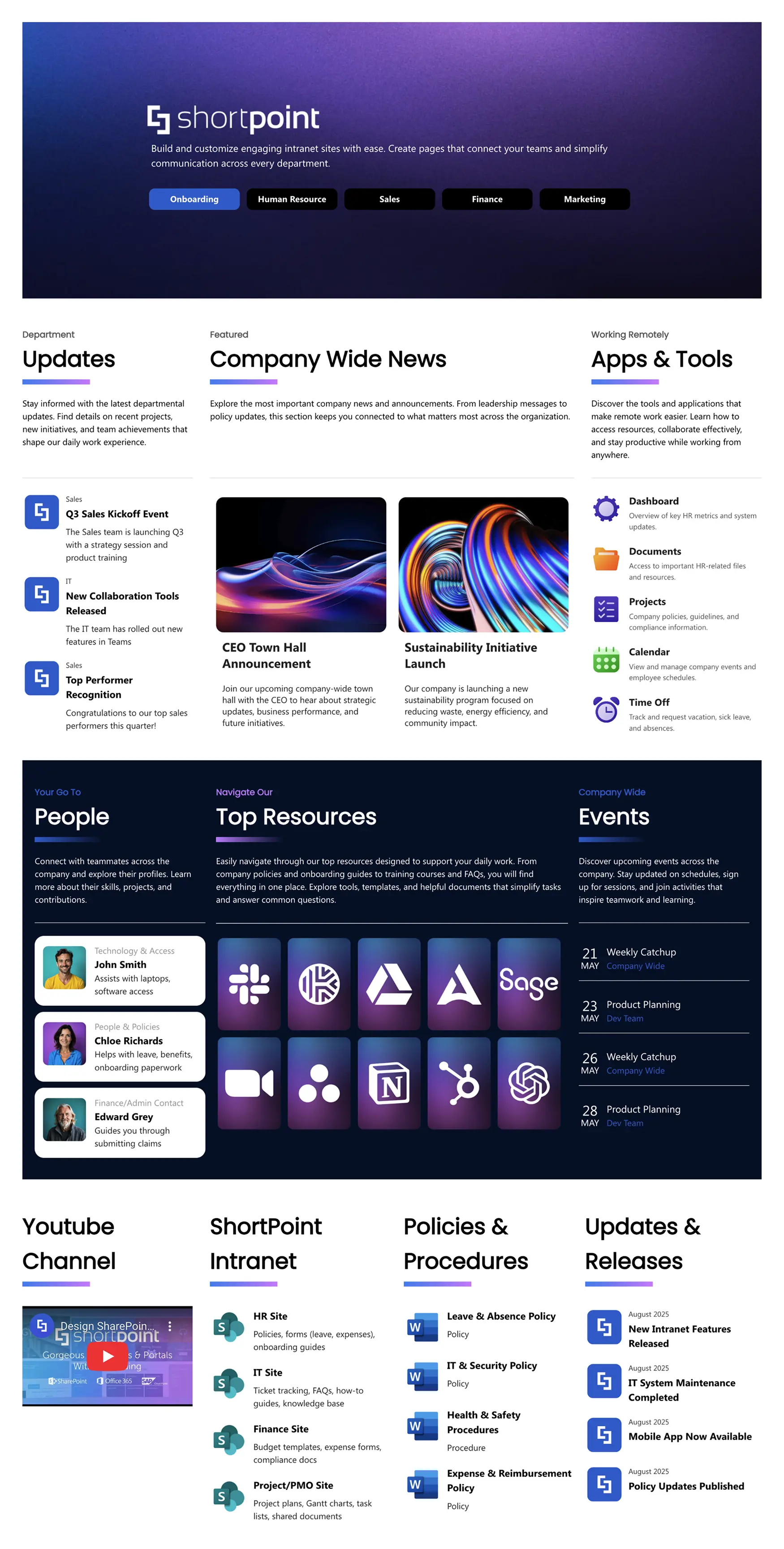
This is the intranet homepage that does everything. It's a balanced dashboard that combines company news, people discovery, essential tools, and an events calendar into one clean, modern layout. The design follows the core intranet design principle of giving every content type its own space without overwhelming the page.
The layout is structured around clear content zones: a hero banner for featured announcements, a news grid for dynamic updates, a people section for team discovery, and a quick links area for daily tools. It's the kind of modern SharePoint intranet homepage that works as a browser default—the page employees start their day on.
Best for: Mid-to-large companies that need a well-rounded homepage covering news, people, tools, and events in one view.
Improve with ShortPoint AI Designer: Ask the AI to simplify the layout ("make the news section tighter", "add a second row of tool shortcuts") or update only one zone with element-level targeting.
Standout feature: Balanced four-zone layout that keeps every content type visible without visual clutter.
View Template -
3. Everyday Home — Company Intranet Template
The central hub for your modern digital workplace needs.
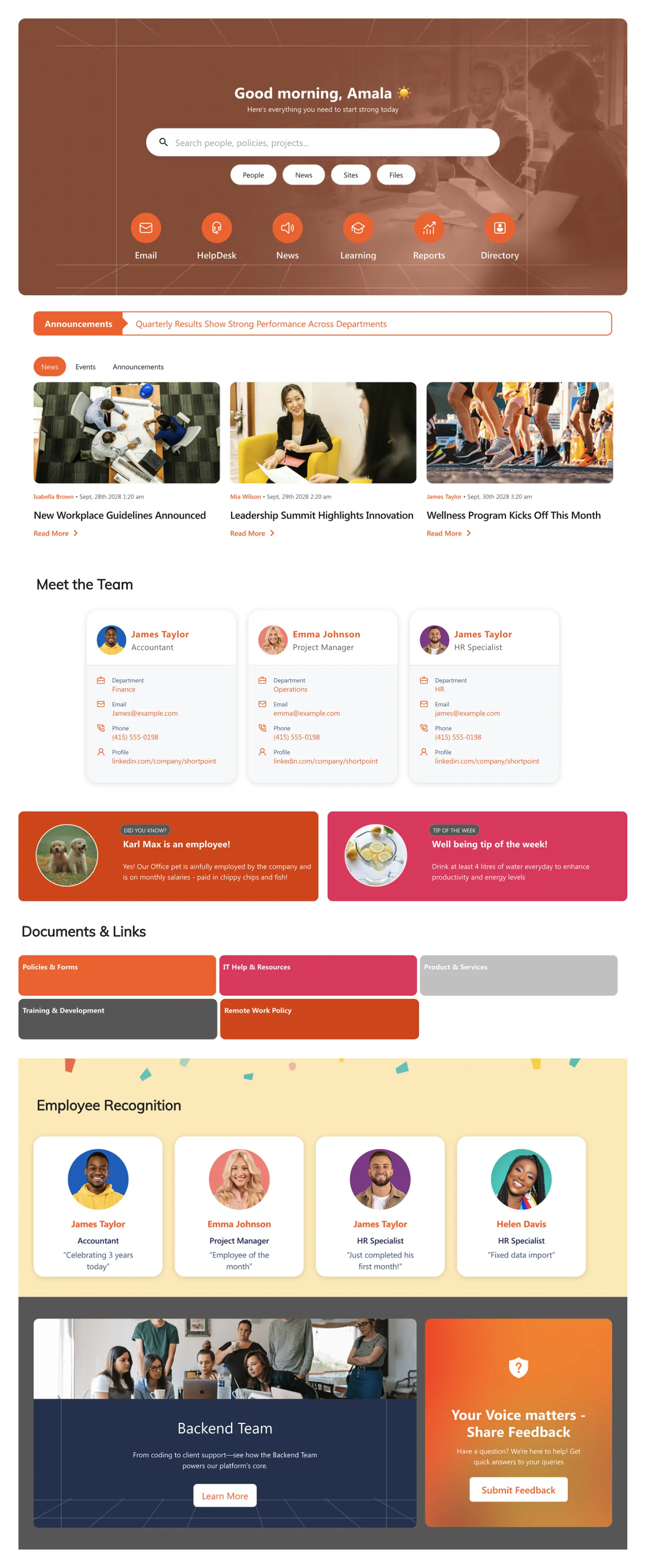
If you're looking for the best company intranet template as a starting point, this is it. Everyday Home is designed to be the default browser homepage for every employee—a balanced dashboard that serves company news, tasks, and tools in one place. Its "Top Resources" section provides one-click access to the links employees use most: payroll, IT support, the employee handbook, and department-specific tools.
What sets Everyday Home apart from other SharePoint intranet templates is its practicality. There's no visual excess—every section earns its place on the page. The template is built for organizations that want their homepage to be genuinely useful every single day, not just pretty on launch day. It's fully customizable through ShortPoint's Page Builder and Theme Builder, and it connects to live Microsoft 365 data for automatic content updates.
Best for: Most companies as an ideal starting point for their digital workplace—designed for daily use, not just launch day.
Improve with ShortPoint AI Designer: Generate a role-based variation ("Create a version for frontline workers"), then tweak just the Top Resources tiles and quick links without touching the rest of the layout.
Standout feature: "Top Resources" section for one-click access to essential, everyday links.
View Template -
4. Intranet Layout 6 — SharePoint Homepage Design
Personalized intranet homepage for search, news, and actions.
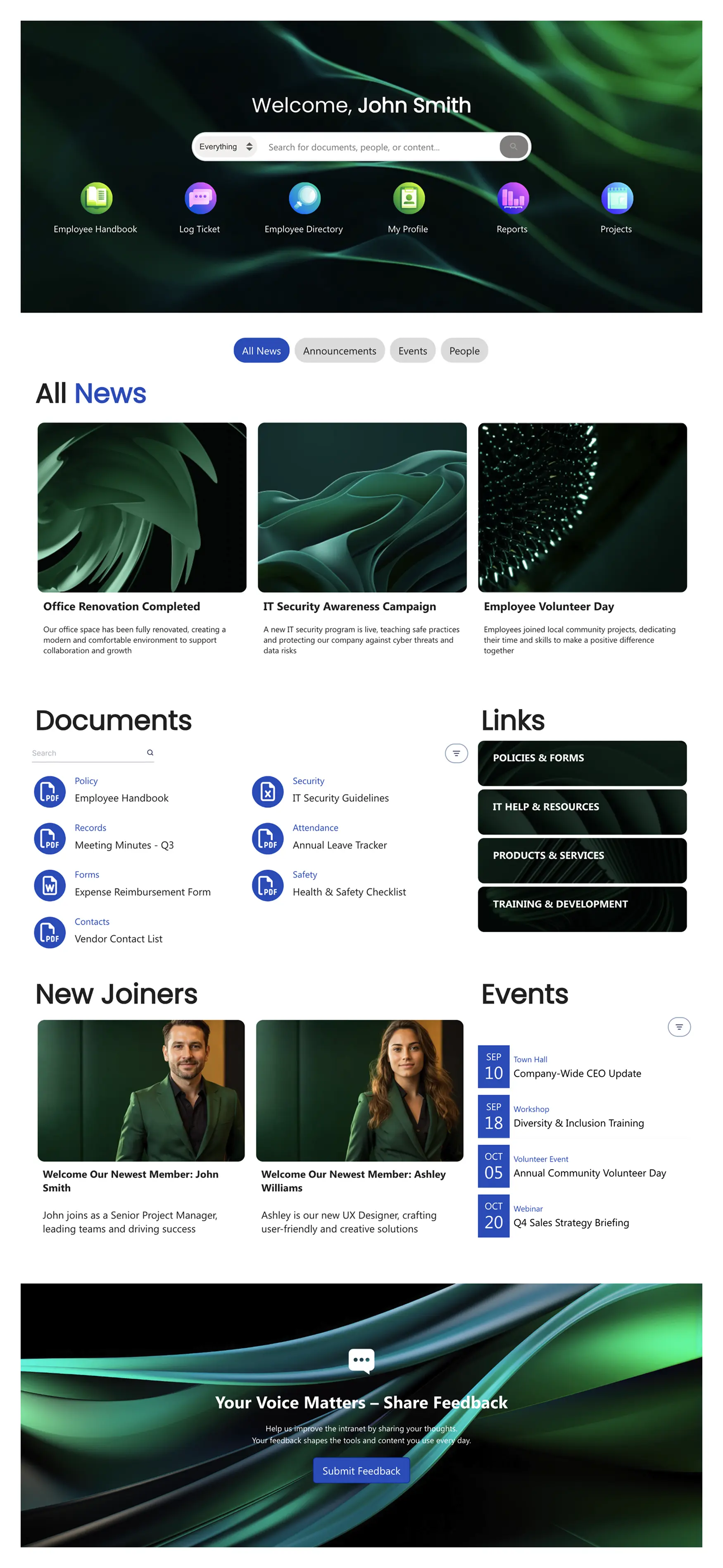
This SharePoint homepage design puts personalization at the center of the experience. It leads with a powerful search bar and uses audience-targeted content blocks to show each employee the news, tools, and actions most relevant to them. The result is an intranet homepage that feels personalized without requiring complex development.
The layout follows a search-first, action-second philosophy that reflects modern intranet design best practices. Below the search bar, content is organized into clear zones: featured announcements, quick-action tiles, dynamic news feed, and contextual links. It's one of the best SharePoint home page examples for organizations that want their homepage to adapt to different audiences while maintaining a consistent brand.
Best for: Organizations that want a personalized, search-first homepage experience with audience-targeted content.
Improve with ShortPoint AI Designer: Ask for a "search-first homepage" from a prompt, then add SmartToolbar patterns (tabs, filters, sorting) to help employees find relevant content faster.
Standout feature: Search-first design with personalized content blocks driven by audience targeting.
View Template -
5. Together — Intranet Homepage Template
Modern intranet homepage for news, documents, and events.
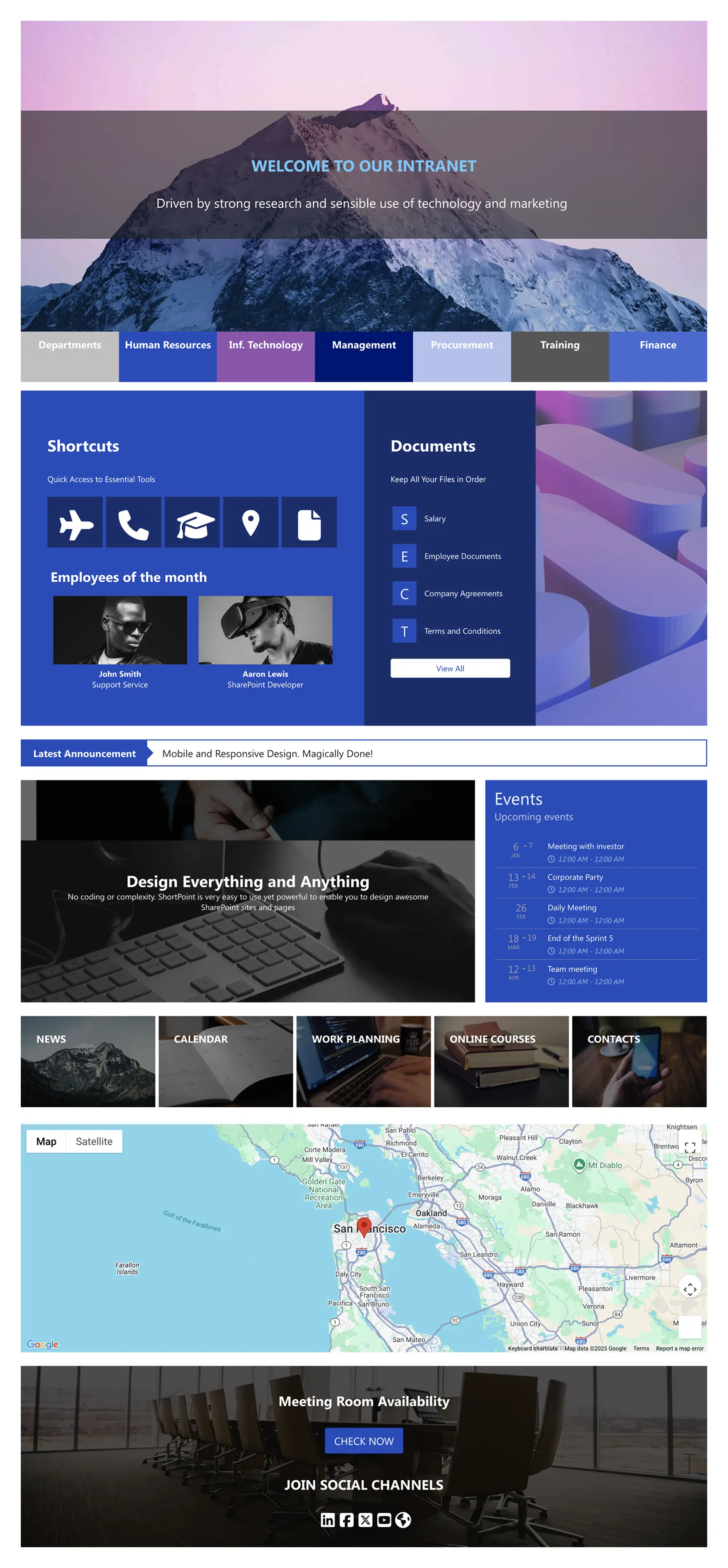
Together is the intranet homepage template built for organizations that take internal culture seriously. It opens with a bold hero and department tabs that set priorities at a glance. Shortcut tiles connect to HR, IT, training, and finance—giving employees a clear action path from the moment the page loads.
What makes this template special is how it balances operational utility with culture-building elements. A documents panel organizes policies, agreements, and forms. An events agenda shows upcoming dates at a glance. Feature blocks lead to news, calendar, work planning, and online courses. An interactive map showcases office locations. Employee highlights and social links reinforce recognition and cross-office connection. It's a modern intranet design that proves you don't have to choose between practical and engaging.
Best for: Multi-location organizations that want to blend operational efficiency with culture, recognition, and cross-office connection.
Improve with ShortPoint AI Designer: Generate localized variants ("Create a Lisbon office version"), then update only the map, tabs, and spotlight sections using element-level targeting—keeping the structure consistent.
Standout feature: Interactive office map and employee highlights that build culture alongside daily workflows.
View Template -
6. Intranet Layout 5 — SharePoint Page Template
Action-first homepage with tiles, news, docs, and schedules.
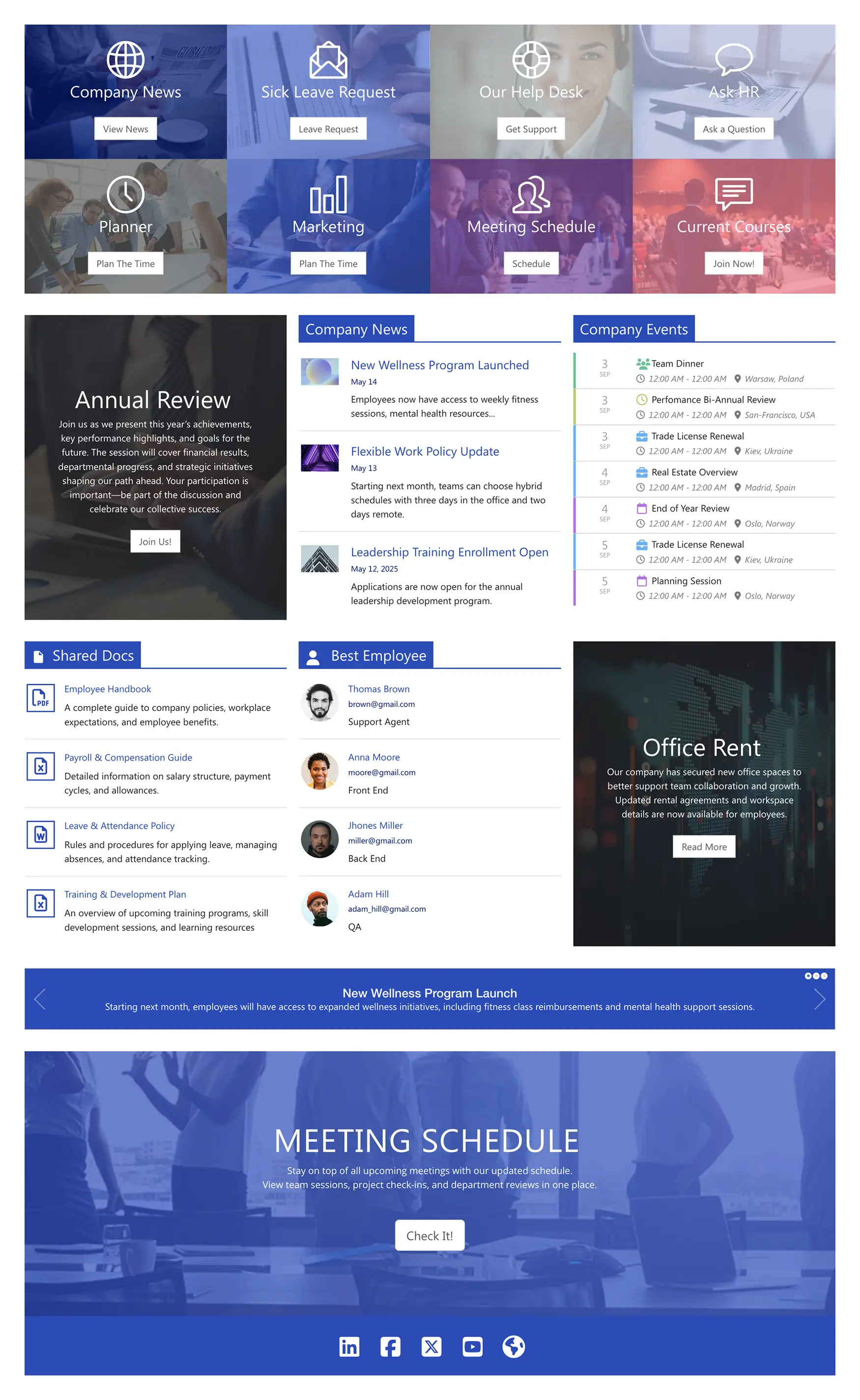
This SharePoint page template takes an action-first approach to intranet homepage design. It leads with bold, image-rich tile navigation that puts key departments and tools front and center—People, IT, Communication, Finance—each with its own visual identity. Below the tiles, a split-panel layout presents company news alongside a rich people directory.
The design is deliberately information-dense without feeling cluttered. It uses a dark, immersive color scheme that makes content pop and gives the homepage a premium, professional feel. For organizations that need their SharePoint intranet site to serve as a real productivity hub rather than a news bulletin, this template delivers. It's especially effective for companies that value visual hierarchy and want employees to immediately see what's new and who's who.
Best for: Organizations that want a bold, visually distinctive homepage with strong navigation and information density.
Improve with ShortPoint AI Designer: Ask the AI to "make this more minimalist" or "increase tile emphasis" and apply changes safely using version history—so you can experiment without losing the original layout.
Standout feature: Bold tile-based navigation with immersive visual hierarchy that makes the homepage feel like a premium app, not a document library.
View Template
How to Choose the Right Homepage Template
With six options, the right choice depends on your organization's priorities. Here's a quick decision framework:
| If your priority is… | Choose… | Why |
|---|---|---|
| Executive communication & transparency | Annual Report | Editorial layout tells a story |
| Balanced all-in-one homepage | Intranet Layout 2 | Four-zone layout covers everything |
| Daily utility & practical adoption | Everyday Home | Built for daily use, not launch day |
| Personalization & search-first | Intranet Layout 6 | Audience targeting built in |
| Culture + multi-location teams | Together | Office maps, recognition, events |
| Bold visual impact & info density | Intranet Layout 5 | Tile navigation, premium feel |
Not sure yet? Every ShortPoint subscription gives you access to the full template library—you can try any template and switch at any time.
Intranet Design Best Practices for Your Homepage
Having the right template is the foundation. These intranet design best practices ensure your SharePoint homepage actually drives adoption and becomes the page employees use every day:
Start with the Content Model, Not the Layout
Before picking colors or moving widgets, decide what content lives on your homepage. The best practice for intranet design is to identify the 5–7 content types your employees need daily (news, events, tool links, documents, search, people, quick actions) and ensure each has a dedicated zone. Every element should earn its space.
Make It the Browser Default
The simplest way to drive intranet adoption is to set your SharePoint homepage as the default browser start page across the organization. Use Group Policy for Edge or Chrome. If your homepage is good enough to be the first thing employees see every morning, adoption takes care of itself.
Connect Live Data, Don't Upload Static Content
Static pages die fast. ShortPoint's Connect feature pulls live content from SharePoint lists, Outlook calendars, Planner tasks, and Microsoft Graph API. Your news feed updates automatically. Your events calendar reflects real schedules. Your people directory stays current from your organization's source of truth. This is what separates modern intranet design from a fancy document dump.
Structure for AI Discovery (Not Just Navigation)
In 2026, employees won't only browse your homepage—they'll also ask for information in natural language. Build your intranet so it's easy to interpret: use descriptive headings, clear section titles, scannable summaries, and consistent labels. When ShortPoint AI Designer generates or refines pages, it helps maintain this structure—so information is easier to find, easier to summarize, and easier to reuse across your intranet.
Apply Your Brand on Day One
A branded intranet builds trust. ShortPoint's Theme Builder lets you set your exact colors, fonts, and logo globally—update once and every page reflects your brand. Don't launch with the default blue. A company intranet design that looks like your brand feels like your company.
Measure What Matters
Track page views, search queries, and click-through rates on your homepage. If the top search query is "pay stub" but there's no payroll link on your homepage, you've found an easy fix. Use Microsoft Analytics or ShortPoint's built-in tracking to identify gaps and iterate quarterly.
Why Teams Build Intranet Homepages with ShortPoint
Every SharePoint homepage template in this guide is built with ShortPoint —a no-code design platform for SharePoint that transforms how teams build and manage intranet sites.
- Page Builder: Drag-and-drop visual editor. See every change in real time—no saving, no previewing, no guessing.
- Theme Builder: Set your brand colors, fonts, and logos globally. One change updates every page.
- Connect: Pull live data from SharePoint lists, Outlook, Planner, and Microsoft Graph API directly into your pages.
- 250+ Templates: Homepage, HR, onboarding, department sites, knowledge bases, and more. All customizable.
- 80+ Design Elements: Tiles, accordions, timelines, people directories, news feeds, image carousels, and more.
- Copy & Paste: Duplicate layouts across pages and sites in seconds. Standardize without starting over.
- Accessibility: WCAG 2.1, ADA compliant. SOC 2 Type II and GDPR certified.
- Works everywhere: Microsoft 365, SharePoint Online, SE, 2019, 2016, 2013, and Microsoft Teams.
- ShortPoint AI Designer: Full page generation from prompts, follow-up edits via conversation, element-level targeting, template customization, text/voice/image/clipboard inputs, SmartToolbar interactivity (search/filter/sort/pagination/tabs/date filtering), version history, and persistent conversations stored in SharePoint.
ShortPoint customers report launching up to 60% faster (2–4 weeks vs. 6+ months for custom builds) and saving $100,000+ in development costs.
How to Get Started
You can go from template to live homepage in under an hour:
- Start a free trial: Install ShortPoint on your SharePoint site. No credit card required—sign in with your Microsoft 365 credentials.
- Pick a template: Open the ShortPoint web part in edit mode and choose a homepage template from the library.
- Customize and publish: Replace placeholder content with your own news, links, and branding. Connect live data sources. Publish.
Frequently Asked Questions About Intranet Homepages
The key is using a design platform like ShortPoint instead of relying on SharePoint's out-of-the-box web parts. Start with a professionally designed homepage template that includes hero banners, tile navigation, news grids, and branded elements. Apply your brand through Theme Builder, connect live data sources, and publish. The result is a SharePoint homepage design that looks and feels like a modern website—not a document library.
An effective intranet homepage should include: a prominent search bar, company news and announcements, quick-access tiles for frequently used tools (HR, IT, payroll), an events calendar, a people directory or org chart, department navigation, and personalized content based on the user's role or location. The best intranet homepage examples balance all of these elements without feeling cluttered.
Yes. ShortPoint's Copy & Paste feature lets you duplicate any homepage template across sites. Deploy a standard homepage design, then let each department or location customize their content while keeping the same structure and branding. This is how organizations scale their intranet design consistently.
Yes. All ShortPoint templates work with Microsoft 365 and SharePoint Online, Subscription Edition (SE), 2019, 2016, and 2013. The same template library and design tools are available across all supported versions.
A site template is a blueprint for an entire SharePoint site—including the homepage, lists, libraries, and navigation structure. A page template is a layout for a single page within that site. The homepage templates in this guide are page templates: they define the design and content structure of your intranet's front page. You apply them inside an existing SharePoint Communication site or Team site.
SharePoint pages with clear headings, structured metadata, and organized content are indexed by Copilot. When employees ask questions about company news, policies, or events, Copilot can surface answers from your homepage content—as long as pages are structured with proper headings and tagged documents.
Most teams go from template to live homepage in 1–2 hours. Install ShortPoint, select a template, swap in your content, apply your branding, and publish. There's no development backlog or code required.
The SharePoint Intranet Examples article covers a broader range of intranet site types—including HR portals, onboarding sites, department pages, and knowledge bases. This article focuses specifically on homepage templates: the front-door page that every employee sees first. If you're designing your intranet's main landing page, you're in the right place.

Luisa Silva
Growth Manager, ShortPoint
Luisa is the Growth Manager at ShortPoint. She translates customer insights and ShortPoint solutions into practical, no-code guides for SharePoint and Microsoft 365 intranets. Focusing on intranet design, HR, knowledge hubs, and internal comms, her work is all about helping you achieve faster launches and higher adoption rates.
Ignite your vision. Install ShortPoint directly on your site, or play in sandbox mode. No credit card required.