


About this Template
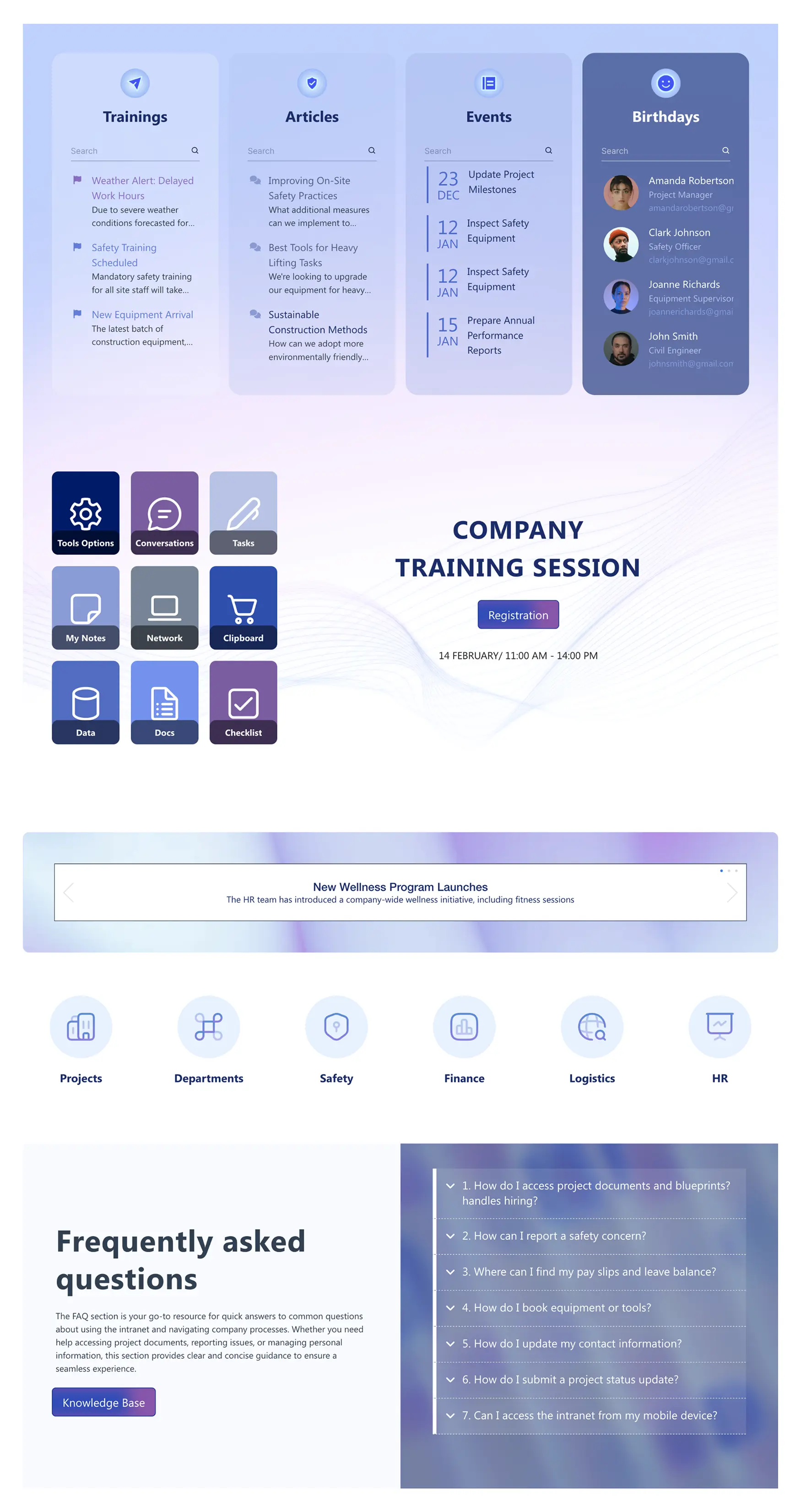
Launch an HR SharePoint template that organizes training, articles, events, and birthdays in focused columns with built-in search. A central “Company Training Session” spotlight with a link to registration drives participation, while a grid of quick links—tools options, conversations, tasks, notes, network, docs, data, and checklist—speeds access to daily actions. Use the announcement slider to broadcast program updates, and guide navigation with icon shortcuts to projects, departments, safety, finance, logistics, and HR. An on-page FAQ section answers common questions and points to the Knowledge Base for deeper guidance. Designed to keep employees informed and self-sufficient, this layout reduces support requests, highlights key dates, and promotes learning initiatives from one clean, familiar page.
Template Features
Remove friction and publish faster with ShortPoint tools; connect SharePoint and Microsoft 365, align to your design system, and maintain consistent branding.
Improve your template with AI. Describe changes and see them in minutes.
Page building made simple. Combine elements, sections, and layouts for fast editing.
Edit once, update everywhere with live theme changes—no coding needed.
Link SharePoint lists, libraries and external feeds to your page for easy, scalable integration.
Reuse with confidence—copy and paste perfectly styled components to new sites.
Forms made accessible with proper labels, hints, errors, and ARIA states.
Bring the best tools together—integrations make workflows and publishing easy.
We offer hundreds of other page designs to make your starting point clear and confident.
Build pages fast with 80+ easy-to-use elements—no complexity involved.
Mobile-first navigation is always accessible and easy to use anywhere.
Get Started With Everyday Home In Three Simple Steps
Launch a branded HR SharePoint site template in under an hour—no coding required.
- 1
Start free trial & add ShortPoint to your site : Click "Start a Trial" and get access to ShortPoint instantly. No credit card needed—just sign in with your Microsoft 365 credentials or download ShortPoint manually and activate your trial.
- 2
Insert a Template : Edit your SharePoint page, insert the ShortPoint web part, and select the HR 6 template (or any preferred template page) from the Templates Library
- 3
Customize & Publish : Replace placeholder content with your own, connect your SharePoint data sources, apply your company branding, and publish your new communication site for immediate use.
Frequently Asked Questions
Setup is fast. It's designed for HR teams to launch independently in just a few hours. The entire process is visual, so you can connect your content and go live the very same day without needing to write any code.
This template is built to work reliably in modern SharePoint Online (Microsoft 365), SharePoint Subscription Edition (SE) and supported On-Premise environments. It’s designed to fit into your existing infrastructure.
Your HR department portal should feel like an authentic part of your company, not a generic web site. You get full control to make that happen. Use the Theme Builder to apply your exact brand colors and fonts, and the Page Builder to visually arrange content so it speaks your company’s language.
Yes. The design automatically adapts to any screen, ensuring that everyone—from your remote team to your frontline workers—has the same high-quality, easy-to-use experience on their phones and tablets.
Yes. You can easily duplicate this template's structure and design to give other teams, like Finance or IT, a massive head start in building their own portals, ensuring a consistent employee experience across the company.
It's designed to be a low-maintenance source of truth. Using ShortPoint Connect, you can link directly to your existing data in SharePoint lists, libraries, Microsoft 365 apps such as Planner, Outlook, an more. This means content like event calendars or task lists updates automatically, saving you time and ensuring information is always accurate.
Yes. You're getting a complete intranet design solution. A subscription gives you access to our entire library of templates and design elements, plus all future updates and our dedicated customer support team. It's a long-term solution to continuously improve your digital employee experience.
Related Templates
See all Templates









We were spending a lot of development dollars, but things still weren’t how we wanted and every day wasted was a day closer to our deadline.

ShortPoint has enabled us to create internal SharePoint sites that are user-friendly and attractive for our multi-generational group of Associates.

Before using ShortPoint, I’d never have expected that a small team such as ours could deliver a product that looks as good as our portal does today.
ShortPoint reduced the time it took to rebuild our intranet from 3 months to just 2 weeks. It really is a must-have for every company that uses SharePoint.

Building and customizing sites in SharePoint was a very heavy lift. We needed a developer on every project and it felt like we were always doing things the hard way.


I had no idea intranet consultancy would become so big for us! And none of it would have been possible without ShortPoint’s incredible software and support team.


It was hard to find solutions to beautify customers’ SharePoint installations and give customers a visual impression of how a new intranet could look.

Thanks to ShortPoint, the intranet isn’t a pain point for us anymore. I couldn’t put a price on how much happier we are working with ShortPoint as opposed to our previous vendor.

Working with ShortPoint was one of the smoothest projects I’ve ever been involved in. What they created for us is fantastic, and we never felt an ounce of stress.