Best SharePoint Onboarding Templates for Employee Onboarding in 2026
Five ready-to-use SharePoint onboarding templates for new hires—complete with checklists, team introductions, and onboarding roadmaps. No coding required.
First impressions are expensive to get wrong. Research consistently shows that structured onboarding improves new hire retention by up to 82% and productivity by over 70%. Yet most organizations still rely on scattered emails, shared drives, and a "good luck" approach to the first week.
A SharePoint onboarding template changes that. Instead of building from scratch, you start with a professionally designed page that centralizes everything a new hire needs: checklists, policy documents, team introductions, training schedules, and IT setup guides—all in one place.
In 2026, digital employee onboarding has evolved beyond static document dumps. Onboarding sites need to be easier to build, easier to keep current, and structured so teams can continuously improve the experience without relying on IT. That's exactly what ShortPoint AI Designer, an AI-Powered Intranet Page Builder for SharePoint, enables inside Page Builder: generate complete onboarding pages from a prompt, refine them through conversation, and update specific sections or elements without rebuilding the whole page.
Onboarding is just one piece of the puzzle. Browse all 250+ SharePoint templates in our template library.
By Luisa Silva, Growth Manager at ShortPoint • Last Updated: March 30, 2026 • 8 min read
What Makes an Effective SharePoint Onboarding Site
Before choosing a template, it helps to understand what the best employee onboarding experiences have in common. Based on what we see working across organizations using ShortPoint, five principles consistently drive high adoption:
1. One Central Hub, Not Scattered Links
New hires shouldn't have to check email, Teams, a shared drive, and a wiki to find onboarding information. The best SharePoint onboarding portals consolidate everything into a single destination. If an employee can't find it on their onboarding page within two clicks, it needs to be restructured.
2. A Clear Onboarding Roadmap
The first week is overwhelming. Templates that include a visual timeline or step-by-step roadmap—Day 1, Week 1, Month 1—significantly reduce anxiety and give new hires a sense of progress. This is the employee onboarding checklist made visible.
3. AI-Ready Page Design (So You Can Improve It Fast)
Onboarding content changes constantly—new tools, new processes, new policies. Your onboarding pages should be structured with clear headings, scannable sections, and modular layouts so they're easy to update over time. With ShortPoint AI Designer, teams can generate new onboarding pages from a prompt, refine them with follow-up edits (like "add a Week 2 section" or "simplify this checklist"), and target specific elements to update only what's needed—without redesigning the entire page.
4. Self-Service Design
The most effective onboarding sites minimize the need to ask HR for help. Policy documents, IT setup guides, benefits enrollment forms, and FAQ sections should all be accessible without sending a single email. Every self-served answer saves HR time and builds employee confidence.
5. Mobile-First, Accessible Design
Frontline workers, remote employees, and people onboarding before their first day often access SharePoint from their phones. Responsive design and WCAG 2.1 compliance aren't extras—they're the baseline for any modern onboarding template.
5 Best SharePoint Onboarding Templates
Each template below is a fully designed, production-ready SharePoint page built with ShortPoint . They work on Microsoft 365, SharePoint Online, SE, 2019, 2016, and 2013—no code required. Click "View Template" on any to see it in action.
-
1. Onboarding Fun — Best Onboarding SharePoint Template
A structured, step-by-step visual roadmap for new hire success.
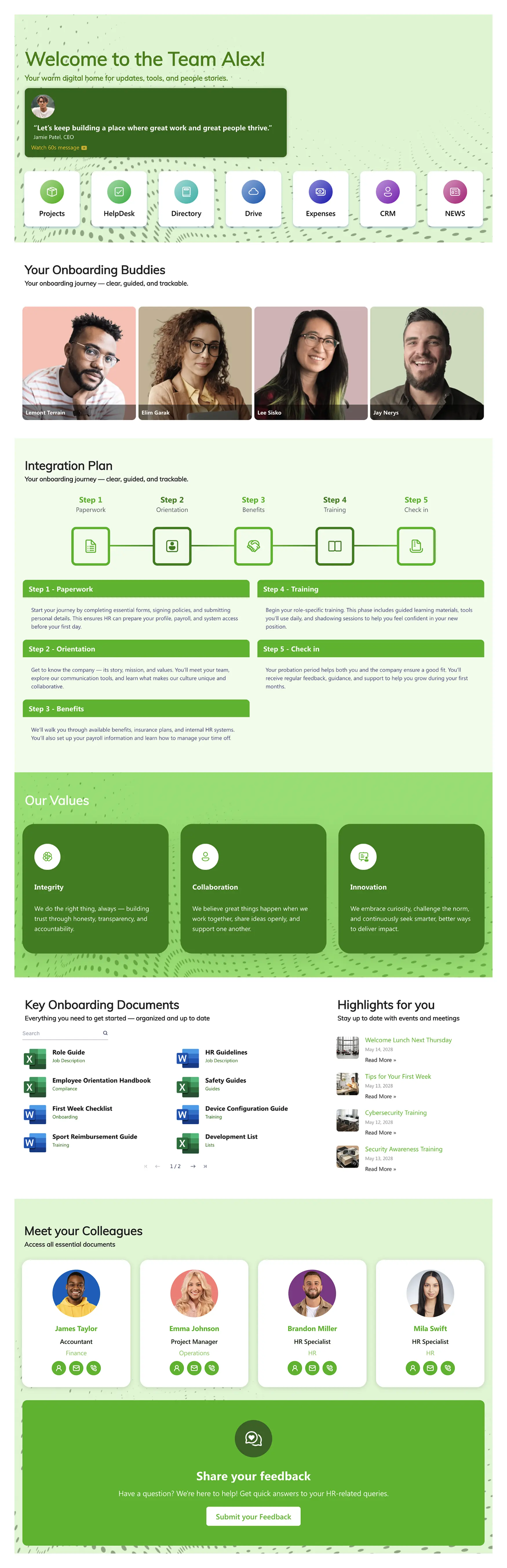
This is the onboarding template you choose when you want new hires to feel genuinely excited about joining. It replaces the typical list-of-links approach with a visual journey—a step-by-step roadmap that guides employees through their first weeks with clarity and purpose. Each stage has its own section with integrated document access, mentorship connections, and milestone markers.
The design is deliberately bold and engaging. It signals that your company takes the employee experience seriously from day one. Underneath the design, it's deeply practical: ShortPoint's Connect feature pulls live data from Microsoft 365, so onboarding schedules, Planner tasks, and team calendars stay current automatically.
Best for: Creative agencies, tech companies, and organizations that want their employer brand to shine during onboarding.
Improve with ShortPoint AI Designer: Start from this template and ask the AI to tailor the roadmap to your process (e.g., "Create Day 1 / Week 1 / Month 1 steps for Sales"). Then use follow-up edits like "add a VPN setup section" or "make the milestones more compact," and target individual elements to update only the checklist or hero.
Standout feature: Step-by-step visual roadmap that turns onboarding into a guided journey, not a checklist.
View Template -
2. Onboarding 1 — SharePoint Onboarding Template
One central, organized resource for streamlined new hire onboarding.
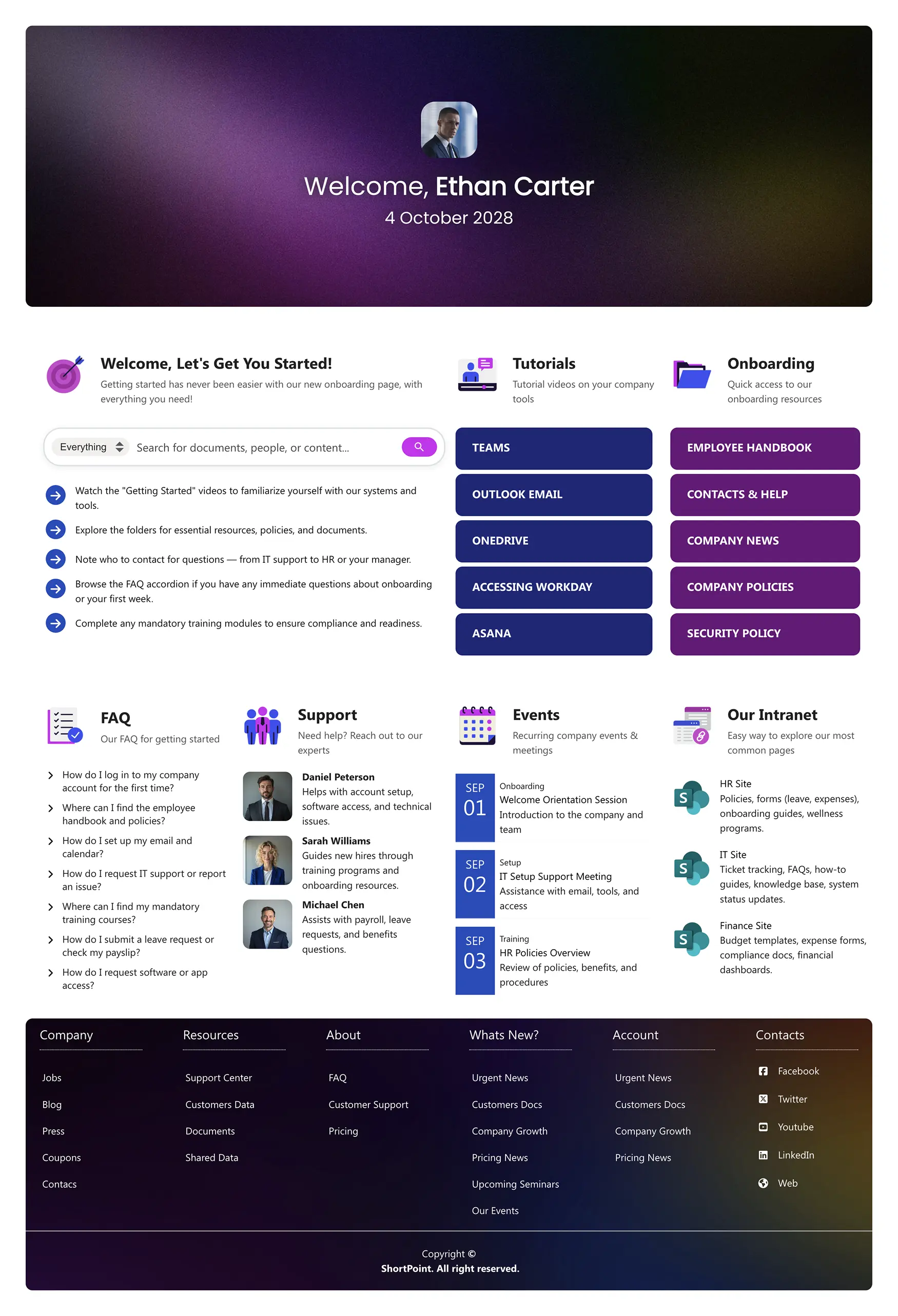
This SharePoint onboarding template is the all-in-one solution. It gives new employees a single page to find all official onboarding content: a personalized welcome hub with a "Let's Get You Started" checklist, a search bar for instant document discovery, and quick links to Outlook, Teams, and the company handbook.
It's built for organizations that value structure and completeness. Sections are organized logically—tutorials, onboarding events, FAQ, key contacts for IT, HR, and payroll—so nothing falls through the cracks. An intranet module links to other company sites, making this both an onboarding hub and a gateway to the broader digital workplace.
Best for: Mid-to-large organizations that need a comprehensive onboarding hub covering every new hire need in one place.
Improve with ShortPoint AI Designer: Generate a cleaner "first week dashboard" from a prompt (e.g., "Create a welcome hub with quick links + checklist + key contacts"), then add smart interactivity like tabs, filtering, or sorting to help new hires find the right resource fast—without turning the page into a scroll marathon.
Standout feature: "Let's Get You Started" checklist that gives new hires a clear sequence of actions.
View Template -
3. Onboarding Essentials — Onboarding Template
Get new hires productive from their first day.
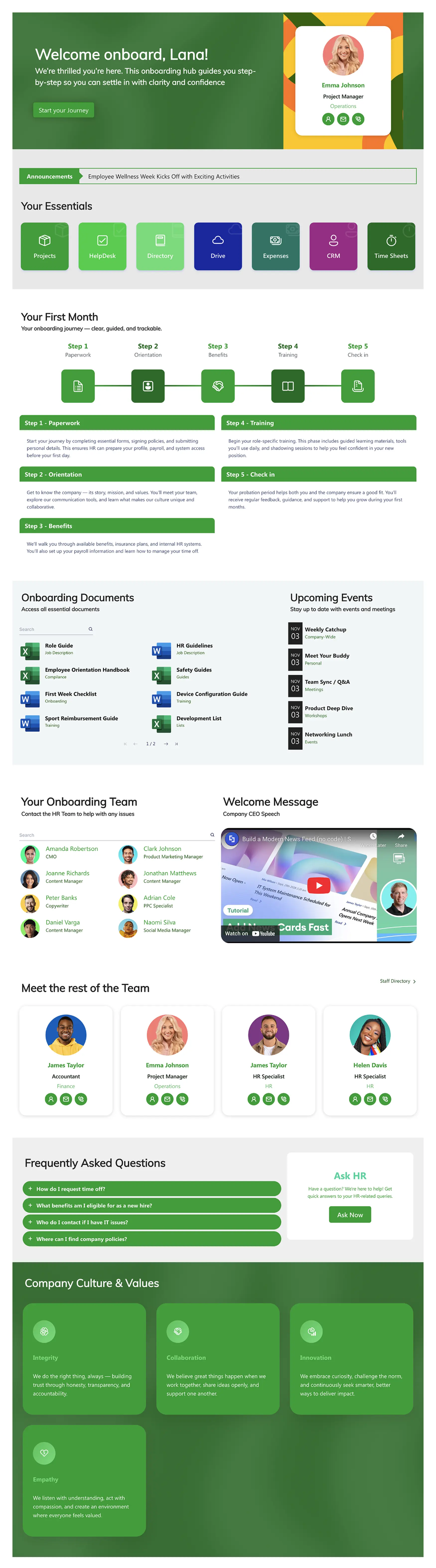
Sometimes you don't need a complex portal—you need a clean, structured onboarding template that gets new employees up to speed fast. Onboarding Essentials turns SharePoint into a guided first-weeks experience with everything from training schedules and essential resources to team introductions and company culture.
This template is built for SharePoint Admins and HR teams who need a professional new employee onboarding experience deployed quickly. Every element is editable through ShortPoint's Page Builder—swap sections, adjust the timeline, add your policies—without writing a line of code. It works equally well as a standalone onboarding site or as a section within a larger HR intranet.
Best for: Organizations that want a lean, focused onboarding experience without unnecessary complexity.
Improve with ShortPoint AI Designer: Use AI to generate role-based variants fast (e.g., "Make an IT onboarding version" or "Create a frontline employee version"), then use element-level targeting to adjust only the training schedule or resource list—keeping everything consistent and on-brand.
Standout feature: Clean, distraction-free layout that keeps new hires focused on what matters most.
View Template -
4. The Welcome Space — SharePoint Employee Onboarding Template
A central hub for all team resources and needs.
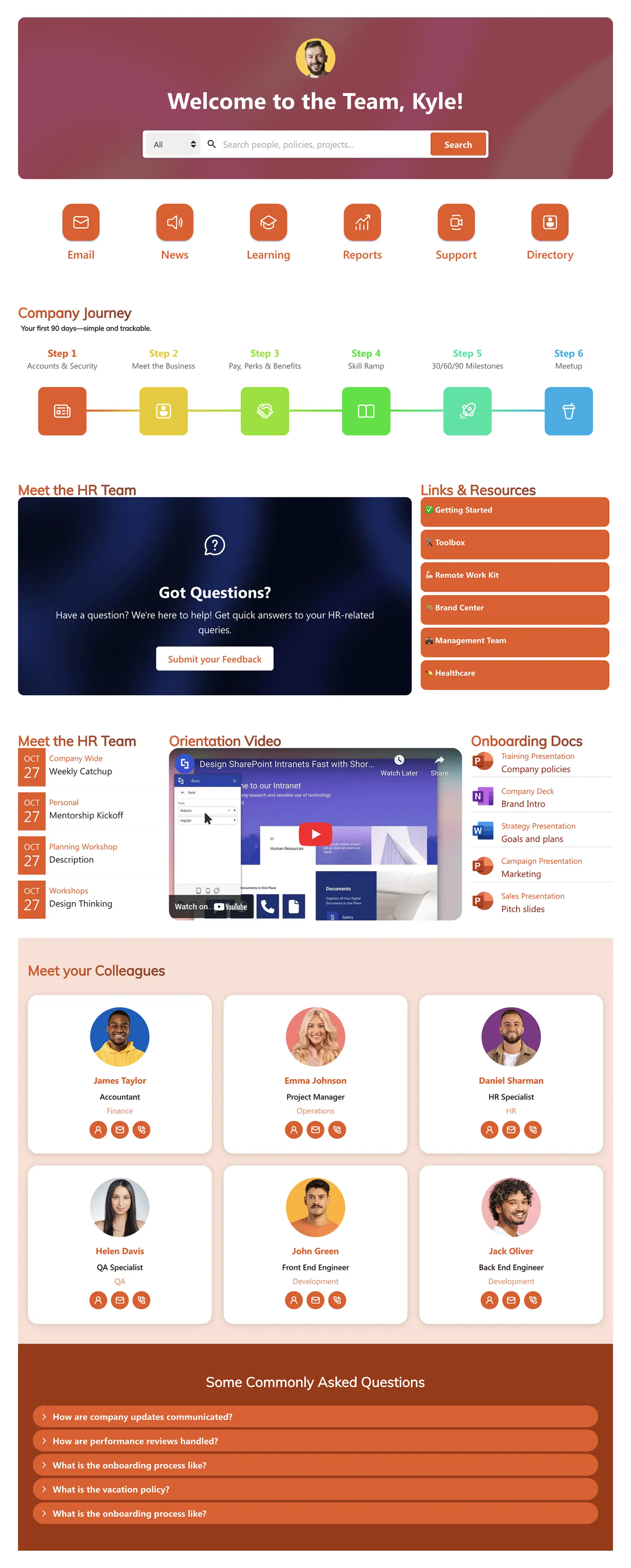
This SharePoint employee onboarding template eliminates the chaos of manual new hire processes. It gives HR teams a centralized hub where employees access everything they need—onboarding roadmaps, team contacts, documents, and resources—through a structured journey from their first login to their first milestone.
What sets this apart is its focus on reducing HR workload. New hires see exactly what to do next, who to contact, and where to find critical documents. The site can serve as a department-level standard: establish it as your organization's onboarding template, then let each department customize their specific content while maintaining the same professional structure and navigation.
Best for: HR teams that need to standardize onboarding across departments while giving each team room to customize.
Improve with ShortPoint AI Designer: Generate department-specific sections from prompts (e.g., "Add a Finance onboarding section"), then use follow-up edits to align the tone, simplify copy, or reorganize cards. Use version history to test changes safely and revert if a department wants the old layout back.
Standout feature: Department-scalable design—deploy once, customize per team.
View Template -
5. Employee Start Hub — Employee Onboarding Template
The complete employee onboarding template for SharePoint.
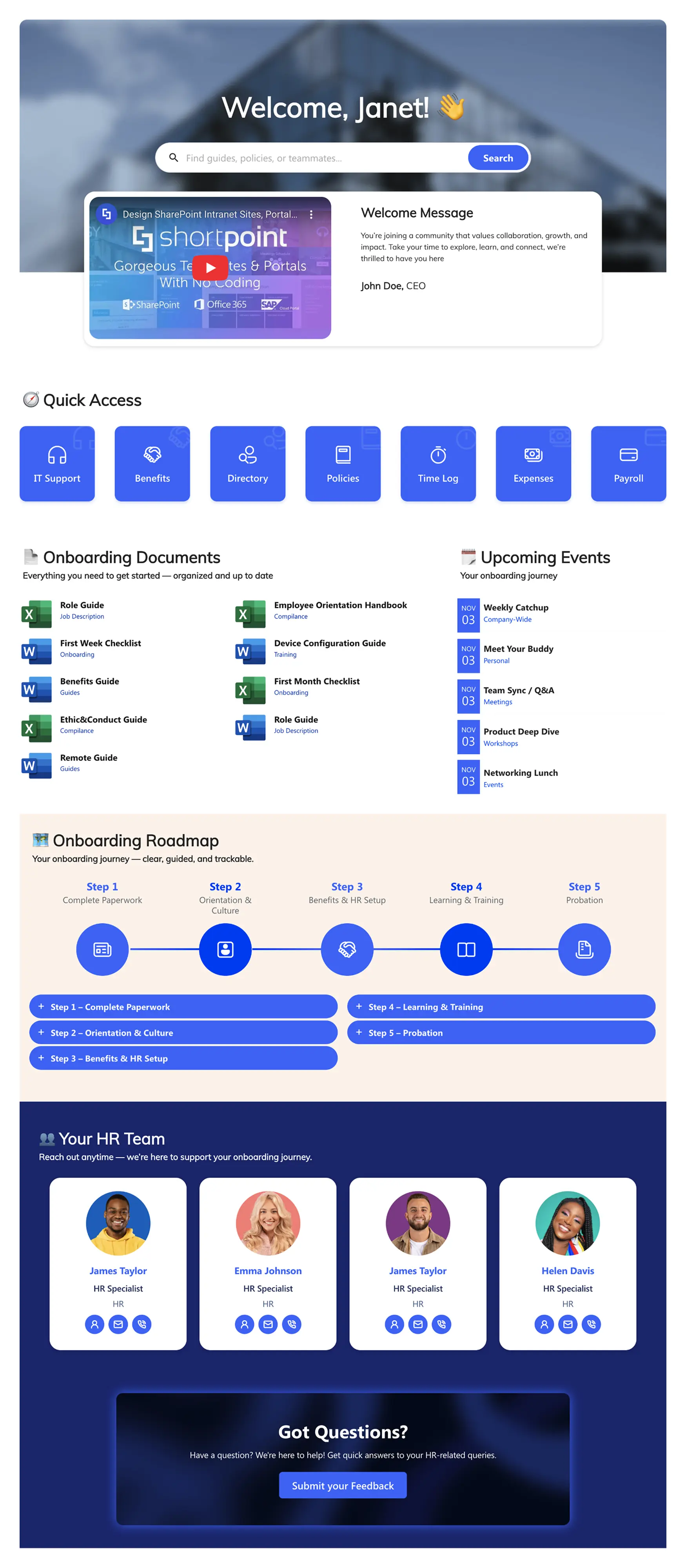
This is the template that does it all. The Employee Start Hub transforms employee onboarding in SharePoint into a guided, central dashboard. New hires land on a personalized welcome with an embedded video, quick access to tools, a curated list of key documents and events, a visual 5-step onboarding roadmap, and a directory of HR team contacts.
It's designed to replace the "document dump" approach entirely. Instead of overwhelming new hires with emails and attachments, everything is organized into one clear, welcoming dashboard. The template also includes team spotlight sections—monthly hero highlights and upcoming vacation visibility—that build culture from the first day. Plus, a latest articles feed keeps messaging current without sending more emails.
Best for: Organizations that want a comprehensive, all-in-one onboarding portal with strong culture and engagement elements.
Improve with ShortPoint AI Designer: Generate a full "Start Here" dashboard from a prompt (welcome video + steps + links + documents), then refine it through conversation ("make this more executive tone", "add a Week 2 section", "move the tools above the roadmap"). Add SmartToolbar patterns like tabs or date filtering for onboarding events so new hires can find what's relevant fast.
Standout feature: Embedded welcome video and team spotlights that build culture, not just complete tasks.
View Template
The SharePoint Onboarding Checklist: What to Include
No matter which template you choose, your SharePoint onboarding site should cover these essential elements. Think of this as a new employee onboarding checklist for the content itself:
Pre-Boarding (Before Day 1)
- Welcome message from the team lead or CEO (video or text)
- IT equipment and account setup instructions
- First-day logistics: office location, parking, dress code
- Pre-reading: company handbook, org chart, team bios
Week 1: Orientation
- Onboarding schedule with meeting links
- HR paperwork: benefits enrollment, tax forms, emergency contacts
- IT setup: email, Teams, VPN, security training
- Buddy or mentor introduction
- Building tour or virtual office walkthrough
Month 1: Ramp-Up
- Role-specific training resources and schedules
- 30-day goals and expectations
- Recurring 1:1 with manager (linked to Outlook)
- Key projects and stakeholder introductions
- Feedback survey link (Microsoft Forms)
Month 2–3: Integration
- Advanced training and certifications
- Cross-team introductions and collaboration opportunities
- 90-day review preparation
- Transition from onboarding site to main intranet
Every ShortPoint onboarding template can be customized to include these phases. Use ShortPoint's Steps element to build a visual timeline, and the Connect feature to auto-populate schedules from Outlook and Planner.
Employee Onboarding Best Practices for SharePoint
Having the right template is the foundation. These employee onboarding best practices ensure your SharePoint site actually drives adoption and results:
Assign Clear Content Ownership
Every section of your onboarding site needs an owner. HR owns policies and benefits content. IT owns setup guides and security training. The hiring manager owns role-specific materials. Without ownership, content goes stale—and stale onboarding content is worse than no content at all.
Automate What You Can
ShortPoint's Connect feature can pull live data from Planner tasks, Outlook calendars, SharePoint lists, and Microsoft Graph API. Instead of manually updating the onboarding schedule for every new cohort, connect it to a Planner board and let it update itself. The same applies to document libraries, event calendars, and team directories.
Improve Iteratively with ShortPoint AI Designer (Instead of Redesigning)
Onboarding content changes constantly—so your onboarding site should be easy to evolve. With ShortPoint AI Designer, you can generate new pages from prompts, refine content through multi-turn conversation, and update specific sections by targeting individual elements. You can also browse version history, preview changes, and revert if needed—so you can keep improving the experience without risking breaking the layout.
Build an Employee Onboarding Plan Template
The most effective organizations don't just build one onboarding page—they create a repeatable employee onboarding plan template that standardizes the process across departments. Use ShortPoint's Copy & Paste feature to duplicate your onboarding site for Engineering, Sales, Marketing, and other teams. Each department customizes their specific content while maintaining the same professional structure.
Measure and Iterate
Track page views, time on page, and search queries within your onboarding site. If new hires consistently search for "parking" or "VPN setup," those topics need more prominent placement. Use Microsoft Forms to collect 30-day feedback on the onboarding experience and update your site quarterly.
Why Teams Build Onboarding Sites with ShortPoint
Every SharePoint onboarding template in this guide is built with ShortPoint —a no-code design platform for SharePoint. Here's what it gives your onboarding team:
- Page Builder: Edit your onboarding page visually with drag-and-drop. See changes in real time without switching between edit and preview modes.
- Theme Builder: Apply your brand colors, fonts, and logos globally. Update once and every page reflects your brand.
- Connect: Pull live data from Outlook, Planner, SharePoint lists, and Microsoft Graph API directly into your onboarding pages.
- 80+ Design Elements: Steps timelines, accordion FAQs, people directories, countdown timers, image carousels, and more.
- Copy & Paste: Duplicate your onboarding template across departments in seconds.
- Accessibility: WCAG 2.1, ADA compliant. SOC 2 Type II and GDPR certified.
- Responsive Design: Every template works on desktop, tablet, and mobile automatically.
- ShortPoint AI Designer: Full page generation from prompts, follow-up edits via conversation, element-level targeting, template customization, text/voice/image/clipboard inputs, SmartToolbar interactivity (search/filter/sort/pagination/tabs/date filtering), version history, and persistent conversations stored in SharePoint.
ShortPoint works with Microsoft 365, SharePoint Online, SharePoint SE, SharePoint 2019, 2016, 2013, and Microsoft Teams.
How to Get Started
You can go from template to live onboarding site in under an hour:
- Start a free trial: Install ShortPoint on your SharePoint site. No credit card required—sign in with your Microsoft 365 credentials.
- Pick a template: Open the ShortPoint web part in edit mode and choose one of the onboarding templates from the library.
- Customize and publish: Replace placeholder content with your own, apply your brand with Theme Builder, connect live data sources, and publish.
Frequently Asked Questions About SharePoint Onboarding
The five stages are: (1) Pre-boarding—sending welcome materials and setting up accounts before day one; (2) Orientation—covering company policies, introductions, and logistics in the first week; (3) Training—role-specific skills development and tool setup in weeks 2–4; (4) Integration—building relationships, joining projects, and establishing routines in months 2–3; and (5) Ongoing development—transitioning into continuous learning and performance management. A well-structured SharePoint onboarding template can guide new hires through each of these stages with visual roadmaps and organized content sections.
A comprehensive employee onboarding checklist should include: welcome message and company overview, IT account and equipment setup, HR paperwork (tax forms, benefits enrollment, emergency contacts), employee handbook and policy acknowledgments, first-week schedule with meeting links, buddy or mentor assignment, role-specific training plan, 30/60/90-day goals, team introductions and org chart, and feedback survey. The SharePoint onboarding templates in this guide include pre-built sections for each of these items.
The 5 C's are Compliance (legal and policy requirements), Clarification (role expectations and goals), Culture (company values, norms, and ways of working), Connection (relationships with colleagues and managers), and Checkback (ongoing feedback and adjustment). The best SharePoint onboarding sites address all five by including policy libraries (Compliance), role-specific content (Clarification), culture pages and team spotlights (Culture), people directories (Connection), and feedback forms (Checkback).
Start by creating a SharePoint Communication site. You can apply Microsoft's built-in New Employee Onboarding template from the SharePoint Look Book, or install ShortPoint to access professionally designed onboarding templates with full drag-and-drop customization. Add your content—checklists, documents, team info, training schedules—structure it with clear navigation and headings, apply your brand through Theme Builder, and publish. With ShortPoint, most teams go from template to live site in under an hour.
Yes. ShortPoint's Copy & Paste feature lets you duplicate any onboarding page across sites. Deploy a standard onboarding template, then let each department—Engineering, Sales, Marketing, Finance—customize their specific training content and team introductions while keeping the same structure and branding.
Yes. All ShortPoint templates work with Microsoft 365 and SharePoint Online, Subscription Edition (SE), 2019, 2016, and 2013. The same template library and design tools are available across all supported versions.
ShortPoint AI Designer helps teams create and improve onboarding pages faster by generating full pages from prompts, refining them through multi-turn edits, and targeting specific elements to update only what's needed. This SharePoint AI tool also supports voice input, image/clipboard references, Search & Filters Toolbar interactivity (search/filter/sort/pagination/tabs/date filtering), and version history so you can iterate safely over time—without redesigning the whole portal.
Most teams go from template to live onboarding site in 1–2 hours. Install ShortPoint, select a template, replace placeholder content with your own, apply your branding, and publish. There is no development backlog or coding required.

Luisa Silva
Growth Manager, ShortPoint
Luisa is the Growth Manager at ShortPoint. She translates customer insights and ShortPoint solutions into practical, no-code guides for SharePoint and Microsoft 365 intranets. Focusing on intranet design, HR, knowledge hubs, and internal comms, her work is all about helping you achieve faster launches and higher adoption rates.
Ignite your vision. Install ShortPoint directly on your site, or play in sandbox mode. No credit card required.