February 2026 Snapshot
This month's Snapshot is filled to the brim with
exciting news and updates.

What's New?
Securing Your Intranet for the Microsoft CSP Enforcement Deadline

If you're using SharePoint in Microsoft 365, Microsoft's new security policy goes into effect on March 1, 2026, just days away. If you haven't updated ShortPoint yet, your intranet pages may stop working when enforcement begins.
What's happening: Microsoft is now enforcing stricter Content Security Policy (CSP) rules across SharePoint Online in Microsoft 365. Starting March 1, any unauthorized scripts will be automatically blocked by browsers, resulting in blank pages where your intranet content should be.
Action needed now: Reinstall the ShortPoint SPFx package in the SharePoint App Catalog and update to version 8.7.6.0 or later. We've specifically built these to work within Microsoft's new security framework. Follow our Quick Guide to CSP Compatibility to complete the update today.
Can't update before March 1? You can postpone enforcement for 90 days using a simple PowerShell script. This buys you until late May to complete the upgrade without any service interruption. Find the script and instructions here: How to Postpone CSP Enforcement via PowerShell . We strongly recommend running this script now if you haven't finished your update.
We're here to help: Our support team is standing by and prioritizing all CSP-related requests. Whether you need help with the immediate update, want us to review your environment, or need assistance running the postponement script, reach out now so we can ensure your intranet continues working without interruption.

From Animations to Timelines: 7 New Design Elements Released
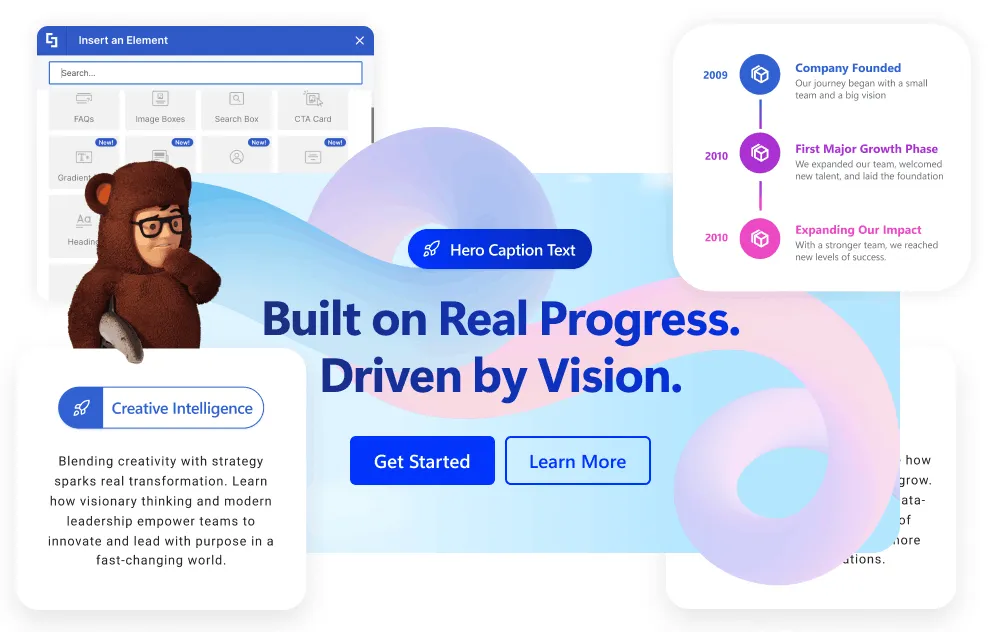
You've got the chance to take your SharePoint sites to the next level with our latest 7 brand-new Design Elements release. We've added an extra batch of elements to our library so you can give your standard SharePoint pages a serious overhaul and take them from bland to grand. The beauty of it all is that you don't need to write a single line of code. We're not just talking about adding some fancy widgets here; we're talking about giving you the freedom to craft an intranet that feels tailored to your organization.
We want to grab your audience's attention, so we've introduced some nifty tools to stop them scrolling in their tracks. Lottie lets you add top-notch, lightweight animations to draw people in, while Rotating Text adds a bit of movement magic to headlines, giving you the chance to highlight loads of different messages in one go. And when you pair it all with the elegant Hero Caption , you can start to create modern, app-like experiences that are just as polished as your external websites.
But it's not all just about fancy visuals — these updates also tackle some of the core usability issues by making it easier to structure information. The Timeline element is a game-changer, turning static dates into a compelling visual story that's perfect for roadmaps and history pages. Meanwhile, the Dual Button , Highlighted Text , and fully customisable Heading elements give you the precision you need to sort out messy layouts and guide your employees exactly where they need to go.
Ready to take a closer look at all the new possibilities we've opened up for you? These elements are available right now for all ShortPoint Designers. Just make sure you're running ShortPoint SPFx version 8.8.0.0 or later, and your Page Builder will be unlocked & ready to go. For a full rundown of each feature, check out our in-depth New Design Elements Guide .

Articles
New Articles
- How to Change the Hover Color of the Quick Links Design Element Using Custom CSS
- How to Access the ShortPoint Dashboard
- Introducing ShortPoint Lite: The Perfect Entry-Level Solution for Single SharePoint Sites
- How to Hide the SharePoint App Bar Using ShortPoint Theme Builder
- How to Add a Border to ShortPoint Sections Using ShortPoint Theme Builder
- How to Create a SharePoint Hub Navigation
- New Design Elements Articles
- Unwrap 7 New ShortPoint Design Elements
- Heading Design Element
- Dual Button Design Element
- Hero Caption Design Element
- Highlighted Text Design Element
- Rotating Text Design Element
- Lottie Animation Design Element
- Timeline Design Element
- All About Microsoft CSP Enforcement in SharePoint
- Content Security Policy (CSP) in SharePoint Online: What It Is and Why It Matters
- Quick Guide to Ensuring ShortPoint Compatibility with Microsoft's Content Security Policy (CSP)
- How to Test ShortPoint Components for CSP Compliance
- How to Postpone SharePoint Content Security Policy (CSP) Enforcement Using PowerShell
- Managing Trusted Script Sources for JavaScript Customizations in ShortPoint
- Ensuring ShortPoint CSP Compliance via Manual Domain Authorization
Updated Articles
- How to Use the ShortPoint SPFx Auto Update Feature
- How to Use the ShortPoint Sandbox Mode Feature
- How to Update to New ShortPoint SPFx versions
- ShortPoint SPFx App and ShortPoint Dashboard: What is the Difference
- How to Install ShortPoint SPFx Using ShortPoint Automated Installation (Recommended)
- Who Is a ShortPoint Designer?
- How to Display Your SharePoint Users in Your SharePoint Site Using the People Search Connection
- How to Use ShortPoint Theme Builder as your SharePoint Color Palette Tool
- How to Adjust the Size of the Hub Navigation Logo

Tech Tip
Stop the Scroll: How to Fix Information Overload on SharePoint Pages
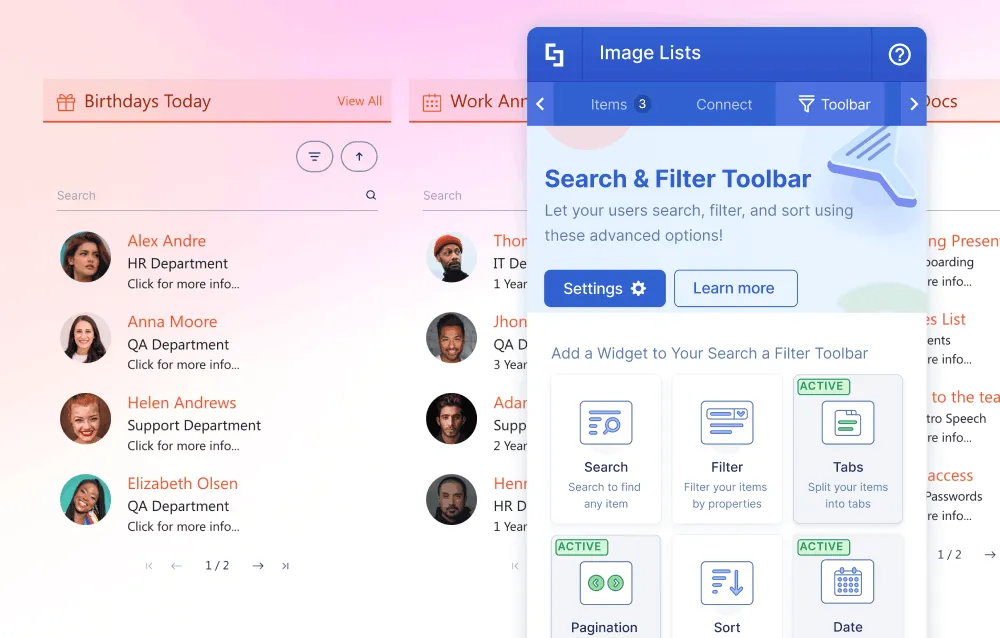
We've all experienced the "SharePoint Scroll." You open the intranet looking for one thing and find yourself staring at an endless news feed, a document library stuffed with years of files, or an HR page that seems to go on forever. When information exists but finding it feels like doomscrolling on social media, employees don't dig deeper — they give up. That frustration isn't just a design flaw. It creates real cognitive load that quietly ruins trust in your intranet over time.
The answer isn't less content. It's a smarter page structure.
Two Tools for Two Different Problems
ShortPoint approaches content density in two distinct ways, depending on what you're working with — dynamic data that pulls from live SharePoint lists, and structured content that you're organizing manually. Knowing which approach fits your situation is the first step.
For Dynamic Lists: Tabs and Pagination Widgets
If your page is pulling live data — news posts, file lists, image libraries, or any other content element connected to a source — the Tabs and Pagination widgets are your primary tools. You'll find both inside the Toolbar tab of a select number of ShortPoint content elements.
The Tabs Widget lets you segment a single data source into clean, logical categories without duplicating any content. For example, you can pull from one news list and display "All News", "HR Updates," and "IT Announcements" in separate clickable tabs, automatically sorted by a list property. Employees see only what's relevant to them without wading through everything else.
The Pagination Widget works alongside tabs to control vertical length. Instead of loading an entire list at once, you set a display limit — five items, ten items, whatever fits your layout — and let users flip through the rest on demand. Pages load faster, layouts stay compact, and the experience feels intentional rather than overwhelming.
For Structured Content: Tabs and Accordions Design Elements
When you're organizing text-heavy content — HR policies, FAQs, project briefs, onboarding guides — the Tabs and Accordions Design Elements give you the same clarity whether or not there's a live data source connection. The Tabs Design Element is great for presenting different content types, so users can jump between sections horizontally without scrolling. The Accordions Design Element is better for vertically stacked content, where each item expands only when a user clicks it. This approach keeps the page clean while making every piece of content accessible.
By moving away from a single overwhelming feed or page, you create an intranet where content is discoverable rather than buried. Employees find what they need in seconds. Pages load faster. Layouts stay clean as your content library grows. And your team spends less time maintaining the intranet and more time using it.
Tabs, Pagination, and Accordions aren't cosmetic choices — they're the structural decisions that determine whether your intranet works for people or just exists for them. The best intranets aren't just well-designed. They're well-organized.
Ready to build it? Jump to the linked support articles to learn how to use these ShortPoint features today.

Faces of ShortPoint
Meet Ameer AlSayyed, Our Quality Manager

Great software doesn't ship itself, and behind every clean release is someone who refused to let anything slide. Meet Ameer AlSayyed, ShortPoint's Quality Manager and the person making sure everything we deliver is essentially bulletproof. A firm believer in the "shift-left" approach, Ameer's energy goes into catching bugs before they ever get the chance to surface.
When it comes to challenges, Ameer doesn't hesitate: "The real challenge? The pace! We move incredibly fast, so finding that sweet spot between staying agile and maintaining high standards is a constant balancing act." Even so, for him, it's the people who make it all worthwhile. "There's nothing quite like seeing a teammate master a new skill or watching the whole crew take pride in a totally clean release."
What keeps him going is ShortPoint's ownership culture, a place where ideas carry real weight, and people have the freedom to make a genuine impact. When asked about his approach to achieving success, he keeps it simple: "I stay transparent with the data, keep communication real, and I never, ever stop tweaking the process." Because to Ameer, quality isn't a department or a checklist, it's a mindset the whole team owns together.
Outside of work, Ameer recharges the way you'd expect, outdoors and on the move. Whether he's camping in the desert, hiking, or cruising on his motorcycle, that's where he goes to reset. Back in Amman, you might find him on the hunt for the city's best new coffee spots. All of his adventures are shared with his wife, Doa'a, and their two kids, Adam and Lyla. Because at the end of the day, being a dad is his favorite way to recharge. And if his trip-planning spreadsheets and maps happen to be just as detailed as his QA reports — well, that shouldn't surprise anyone.
That obsession with structure runs deep. Ameer once spent his free time extracting and cleaning the entire administrative dataset for Jordan's governorates and districts, just because messy data bothers him that much. Where others see a map, he sees a database waiting to be perfected. It's exactly that level of care that keeps ShortPoint's products stable, reliable, and built to last.