November 2025 Snapshot
This month's Snapshot is filled to the brim with
exciting news and updates.

What's New?
From Clutter to Clarity: A Smarter Search and Filter Toolbar is Here
We've all been there: staring at an endless SharePoint list. Maybe it's a company directory with thousands of employees, a document library stuffed with years of files, or a news archive that seems to scroll forever. The information exists but finding it feels like searching for a needle in a haystack. When employees can't locate what they need quickly, frustration builds and productivity suffers.
Your intranet should deliver clarity, not chaos. That's exactly why we built the Search and Filter Toolbar. And today, we're unveiling a major upgrade that puts true architectural control in your hands. No coding required.
Here's what's new in the Search and Filter Toolbar.
Organize with Tabs
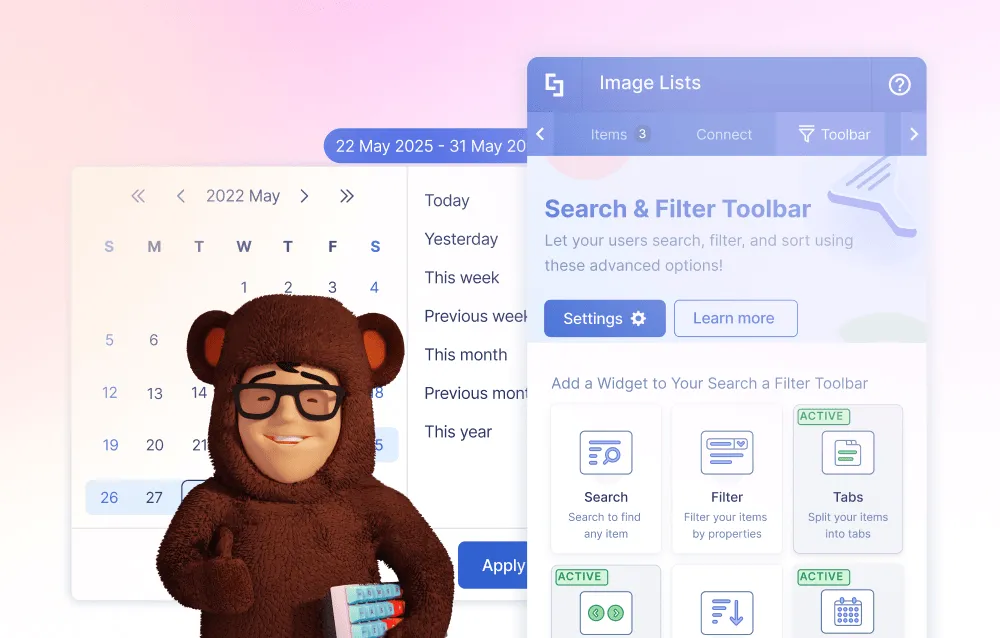
Say goodbye to overwhelming single lists. The new Tabs widget lets you group content into clean, logical categories that make sense for your teams. Pull from a single news source and display "All News," "HR Updates," and "IT Announcements" in separate, easy-to-navigate tabs. Choose from multiple professional styles that align with your brand, so everything looks polished and purposeful.
Find content fast with Date Filters
Time-sensitive information shouldn't be hard to find. Add the Date Filter widget to any Events or Date List, and users can instantly pull up items from "Today," "Last Week," "This Month," or a custom date range. Your news archives and event calendars become genuinely useful tools that deliver answers in seconds, not minutes.
Structure static content with Metadata
Think of this as invisible organization. Add custom tags to static items like Image Lists or manually created Events, tags like "Meeting," "Webinar," or "Department Event." While users never see these tags, they give you powerful behind-the-scenes control. Pair Metadata with the Filter widget, and you can create smart, dynamic filters based on your custom categories. It's sophisticated content management made simple.
Break up long lists with Pagination
Endless scrolling is exhausting. When you're dealing with hundreds or thousands of items, Pagination breaks content into manageable pages that feel digestible. Users get a better experience, and your pages load faster by pulling items in smaller batches. Even your largest directories will feel quick and professional.
What this means for you: If you're still wrestling with out-of-the-box SharePoint, this is your opportunity to move from an intranet people tolerate to one they actually rely on. If you're already using ShortPoint, these tools elevate you from designer to information architect, someone who builds sophisticated, high-value experiences that solve real business challenges. No coding degree required.
Ready to get started? Existing ShortPoint customers can dive in today with the latest update. Just edit a page, add a connected or static Design Element, and you'll find Tabs, Date Filter, Metadata, and Pagination waiting in the settings.
New to ShortPoint? You don't have to settle for a clunky, frustrating intranet. Discover how ShortPoint helps you create a beautiful, modern workspace inside SharePoint—one that employees actually enjoy using.
Your users deserve an intranet that works as hard as they do. Start building it today.

Templates
Why Your Colleagues Will Think You Hired a Design Agency (You Didn't)
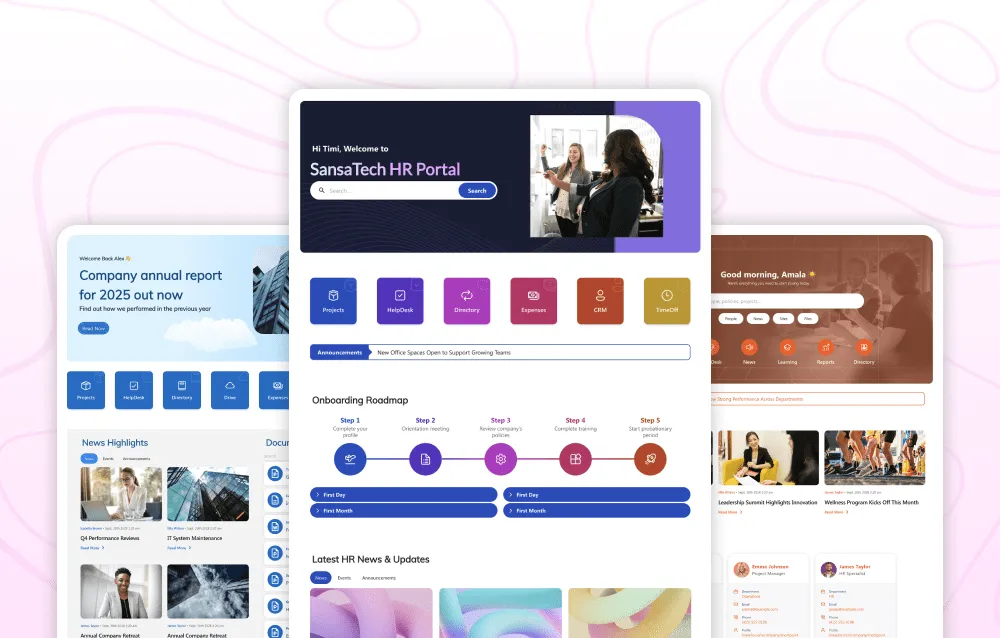
We've been busy building more stunning templates specially for you. Our design team just released a massive collection of new templates that'll make your colleagues wonder if you hired a professional design agency overnight. This month's drop includes complete page templates like Employee Start Hub and Everyday Home page, smart section templates for custom layouts, and uses our latest Design Elements, including Search Box, Person Cards, Steps, and Quick Links. Everything is waiting in your Templates Library right now, ready to transform your basic SharePoint pages into something employees actually want to use.
We've also revamped our Templates Hub on our official website to highlight the quality and visual appeal of ShortPoint templates. We created this showcase specifically for moments when you need to show stakeholders what's actually possible with ShortPoint - no technical explanations required, just stunning visual proof. Every template includes a live preview so your leadership team can see exactly how modern and engaging your intranet could look. It's also perfect for browsing the full collection and getting inspired before you dive into building, whether you're a seasoned ShortPoint user or just getting started.
Here's why this matters for your team. IT Teams and SharePoint Admins can stop rebuilding the wheel - these professional designs would normally take weeks to code, but are available in your Page Builder instantly. Communications and HR Leaders will see their engagement numbers skyrocket because these templates are designed around what actually makes employees click, read, and participate. Executive Sponsors who've been pushing for that "modern, engaging intranet" can now see results by next week instead of next quarter.
Using the new templates is incredibly simple. If you're already using ShortPoint, fire up your Page Builder and look for the "New" badges in the Templates Library - that's where the magic lives. New to ShortPoint? All these templates are included with the subscription, and we can show you exactly how they transform your environment in a 15-minute demo. Also, don't just use them as-is. Think of them as your creative starting point and customize with your content and brand colors using the Theme Builder.

Articles
New Articles
- New Search and Filter Toolbar Widgets and Features
- Search and Filter Toolbar Update: New Widgets and Features
- How to Filter a SharePoint List by Date Range Using the Date Filter Widget
- How to Create Tabs in SharePoint Using the Tabs Widget
- How to Apply SharePoint List Indexing Using the Pagination Widget
- How to Add SharePoint Metadata Tags to Organize Content
- How to Adjust Time Zones for Microsoft Graph API Outlook Connections
- How to Display Messages from a Specific Teams Channel in Your SharePoint Site
- How to Show the People You Work With on Your SharePoint Sites
- How to Display all the SharePoint Lists from a SharePoint Site
- How to Show all the Tabs of a Specific Teams Channel in Your SharePoint Site
- How to Show all the Planner Plans from a Specific Group
- How to List all Your OneNote Notebook Sections in SharePoint
- How to Show all Your OneNote Notebook Pages in SharePoint
- How to Display all Your OneNote Notebooks in SharePoint Sites
- How to Find the Microsoft Planner Plan ID
- How to Show all Your Microsoft Planner Plans in Your SharePoint Page
- Known Issue: New Design Element Configuration is Lost When Switching ShortPoint Versions

Tech Tip: 5 Strategies to Build a Truly Personalized Intranet
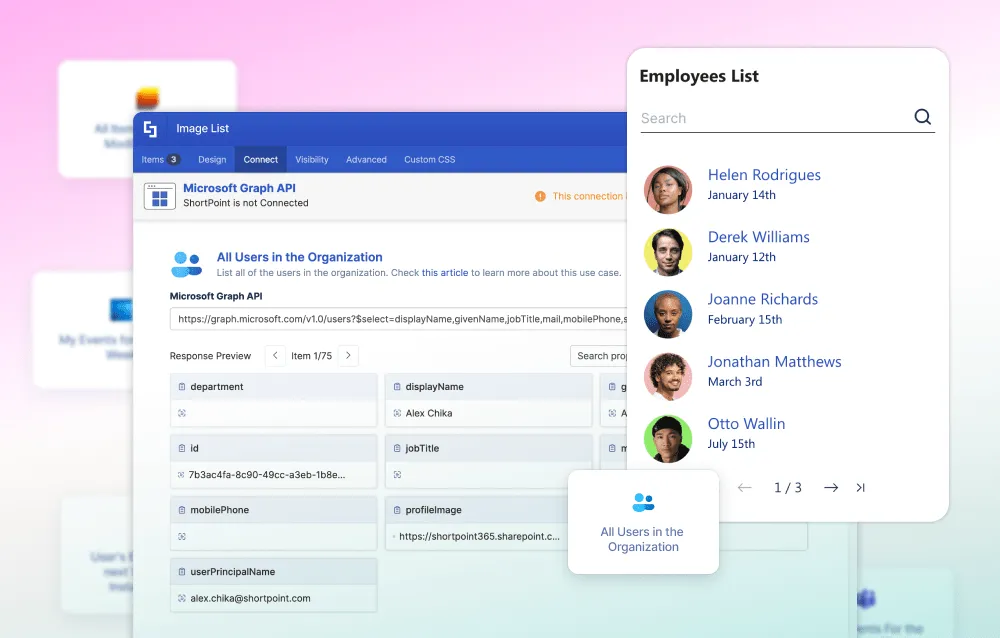
When most organizations say they have a "personalized intranet," they mean adding a user's name to the header or displaying a generic welcome message. But true personalization means your intranet anticipates what each employee needs before they ask, surfacing their upcoming meetings without opening Outlook, displaying documents they're actively working on without browsing folders, and showing navigation relevant to their specific role instead of a cluttered menu for everyone.
The reality? Most intranets are still one-size-fits-all experiences where the CEO sees the same homepage as the intern, and everyone manually hunts for information that already exists about them in Microsoft 365. With ShortPoint's new Microsoft Graph API Connection, you can now pull that real-time data directly into your intranet pages—no coding required—transforming static pages into dynamic, personalized dashboards and smart navigation that adapt to each user.
So what does this look like in practice? Here are five powerful ways organizations are already using the Microsoft Graph API Connection to create intranets that employees actually love.
Instant Access to Your Collaborative Spaces
Using the Groups I Belong To use case, dynamically retrieve all groups the signed-in user is a member of and display them as an organized, clickable list on their homepage. Present groups as a card-based layout with icons and member counts, or as a simple list with quick-access buttons. An HR manager sees "HR Leadership," "Benefits Team," and "Recruiting" groups, while a developer sees "Engineering," "DevOps," and "Code Review." This eliminates guesswork and creates instant pathways to the collaborative spaces that matter most to each user.
A Custom Launchpad to Your Most Important Sites
With the My Followed SharePoint Sites use case, display all SharePoint sites the user has followed as a visually appealing grid or carousel with thumbnails, titles, and one-click access links. A marketing professional sees "Brand Guidelines," "Campaign Hub," and "Content Library" displayed front and center. This transforms the intranet into a personalized navigation hub where every employee's most important destinations are just one click away.
Your Team Collaboration Command Center
The My Teams use case shows the complete list of Microsoft Teams the user has joined as an interactive dashboard widget with icons, names, and direct links to open each Team. A project manager sees "Product Launch 2025," "Marketing Collaboration," and "Executive Updates" in a clean, scannable format. Add quick-access buttons for specific channels or display unread message counts to help users prioritize attention without switching apps.
A Unified Task Tracker Across All Your Projects
With the My Planner Tasks use case, display the user's Planner tasks directly on the intranet as an organized table or Kanban-style board with titles, due dates, priority levels, and completion status. Enable filtering by plan, due date, or priority. An operations coordinator sees tasks from "Q1 Initiative," "Daily Operations," and "Team Goals" consolidated in one view with checkboxes to mark complete. Add sorting options and progress indicators to keep employees focused and organized.
Your Week at a Glance, Always Ready
The My Events for the Next Week use case shows the user's Outlook calendar events in a clean weekly view with meeting titles, dates, times, locations, and links. Present as a daily breakdown or visual events list with color-coded events by type. An executive sees "Board Meeting" on Monday, "Department Reviews" on Wednesday, and "Strategy Session" on Friday with one-click access to open the calendar and join the meetings.
The Microsoft Graph API Connection transforms your intranet from a static, one-size-fits-all experience into a dynamic, intelligent hub that adapts to each employee's unique needs. Instead of forcing employees to hunt across multiple apps for basic information like their calendar, tasks, or team memberships, everything they need is personalized, real-time, and delivered directly to their intranet homepage. ShortPoint's intuitive Connections feature makes this possible without any coding or API knowledge required, you simply configure the connection and let the personalization begin.
Ready to transform your intranet into a personalized experience? Read the Full Details - See step-by-step examples and technical details. Follow the Setup Tutorial - Learn how to enable the Graph API connection. Start Your Free Trial - Test Graph API connections in your own environment.
Making your SharePoint intranet personal, powerful, and perfectly tailored to every employee, that's the ShortPoint difference.

The Faces of ShortPoint
Meet Temitayo Salaudeen, Our Website Developer

This month, we're throwing open the doors to meet the incredible talent behind ShortPoint's website: Temitayo Salaudeen, our Website Developer.
Temi, as we fondly call him, is the one making sure our digital front door is always welcoming and running like a well-oiled machine. His job? Keeping the whole site up-to-date and making sure the entire experience is as slick as our ShortPoint product. It's a job that needs a delicate balance of precision and creativity. So what drives him? He spilled the beans pretty well himself: "What makes doing what I do fun is a bit of both creativity and impact. I love exploring new ways to get the site running faster, and seeing how it all helps users figure out how to get the most out of ShortPoint. It's really rewarding."
How on earth does Temi manage to deliver such a high level of quality consistently? It all comes down to flexibility and teamwork. The freedom to do his tasks in his own way, and then collaborate with the rest of the team to work out the best way to do them, really speaks to him. As for the tools of his trade, he's pretty clear: "The secret to my success at ShortPoint is a mix of curiosity, being adaptable, and being a part of a great team." That's the winning combination of keeping an open mind, being able to change direction quickly, and relying on his colleagues. That's what makes him a true ShortPoint hero.
When he clocks off, Temi trades in code for cards! He dives deep into building and testing "Magic: The Gathering Arena" decks. For him, it's a seriously intense way to keep his brain sharp, and a great way to unwind from coding. Beyond all the strategy games, though, he's just a normal bloke who loves spending quality time with his family and friends. Being able to just have a laugh, and have some genuine conversations is, for him, the best way to relax and keep a level head.
And here's a fun fact you might not know about Temi. He used to be a passionate street footballer, but all that stopped after he broke his forearm for what ended up being the fourth time in a match. Yeah, that's right - four times. It was a pretty sobering experience, but it clearly didn't do much to dampen his ability to create amazing digital experiences for us here at ShortPoint!