SharePoint AI: How AI for SharePoint Is Transforming Intranet Design
From AI intranet builders to productivity assistants, here's how artificial intelligence is reshaping the way teams design, generate, and manage SharePoint pages.
Artificial intelligence is rapidly reshaping how organizations build and manage digital workplaces. For companies using SharePoint, AI is starting to remove one of the biggest barriers to intranet success: complex page design.
Traditionally, creating a modern SharePoint intranet requires a mix of technical expertise, design skills, and significant time. Teams often struggle with layout decisions, branding consistency, and ongoing content updates.
With SharePoint AI tools, that process is changing.
Today, SharePoint AI includes a growing set of tools — from AI intranet builders to productivity assistants — that help teams generate pages, automate content, and improve how information is organized across Microsoft 365.
Instead of manually assembling pages and components, AI can now generate intranet layouts, recommend structures, and assist with content creation.
In this guide, we explore how AI for SharePoint is transforming intranet design, what tools are emerging in the ecosystem, and how organizations can build better digital workplaces faster.
Throughout this guide, we reference tools like ShortPoint AI Designer to illustrate how AI is being applied to SharePoint page creation in practice.
What Is AI for SharePoint?
AI for SharePoint refers to tools that use artificial intelligence to automate intranet page creation, content generation, and knowledge discovery within Microsoft 365 environments.
These tools allow teams to:
- Generate SharePoint pages from prompts
- Improve and rewrite intranet content
- Automate workflows and document management
- Enhance search and knowledge discovery
Why Most SharePoint Intranets Fail Without AI
Many SharePoint intranets fail not because of the platform itself, but because of how difficult it is to design and maintain pages at scale.
Common failure points include:
- Inconsistent page layouts across departments
- Slow content updates
- Heavy reliance on IT teams
- Poor user adoption due to outdated design
AI changes this by removing the dependency on manual design and enabling teams to build pages faster with consistent structure.
Key Use Cases for AI in SharePoint
AI can enhance multiple areas of the SharePoint experience, from page design to information discovery.
AI-Generated Intranet Pages
One of the most powerful applications of SharePoint AI is automated page creation.
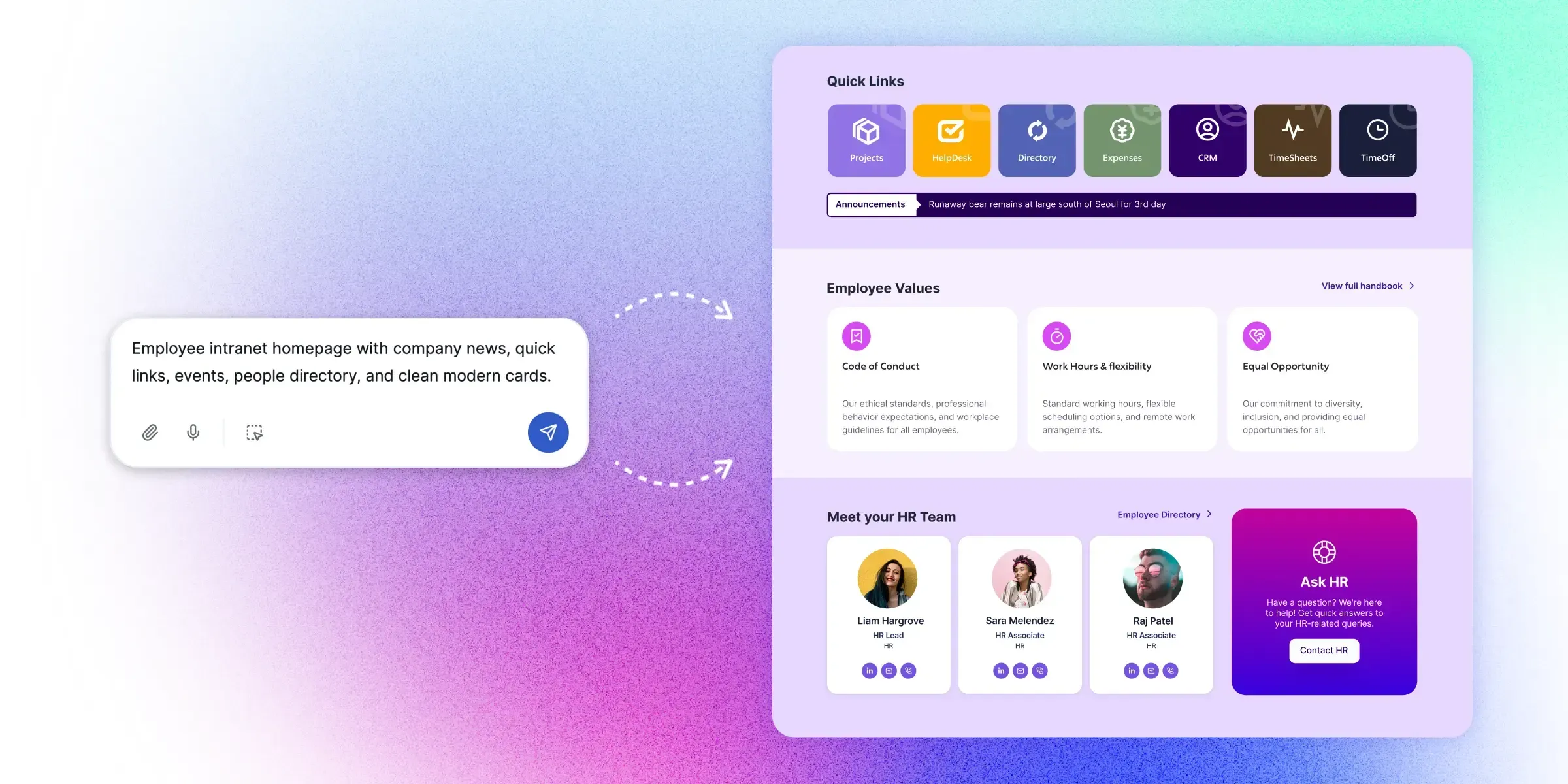
Instead of manually assembling web parts and layouts, users can describe the page they need. For example:
AI tools can translate that request into a structured SharePoint page layout. This dramatically reduces the time required to build new pages.
One example of this approach is an AI-powered SharePoint page builder that translates prompts directly into structured page layouts.
For practical examples of how teams structure these instructions, see our SharePoint AI prompts library covering HR, communications, and knowledge use cases.
Content Creation and Editing
AI can also assist with writing and refining intranet content. Examples include:
- Summarizing long documents
- Writing announcements or internal communications
- Improving clarity and tone
- Translating content for global teams
Intelligent Knowledge Discovery
Finding information is one of the biggest challenges in large intranet environments. AI-powered search tools can improve knowledge discovery by:
- Understanding natural language queries
- Recommending relevant content
- Surfacing related documents
Workflow Automation
AI can also assist with automating repetitive tasks within SharePoint workflows. Examples include:
- Document categorization
- Content tagging
- Approval routing
- Policy management
Types of SharePoint AI Tools
The SharePoint ecosystem is seeing the emergence of several categories of SharePoint AI tools. Each addresses a different aspect of intranet management.
| Tool Type | What It Does | Best For |
|---|---|---|
| AI Assistants | Generate content and summaries | Productivity |
| AI Intranet Builders | Generate full SharePoint page layouts | Intranet design |
| AI Search Tools | Improve knowledge discovery | Large organizations |
| AI Automation Tools | Automate workflows and processes | Operations |
AI Assistants for Microsoft 365
AI assistants integrated with Microsoft 365 help users interact with documents, meetings, and emails more efficiently. These tools focus on productivity tasks such as summarizing documents or generating content.
Microsoft Copilot is the most prominent example in this category. For a side-by-side breakdown of how it compares to specialized intranet design tools, see our SharePoint Copilot vs AI Designer comparison.
AI Intranet Builders
One of the most important categories is the AI intranet builder.
These tools allow teams to generate full SharePoint pages using prompts instead of manual configuration. Instead of assembling layouts component by component, users describe the outcome — and AI builds the page.
Learn more about this category in our guide to AI intranet builders .
AI Search and Knowledge Tools
AI search tools improve how employees discover information within large SharePoint environments. They analyze content relationships and user behavior to surface relevant results more quickly. These tools help organizations unlock the full value of their internal knowledge.
How AI Is Changing the Way Intranets Are Built
AI is fundamentally changing how intranet pages are created.
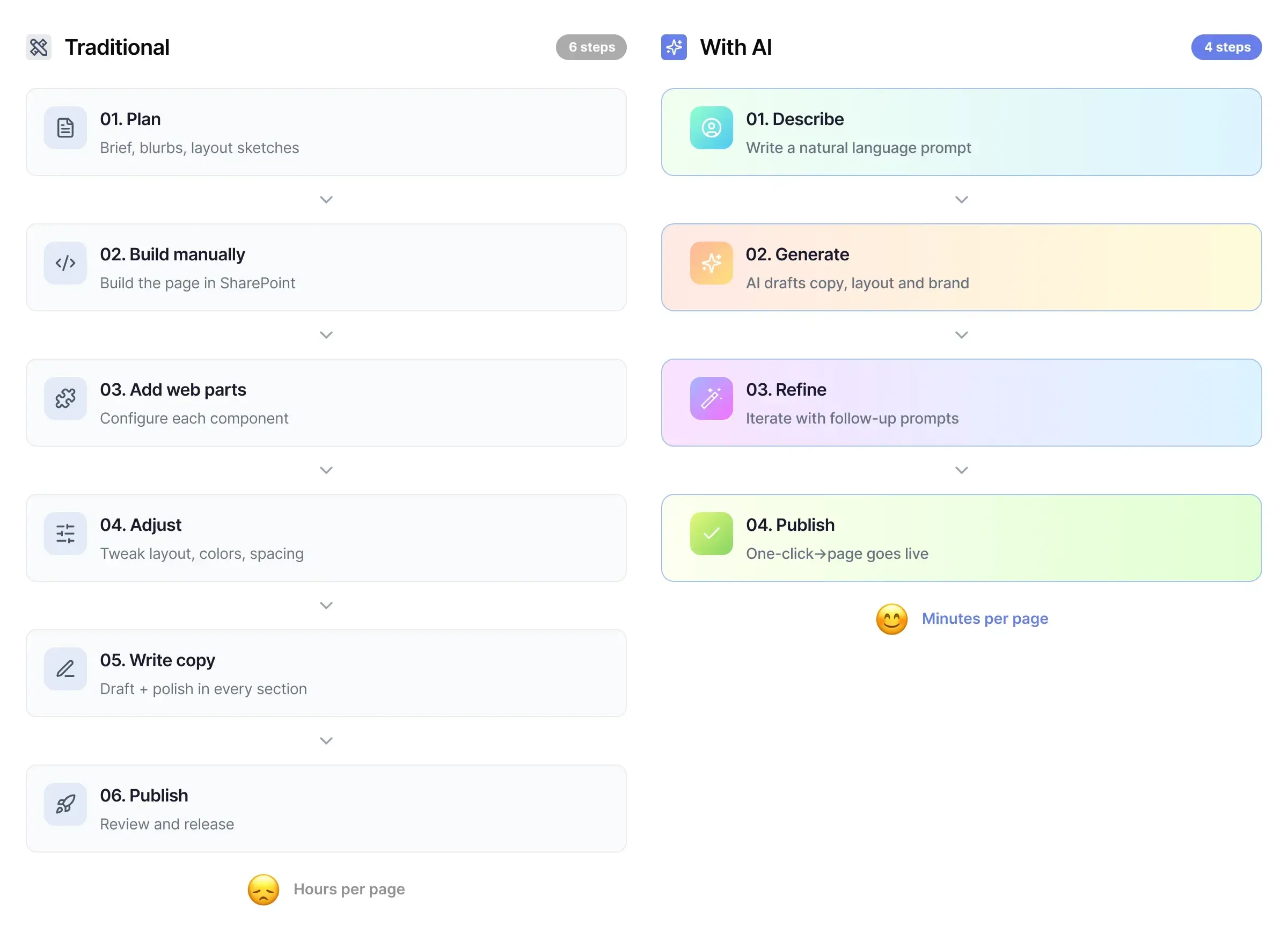
This shift dramatically reduces the time required to launch new pages and allows non-technical users to participate in intranet development.
Example: Building a SharePoint Page With AI
Imagine an HR team that wants to create a new employee onboarding hub.
Instead of starting from scratch, they could enter a prompt such as:
An AI tool can generate the initial page structure automatically. The team can then refine the page by asking for changes, such as:
This iterative workflow makes intranet design significantly more accessible.
Introducing ShortPoint AI Designer
ShortPoint AI Designer is one of the most advanced SharePoint AI tools, built specifically to generate and edit intranet pages using AI.
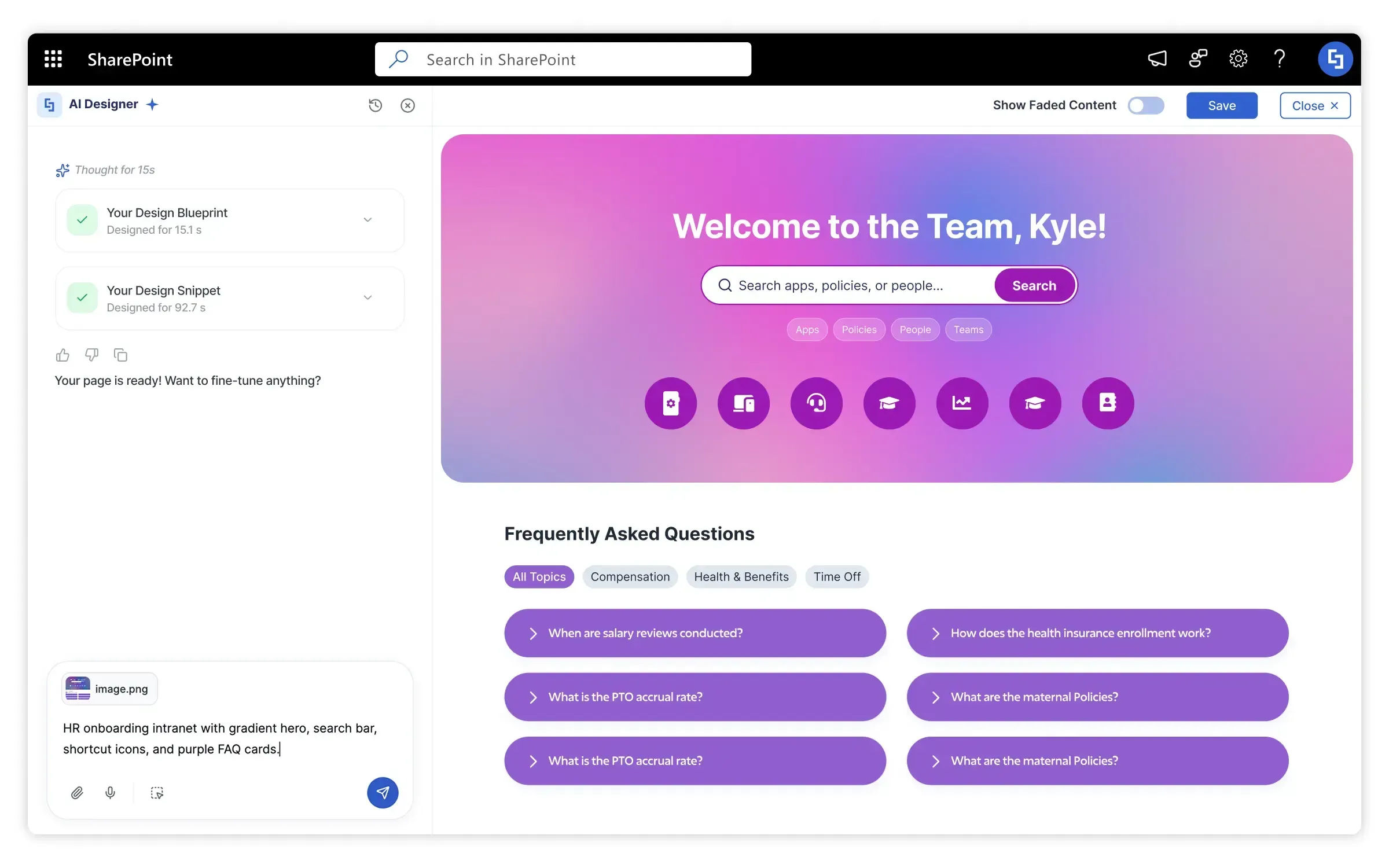
Watch a 60-second look at how AI Designer turns a prompt into a complete SharePoint page:
Instead of manually designing intranet pages, users can generate complete layouts using prompts, voice commands, images, or copied content.
Key capabilities include:
- Full intranet page generation from natural language prompts
- Multi-turn AI editing to refine layouts
- Design aligned with SharePoint branding and themes
- The ability to modify individual page sections using AI
Explore the AI-powered SharePoint page builder and see how AI generates a full intranet page in seconds.
Benefits of Using AI for SharePoint
- Faster Intranet Development AI reduces page creation time from hours to minutes.
- Improved Design Consistency AI tools follow branding guidelines, ensuring consistent design across pages.
- Accessibility for Non-Technical Teams AI enables HR, communications, and operations teams to build pages without technical expertise.
- Better Employee Experience Modern intranet pages improve navigation, usability, and engagement.
The Future of SharePoint AI
The role of SharePoint AI is evolving rapidly. Future capabilities may include:
- Automatic intranet page personalization
- Intelligent content recommendations
- Real-time layout optimization
- AI-driven knowledge management
As SharePoint AI tools continue to improve, intranet development will become faster, smarter, and more accessible across organizations. Organizations that adopt AI early will gain a clear advantage in building scalable digital workplaces.
Getting Started With AI for SharePoint
If your organization is exploring AI for SharePoint, start by identifying where automation can simplify your current workflow.
Evaluate:
- How long it takes to build new pages
- Who is responsible for design and content
- Whether your intranet suffers from inconsistent layouts
From there, adopting an AI intranet builder can significantly accelerate development and improve consistency.
For teams looking to move faster, try ShortPoint AI Designer to see how AI generates complete intranet layouts.
If you want to explore the broader ecosystem, check our guide to the best AI tools for SharePoint intranets .
Start a free ShortPoint trial today and see how AI Designer turns prompts into complete, on-brand SharePoint intranet pages.