


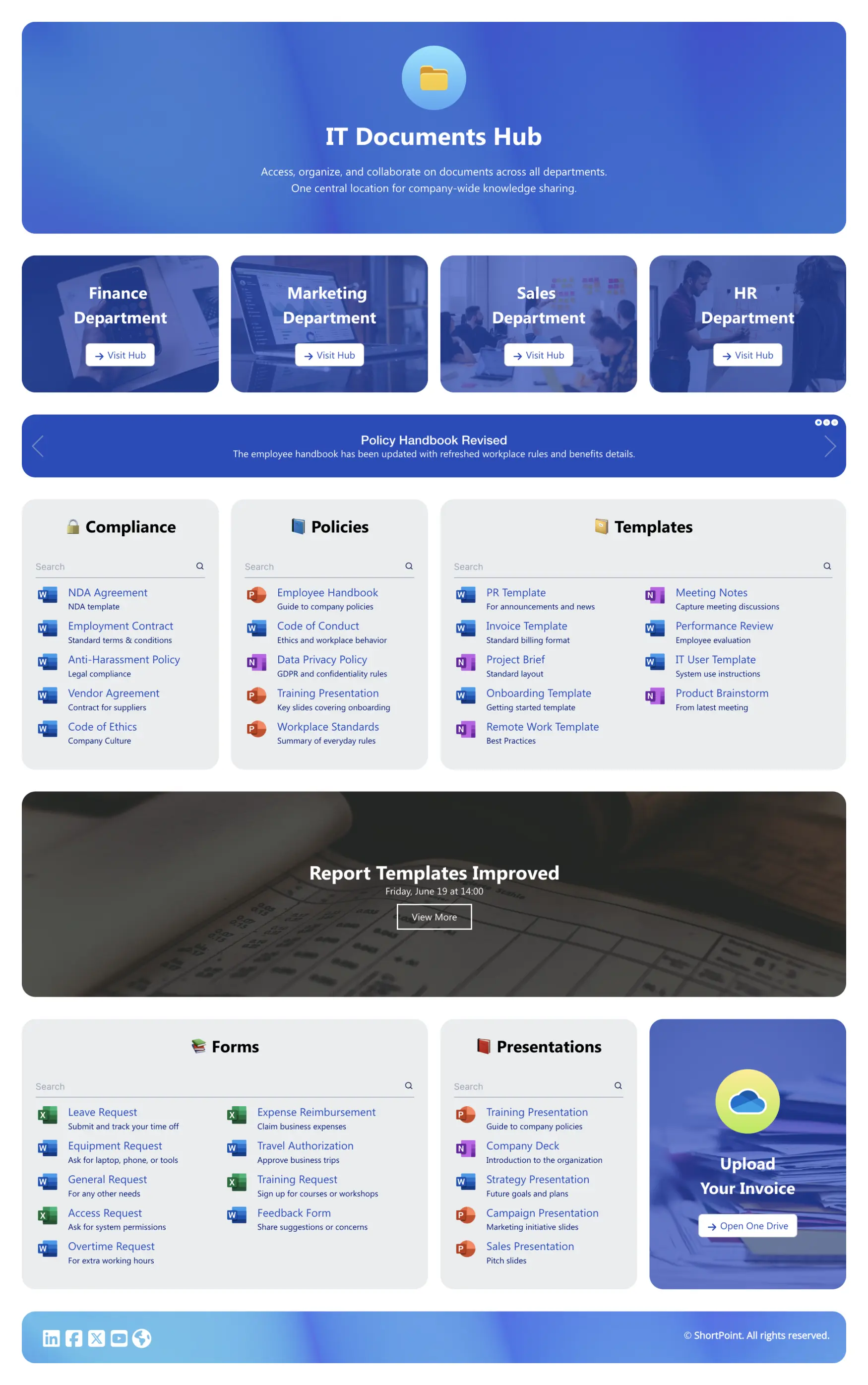
About this Template
A focused hub for day-to-day document work. The hero section sets the context of the page. Department tiles—Finance, Marketing, Sales, HR—route people fast. A slim announcements bar flags urgent updates. Three priority blocks—Compliance, Policies, Templates—include search capability to find files quickly. Forms and Presentations are grouped for common scenarios. An “Upload Your Invoice” panel opens OneDrive to collect files without email back-and-forth. Clear structure and consistent styling reduce chase work and keep official documents easy to access and maintain.
Template Features
ShortPoint connects Microsoft 365 and SharePoint, unifies styling, and speeds builds. Create responsive, accessible pages and reuse sections at scale—no code, consistent design, fewer updates.
Improve your template with AI. Describe changes and see them in minutes.
Construct pages in minutes. Combine elements and patterns for clear, branded layouts—no coding skills. Easy edit experience.
Tweak the brand without code. Live previews show changes as you edit.
Turn data into insight—connect Lists, Planner, Outlook, and Teams in one place.
Copy social widgets and paste them where engagement matters.
Accessible tables and lists—headers, scopes, and summaries for clarity.
Integrate data sources at scale—pages stay timely, accurate, and useful.
We offer hundreds of page designs to make your starting point clear and confident.
Over 60 elements make creative layout work effortless.
Navigation, cards, and lists adapt cleanly to narrow viewports.
Get Started With Everyday Home In Three Simple Steps
Launch a branded SharePoint document management template in under an hour—no coding required.
- 1
Kick off a free ShortPoint trial : Hit Start a Trial, set up your account—no credit card—sign in with M365 or download ShortPoint, then activate your trial.
- 2
Insert a Template : Edit your SharePoint page, insert the ShortPoint web part, and select the documents 2 template (or any preferred template page) from the Templates Library
- 3
Customize & Publish : Replace placeholders, connect live SharePoint data, adjust branding, and publish.
Frequently Asked Questions
Setup is incredibly fast and is 100% code-free, allowing you to have a professional news page live in minutes. The process is simple: just install the ShortPoint app in your SharePoint environment, choose the news template from our library, connect your content sources, and then publish your page.
Yes, it’s compatible with Microsoft 365 (SharePoint Online), SharePoint Subscription Edition (SE) and supported On-Premise SharePoint environments when paired with the ShortPoint design software.
Absolutely. Use the Theme Builder to manage branding elements like colors and fonts, and the Page Builder to visually arrange sections and change layouts—all without any coding.
Built mobile‑first. Breakpoints and components adapt to phones and tablets cleanly.
You can clone the Documents 2 template to create a new site for every department—from HR to Finance—a consistent, on-brand starting point. They can add their specific site content while the core design stays unified across your entire organization.
Using ShortPoint Connect, you can pull dynamic, live site content directly from your everyday tools. Your site will always feel current because it updates itself.
Think of it as your all-in-one toolkit for transforming SharePoint. With a subscription, you get full access to our entire gallery of templates, a vast library of design components, seamless integrations with your Microsoft 365 apps, regular updates, and dedicated support from our expert team.
Related Templates
See all Templates









We were spending a lot of development dollars, but things still weren’t how we wanted and every day wasted was a day closer to our deadline.

ShortPoint has enabled us to create internal SharePoint sites that are user-friendly and attractive for our multi-generational group of Associates.

Before using ShortPoint, I’d never have expected that a small team such as ours could deliver a product that looks as good as our portal does today.

ShortPoint reduced the time it took to rebuild our intranet from 3 months to just 2 weeks. It really is a must-have for every company that uses SharePoint.


Building and customizing sites in SharePoint was a very heavy lift. We needed a developer on every project and it felt like we were always doing things the hard way.


I had no idea intranet consultancy would become so big for us! And none of it would have been possible without ShortPoint’s incredible software and support team.


It was hard to find solutions to beautify customers’ SharePoint installations and give customers a visual impression of how a new intranet could look.


Thanks to ShortPoint, the intranet isn’t a pain point for us anymore. I couldn’t put a price on how much happier we are working with ShortPoint as opposed to our previous vendor.


Working with ShortPoint was one of the smoothest projects I’ve ever been involved in. What they created for us is fantastic, and we never felt an ounce of stress.