How to Build a SharePoint Intranet Without Code in 2026
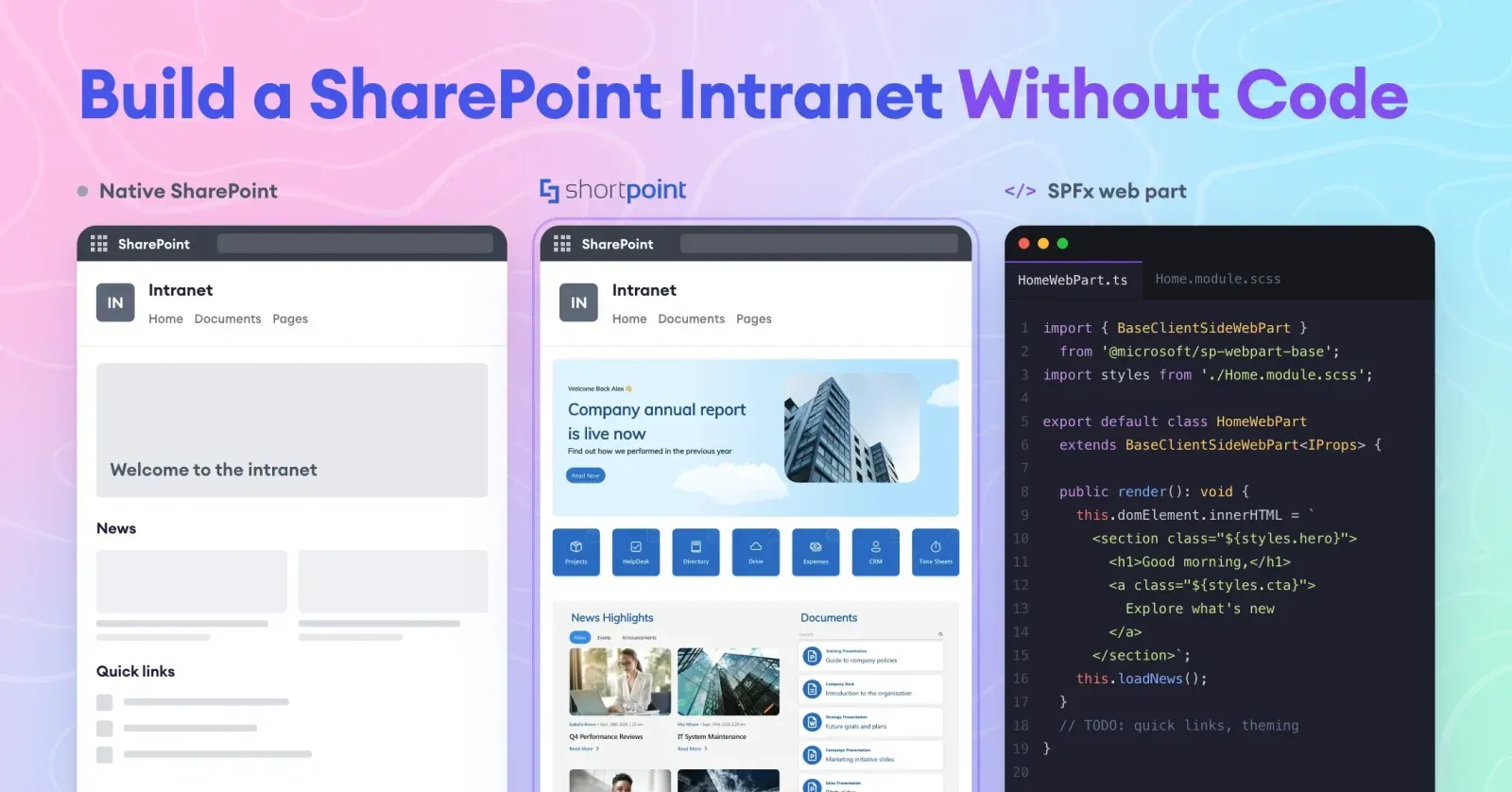
If your organization runs on Microsoft 365, you already own the platform for your intranet. SharePoint gives you sites, pages, news, permissions and search out of the box. The real questions are who builds the intranet, how long it takes, and whether the result looks like something employees will actually use.
There are three realistic ways to do it: build with native SharePoint, add a no-code design tool on top, or hire developers to create custom SharePoint Framework (SPFx) components. This guide compares all three side by side, including what changed in SharePoint in 2026, so you can choose the right path for your team.
Quick answer
The best way to build a SharePoint intranet without code depends on how much design control you need and who will own the intranet.
- Native SharePoint is enough for simple, text-led intranets and costs nothing extra.
- A no-code SharePoint design tool such as ShortPoint is the best fit when communications, HR or IT teams need a branded, modern intranet without developers. It installs inside your Microsoft 365 tenant and adds templates, design elements and live data connections.
- Custom SPFx development only makes sense for unique functionality that neither option covers.
By Yvette Tunguia, Content Unit Manager at ShortPoint • Last Updated: October 2026
The three ways to build a SharePoint intranet
Every SharePoint intranet sits on the same foundation: communication sites, hub sites, a home site, pages and web parts. What differs is the layer you use to design and maintain it.
- Native SharePoint. You build with Microsoft's built-in site templates, page sections, web parts and branding tools. No extra software and no code.
- A no-code design tool. You install a SharePoint add-on that gives non-developers a visual page builder, a template library and site-wide branding. Still no code.
- Custom development. Developers build bespoke web parts and extensions with the SharePoint Framework (SPFx), Microsoft's supported model for extending modern SharePoint.
The first two are both no-code approaches. The third is the traditional route, and it's the one most teams are trying to avoid.
Native vs no-code tool vs custom development
| Native SharePoint | No-code design tool (e.g. ShortPoint) | Custom SPFx development | |
|---|---|---|---|
| Who builds it | Site owners, comms or IT | Comms, HR, marketing or IT: anyone comfortable with a website builder | SharePoint developers |
| Code required | None | None | Yes (TypeScript, usually React) |
| Typical time to launch | Weeks, depending on scope and content readiness | Days to a few weeks | Several months for a full intranet |
| Design flexibility | Fixed section layouts and web part settings | Fully customizable layouts, spacing and elements | Unlimited, within what developers build |
| Templates | Microsoft site templates and the SharePoint Look Book | Ready-made page and section templates (250+ templates in SharePoint) | Built from scratch |
| Branding | Brand Center for custom fonts and color themes | Site-wide theme control on top of SharePoint branding | Whatever developers implement |
| Live data | Standard web parts: News, Events, Highlighted content, lists | Connectors to Microsoft Graph, Power BI, SharePoint lists, Teams and REST/XML | Custom integrations, built per requirement |
| AI page creation | Copilot in SharePoint (requires a Microsoft 365 Copilot license) | Varies by tool; ShortPoint's AI Designer builds pages from a prompt | Not included |
| Maintenance | Microsoft maintains the platform; you maintain content | The vendor maintains the tool; you maintain content | You maintain code, packages and compatibility |
| Cost model | Included in Microsoft 365 | Annual subscription | Project fees plus ongoing developer time |
| Best for | Small or text-led intranets with modest design needs | Branded, modern intranets owned by business teams | Unique functionality no product covers |
Option 2: Use a no-code SharePoint design tool
A no-code design tool adds a visual design layer to SharePoint. You keep SharePoint as the platform (permissions, search, document libraries and Microsoft 365 integration), but you build pages with the flexibility of a modern website builder.
It helps to know that SharePoint add-ons fall into two broad groups. Intranet-in-a-box products ship a pre-configured intranet with their own feature modules and conventions. Design tools give you a builder, templates and design elements, so you can create the intranet you want. Teams that care about owning the look and structure themselves usually prefer the second group.
What a no-code tool adds: ShortPoint as an example
- A visual page builder with 80+ design elements, including heroes, cards, carousels, accordions, directories and video backgrounds, all edited inline.
- 250+ page and section templates for homepages, HR portals, onboarding hubs, news portals and dashboards, inserted in one click.
- Theme Builder to set fonts, colors and layouts once and apply them to every page and site.
- Connect to turn any element into live data from 27+ integrations, including Microsoft Graph, Power BI, SharePoint lists and libraries, Teams and REST/XML.
- AI Designer to build a page from a prompt or recreate a layout from an image, with version history to roll back. See how it compares in SharePoint Copilot vs AI Designer.
ShortPoint is a SharePoint Framework solution that runs inside your own Microsoft 365 tenant, so your SharePoint content stays in your tenant. It works with SharePoint Online, SharePoint Subscription Edition and SharePoint Server 2013–2019, including GCC High.
What to check before you choose a tool
- Where it runs. Prefer a tool that installs as an SPFx solution inside your tenant over one that hosts your content externally.
- Security and compliance. Ask for independent audits (ShortPoint is SOC 2 Type 2 audited) and GDPR documentation.
- Accessibility. Check WCAG 2.1 support for the pages you'll publish.
- Version support. Confirm the tool supports every SharePoint environment you run, online and on-premises.
- Support model. Find out whether expert support is included or sold separately.
- Exit plan. Ask how pages behave if you ever stop using the tool, so the decision is an informed one.
The trade-offs
- It's a subscription. ShortPoint starts at $1,998 per year; see pricing for plans.
- It's another vendor for IT and security to approve.
- It doesn't replace planning. You still need information architecture, content owners and governance.
The time saved can be significant. DSOA used ShortPoint to cut the time to rebuild its intranet from three months to two weeks. Read the DSOA case study.
Browse 250+ SharePoint templates →Choose a no-code design tool if you want a branded, modern intranet, you want business teams to own it without developer tickets, and you need to launch in weeks rather than months.
Option 3: Custom SharePoint development with SPFx
The SharePoint Framework is Microsoft's supported model for extending modern SharePoint. Developers write web parts and extensions in TypeScript (usually React), package them, and deploy them through your tenant's App Catalog.
Custom development is the right choice when you need something no product offers: a line-of-business application, a complex workflow, a unique integration with an internal system, or a highly specific user experience.
It also comes with responsibilities that are easy to underestimate:
- Stricter security rules. Since March 1, 2026, SharePoint Online enforces Content Security Policy, which blocks scripts from untrusted sources and inline scripts in SPFx solutions. Custom code has to follow these rules, and older solutions may need rework. We explain what changed in SharePoint CSP enforcement in 2026.
- Ongoing maintenance. SPFx version upgrades, dependency updates and Microsoft UI changes all become your team's job.
- Slower design changes. Every layout tweak goes through a developer, so comms teams wait in a ticket queue.
- Knowledge risk. If your developer or agency moves on, so does much of the know-how.
Many mature intranets combine approaches: a no-code tool for the pages business teams publish every week, plus a small number of custom SPFx web parts for specific business applications. If you're weighing outside help, our guide to SharePoint consulting services covers what to expect.
Choose custom development if you need functionality that no out-of-the-box feature or product provides, and you have the budget to maintain it for years.
How to choose: five questions to ask
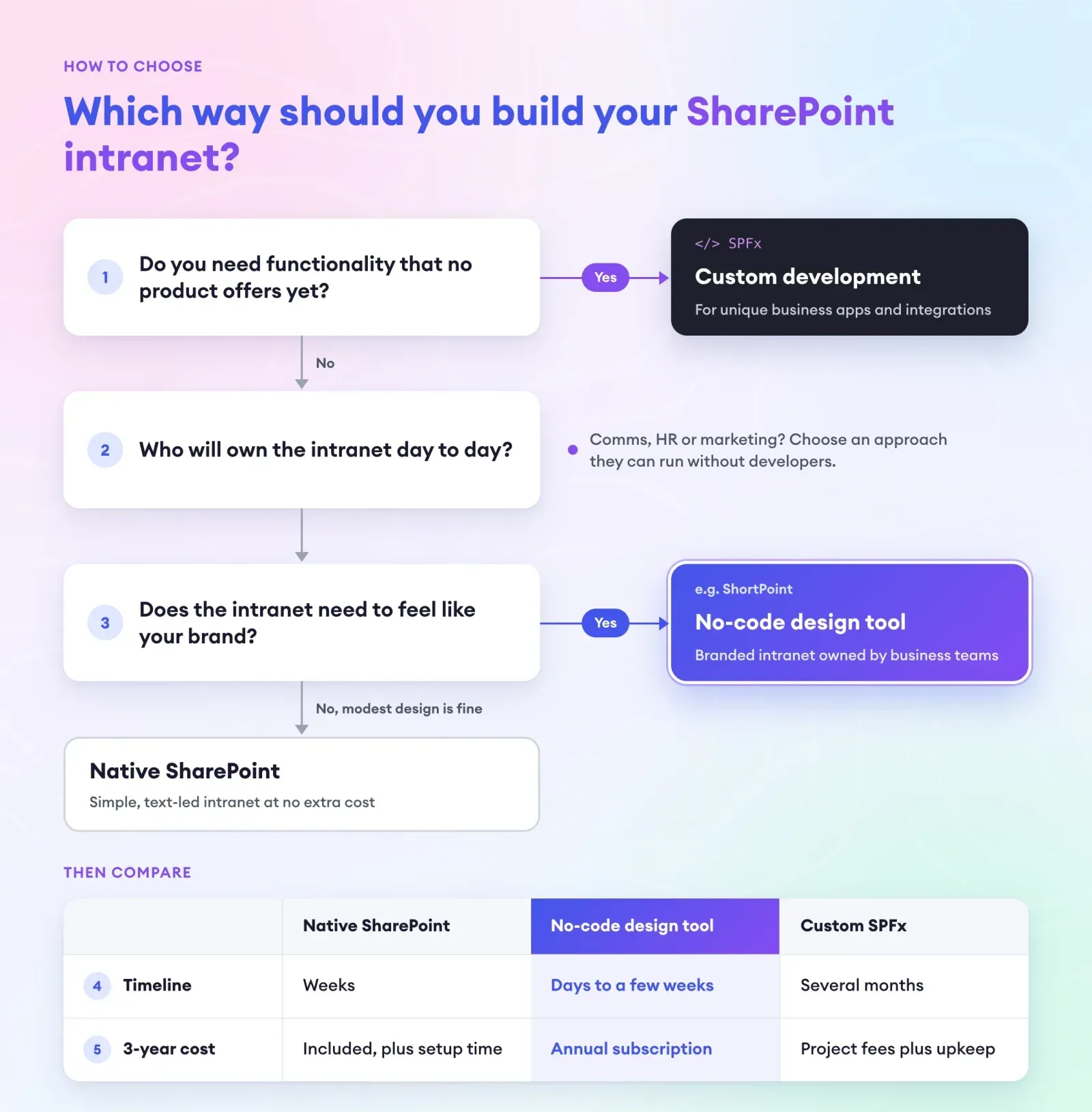
- Who will own the intranet day to day? If it's communications, HR or marketing, choose an approach they can run without developers.
- How much does design matter? If the intranet needs to feel like your brand rather than a standard SharePoint site, native SharePoint alone will feel restrictive.
- Do you need functionality that doesn't exist yet? Only then is custom development worth the cost.
- What's your timeline? Native and no-code options launch in weeks. Custom builds usually take months.
- What's the three-year cost? Compare licenses and people time: configuration hours for native SharePoint, a subscription for a no-code tool, or development and maintenance for custom code.
How to build a SharePoint intranet without code, step by step
Whether you stay native or add a no-code tool, the build follows the same path.
- Define goals and audiences. Agree on what the intranet must do, such as news, policies, onboarding or self-service, and for whom.
- Map your information architecture. Choose the right SharePoint site types, group sites under hubs and plan your site navigation around tasks rather than the org chart.
- Set up the home site and hubs. Create the homepage site, register it as the home site and associate department sites.
- Apply your brand. Configure Brand Center for fonts and themes. If you use ShortPoint, Theme Builder then carries your brand across every page.
- Design the homepage first. Start from a template, then add news, quick links, events and people. Our SharePoint intranet examples are a good source of inspiration.
- Connect live data. Pull in news, events, directories and dashboards so pages stay current without manual updates.
- Launch in Teams and govern. Turn on the SharePoint app in Teams, assign content owners and review analytics after launch. For what separates intranets that stick from those that don't, see what makes a good intranet.
Frequently asked questions
It depends on who will own the intranet and how much design control you need. Native SharePoint works for simple intranets at no extra cost. For a branded, modern intranet that business teams build and maintain themselves, a no-code design tool such as ShortPoint is usually the best fit, because it adds templates, design elements and live data connections inside your existing Microsoft 365 tenant.
Yes. Modern SharePoint lets you build an intranet with communication sites, hub sites, a home site, page sections and web parts, all without code. A no-code design tool extends this with more flexible layouts, templates and site-wide branding, still without writing code.
Copilot in SharePoint can draft pages and sites from natural-language prompts for users with a Microsoft 365 Copilot license. It builds with SharePoint's standard web parts, so the design possibilities are the same as native SharePoint. It's useful for first drafts, but you still need to plan the structure, apply your brand and govern the content.
Not for design, layout or content. Native SharePoint and no-code tools cover those. Bring in a developer only for custom functionality, such as a line-of-business application or a unique integration that no product provides.
It depends on scope and how ready your content is. Teams starting from templates often launch in a few weeks. For example, DSOA used ShortPoint to cut the time to rebuild its intranet from three months to two weeks.
No. Microsoft is investing heavily in SharePoint: in 2026 it rolled out Copilot in SharePoint and renamed the Viva Connections app in Teams to the SharePoint app, making SharePoint the engine behind the intranet experience in Teams.

Yvette Tunguia
Content Unit Manager, ShortPoint
Yvette Tunguia is Content Unit Manager at ShortPoint, where she writes about SharePoint intranet design, structure, and adoption. ShortPoint is used to design and brand SharePoint intranets across 350,000+ sites worldwide.
Ignite your vision. Install ShortPoint directly on your site, or play in sandbox mode. No credit card required.