15+ Company Intranet Examples: Real Designs That Drive Employee Adoption
The best company intranets have one thing in common: employees actually open them every morning.
Not because they have to — because the intranet is genuinely the fastest way to find what they need, stay connected to the company, and start the day. That's the standard this guide is built around.
Below you'll find 15+ company intranet examples and employee intranet designs — real templates from the ShortPoint library, organized by use case, each with an explanation of what makes it work and why employees return to it. If your intranet is a ghost town or a document dump, the fix starts here.
Quick Answer: The Best No-Code Intranet Templates
The best company intranet templates are pre-built, no-code designs that solve a specific business problem. Instead of starting with a blank SharePoint site, you can use a template to create a professional, functional intranet portal — and be live in days, not months.
The top templates from the ShortPoint Template Hub target these key goals:
- Homepage Hubs: Everyday Home, Intranet Layout 6, Intranet Layout 2, and Annual Report
- HR Intranet Examples: Welcome Portal, The Welcome Space, The Welcome Hub, Onboarding Essentials, and HR 12
- Document Management: Documents 1, Documents 2, and Knowledge Portal
- Internal Comms: News Portal 4, Social Layout 2, and News Portal 5
Exploring Intranet Design? Related Guides:
By Luisa Silva, Growth Manager at ShortPoint • Last Updated: June 2026
What the Best Company Intranet Examples Have in Common
Every great company intranet — regardless of industry, size, or platform — shares five characteristics. These are not design opinions. They're the patterns that emerge when you look at the intranets employees actually use versus the ones that become ghost towns within months of launch.
- A personalized homepage. Employees see their name, their team's news, and their most-used tools — not a generic company bulletin board. Personalization is the single biggest driver of daily return visits.
- Findability over structure. The best intranets are built around search and quick links, not deep folder hierarchies. If an employee can't find something in two clicks or one search, they stop looking.
- Mobile-first design. For deskless workers, field teams, and remote employees, an intranet that doesn't work on a phone doesn't exist. The best intranet examples are designed for mobile from the start, not retrofitted.
- Ownership by communications teams, not IT. The intranets with the highest adoption are maintained by the people who understand content — not the people who understand infrastructure. No-code design tools are what make this possible.
- A clear purpose per page. The best company intranet pages do one thing well — HR resources, company news, department tools — rather than trying to be everything at once. Focused pages get bookmarked. Cluttered pages get ignored.
The intranet examples below are built around these principles. Each one solves a specific problem — use the category that matches yours.
What Is a Company Intranet?
A company intranet is a private, internal website that serves as the central digital hub for an organization's employees. Unlike the public internet, an intranet site is only accessible to authorized staff — typically through a company login or VPN.
Modern company intranets go far beyond simple document storage. The best intranet sites function as a personalized digital workplace where employees can access company news, HR resources, IT tools, internal communications, and collaboration spaces — all from a single starting point.
Common platforms used to build company intranet sites include Microsoft SharePoint (the most widely adopted), standalone SaaS tools like Workvivo or Staffbase, and enhancement layers like ShortPoint that add modern design capabilities to existing SharePoint environments.
Key difference: An intranet is internal (employees only), while an extranet extends access to external partners, and the internet is fully public.
Types of Intranet Sites Every Company Needs
Most successful company intranets are not a single site — they're a connected ecosystem of purpose-built intranet sites. Here are the most common types of intranet site examples:
- Homepage / Digital Front Door — The personalized dashboard employees see first
- HR Portal — Benefits, policies, onboarding, and employee services
- Department Sites — Team-specific hubs for IT, Finance, Marketing, etc.
- Knowledge Base — FAQs, how-to guides, and searchable documentation
- News & Communications Hub — Company announcements and social features
- Document Center — Organized libraries for forms, templates, and policies
Each of these intranet site types is covered with ready-to-use templates in the company intranet examples below.
Why Do Most Company Intranets Fail? (The "SharePoint Paradox")
Most company intranets become ghost towns within months of launch. They start with high hopes but turn into digital graveyards of outdated news and broken links.
This is the "SharePoint Paradox": the world's most popular intranet platform is also the one most users avoid.
The problem isn't the platform itself, it's how it's designed. Out-of-the-box, SharePoint is like "a box of 10,000 unsorted bricks." It's incredibly powerful and flexible yet it fails because it's not built with users in mind. Complaints always come back to the same four failures:
- Failure #1: The "Document Dumping Ground." It's seen as an HR storage locker, not a digital workplace.
- Failure #2: "Clunky and Ugly." Users expect to see modern apps and functionality. A "blocky and out-of-date" design makes the platform feel useless.
- Failure #3: "Search is Basically Useless." Findability is everything. When search fails, trust disappears.
- Failure #4: Not Mobile-Friendly. For deskless workers, if the intranet isn't mobile-first, it doesn't exist.
You don't need a new system. You need better design. The examples below show you exactly how.
Intranet Homepage Examples: Best Intranet Site Designs
These intranet homepage examples represent the most successful digital front door designs. Each template solves the core problem of creating a personalized dashboard that employees actually want to use as their browser homepage. A great intranet homepage balances news, resources, and applications in one place — making it the natural starting point for every workday.
-
Homepage
Everyday Home: Company Intranet Template
Homepage Template Preview
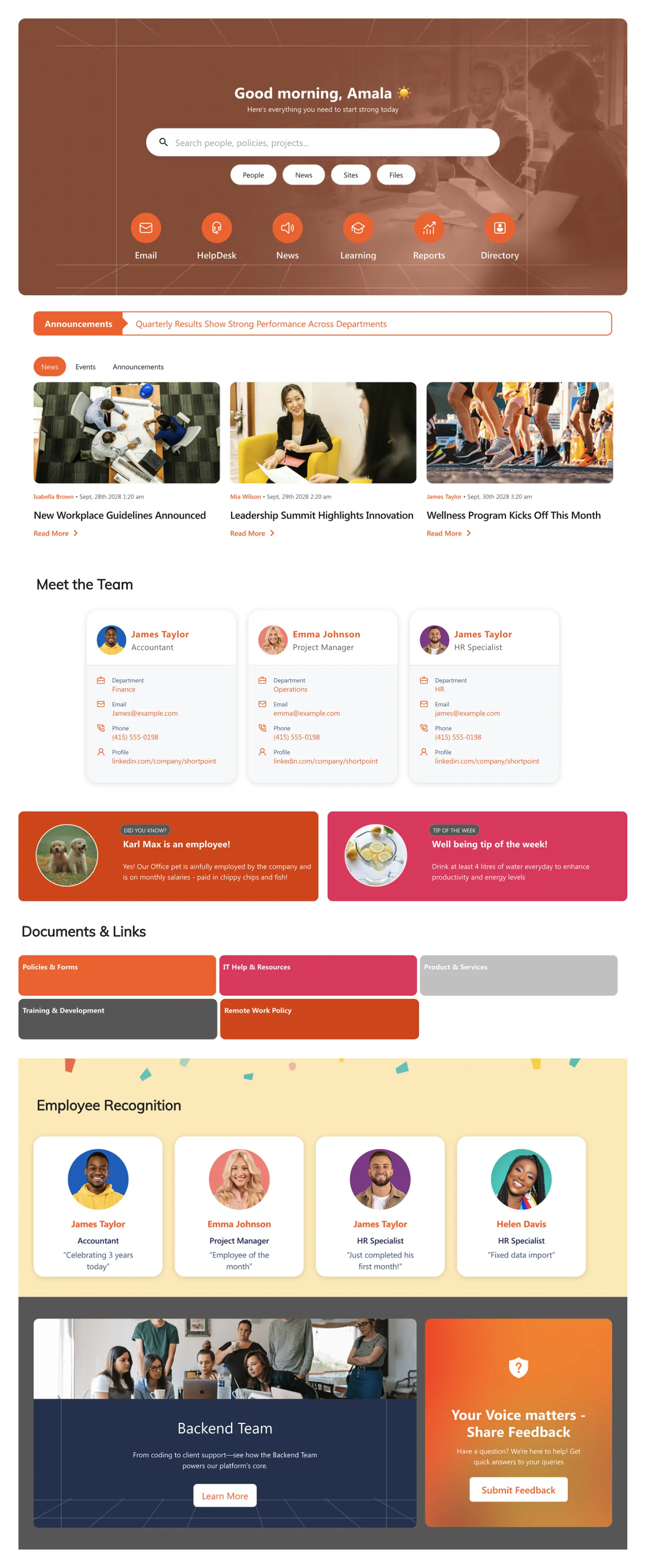
The central hub for a modern digital workplace. Balances news, resources, and applications in a single dashboard that serves company news, tasks, and tools with one-click access to essential resources.
Key Feature: A "Top Resources" section for one-click access to essential, everyday links.
Best For: Most companies as an ideal starting point for their digital workplace.
Employee Benefit: Reduces time spent searching for tools and creates a consistent daily routine.
Why It Works: The Everyday Home template succeeds because it respects the employee's time. Every element — the news feed, the resource shortcuts, the quick links — is positioned around what the average employee needs in the first five minutes of their day. It doesn't ask employees to learn a new system; it works the way they already think.
See Example -
Homepage
Intranet Layout 6: SharePoint Homepage Design
Homepage Template Preview
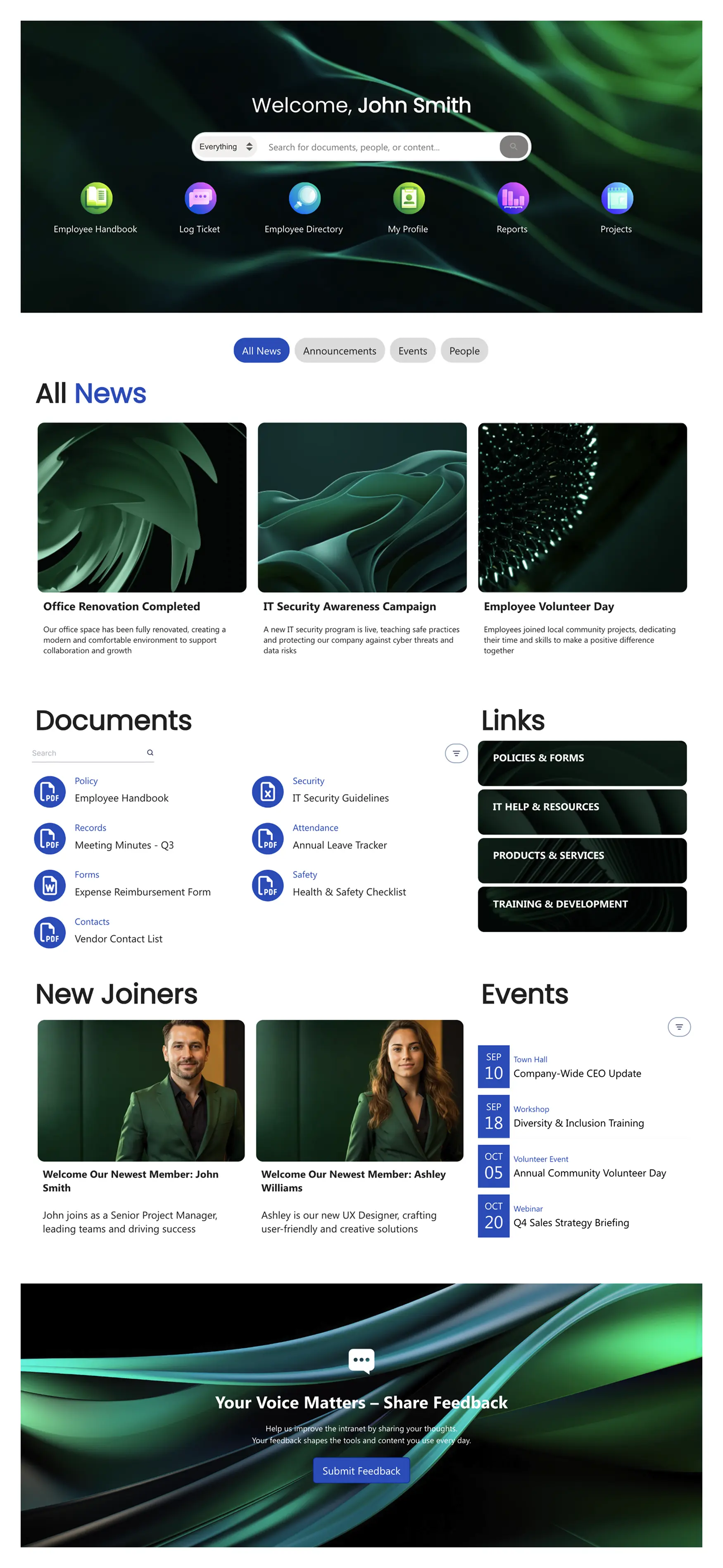
A personalized intranet homepage focused on search, company news, and quick-action links. Built for employee self-service — reduces HR and IT support tickets by making common tasks findable without asking anyone.
Key Feature: A prominent search bar and quick-access icons for self-service — finding the holiday schedule or submitting an IT ticket takes one click.
Best For: Organizations focused on employee self-service and reducing HR/IT support tickets.
Employee Benefit: Empowers employees to solve problems independently without waiting for support.
Why It Works: Layout 6 wins on self-service. The prominent search bar and quick-action icons mean employees can resolve most common queries without emailing anyone. Every self-service interaction is an IT or HR support ticket that doesn't happen.
See Example -
Homepage
Intranet Layout 2: Intranet Homepage
Homepage Template Preview
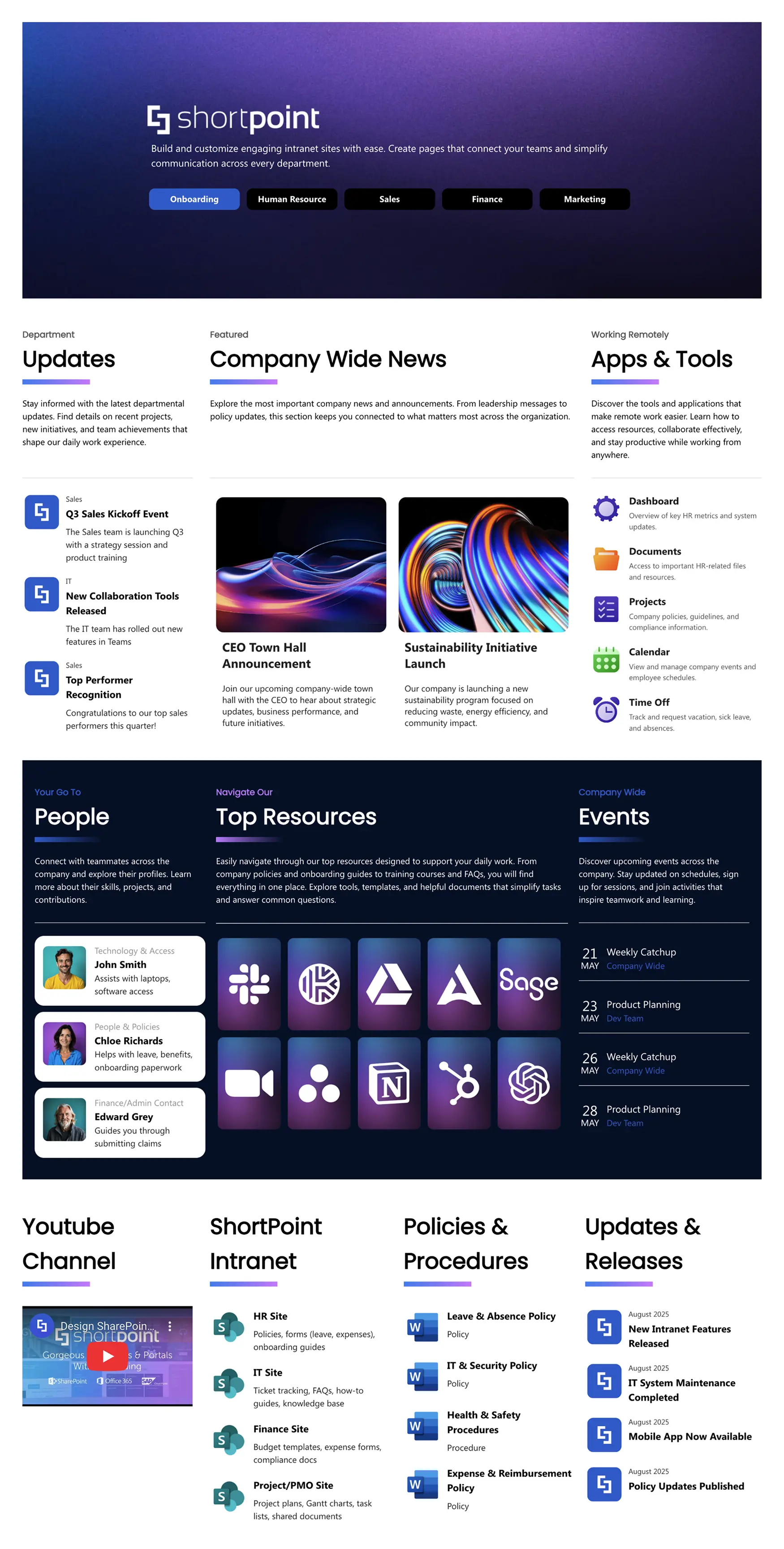
A modern homepage that brings together news, tools, people finders, and upcoming events. Makes the intranet feel like a living company resource rather than a static information board.
Key Feature: An integrated events calendar and people finder to make the intranet feel alive.
Best For: Companies that want to blend culture-building with daily productivity tools.
Employee Benefit: Creates a sense of community and helps employees stay connected to company culture.
Why It Works: The people finder and events calendar are what make Layout 2 feel like a living company intranet rather than a static board. Employees check it not just for documents but because it reflects what is happening right now — who joined, what events are coming, what news is breaking. That is how intranets earn daily return visits.
See Example -
Homepage
Annual Report: Intranet Homepage for Corporate Transparency
Homepage Template Preview
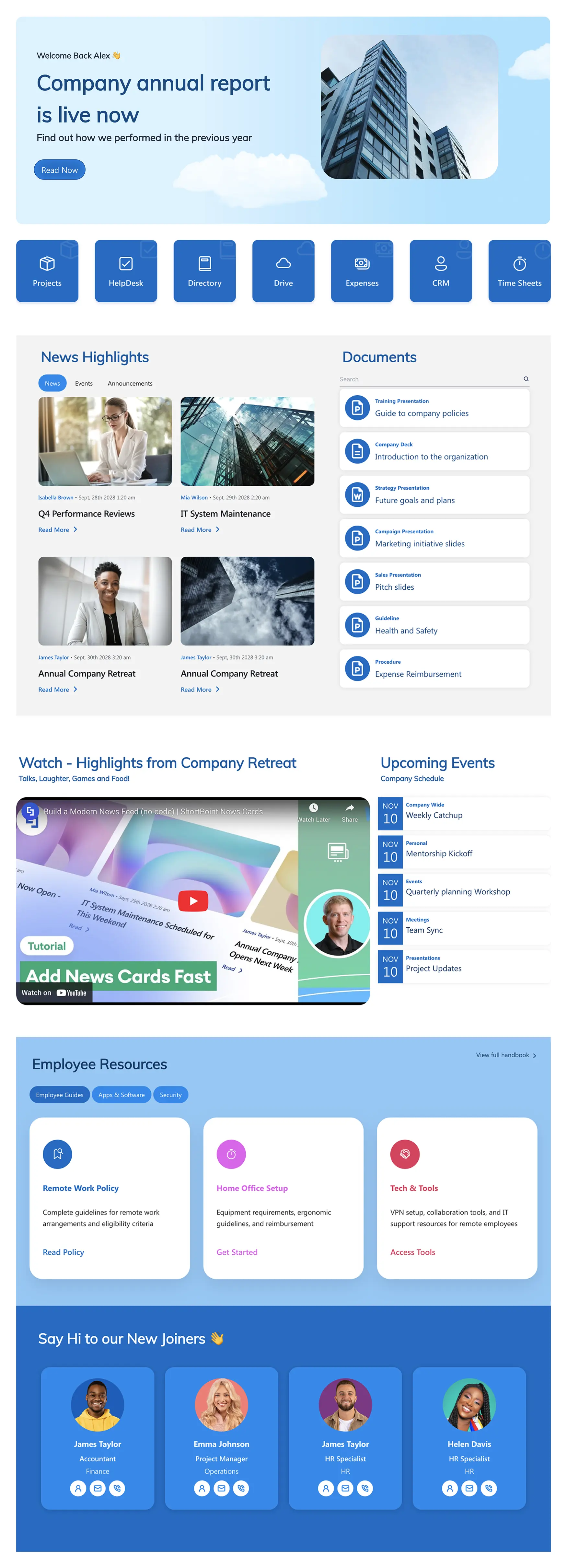
A clean, centralized intranet homepage designed to drive internal communication and corporate transparency. Features a prominent news and events section, quick-access resource links, integrated document libraries, video highlights, and a spotlight for new team members.
Key Feature: A video highlights section paired with a new team member spotlight — creating a homepage that feels alive and keeps employees connected to company milestones.
Best For: Organizations that want to align employees on company performance, celebrate wins, and centralize corporate updates in one visually compelling intranet page.
Employee Benefit: Employees understand the bigger picture at a glance — informed and included without digging through email chains.
Why It Works: The Annual Report template solves the internal transparency problem. Companies spend enormous effort on external investor communications and almost nothing on telling employees the same story. When employees understand company performance in a format that is visual and scannable, they feel informed and invested. That directness drives engagement more reliably than any perks program.
See Example
HR Intranet Examples: Onboarding, Benefits, and People Pages
HR is the most visited section of almost every company intranet — and the most neglected. Policies live in inboxes, onboarding happens via email chains, and the benefits portal requires three clicks to find. These HR intranet examples fix that. Each template is built specifically for the human resources use case: clear navigation, self-service access to the documents employees actually need, and a design that doesn't require an HR generalist to maintain it.
-
HR, Onboarding & Teams
Welcome Portal: SharePoint HR Template
Onboarding Template Preview
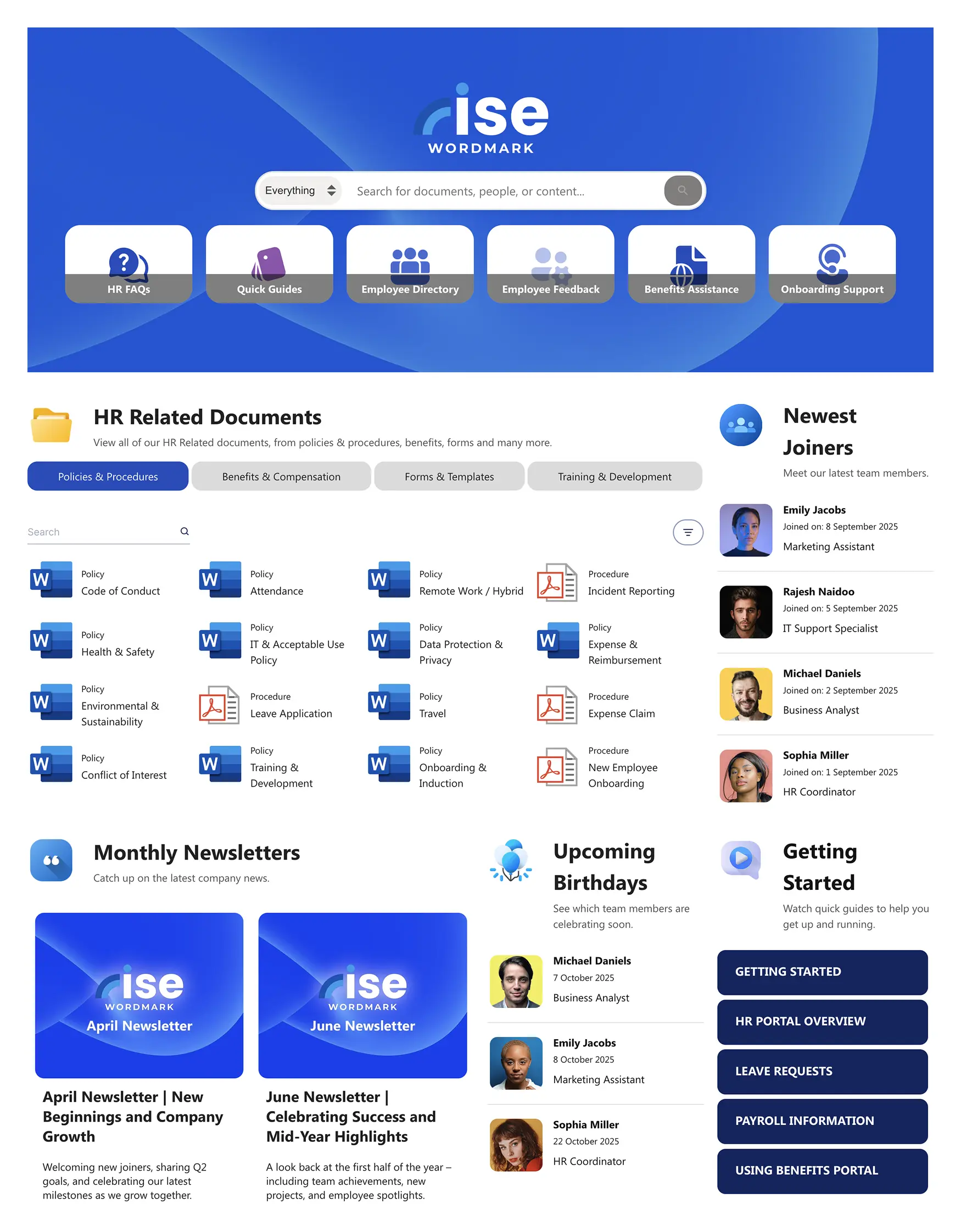
A modern, personalized "front door" for all employees, uniting company news, essential tools, and departmental resources. An HR intranet example built around one principle: everything an employee needs, in one place, from day one.
Key Feature: A personalized hub aggregating company news, quick links to essential tools (payroll, IT), team updates, and an internal job board to support career development.
Best For: Companies wanting a single, unified starting point for all employees.
Employee Benefit: Saves time and reduces frustration — one bookmark to access all critical work systems and information.
Why It Works: Onboarding intranets work when they reduce the cognitive load of being new. A well-designed welcome portal tells a new employee exactly where to go, in what order, and what to expect — without requiring them to chase anyone for answers. The best human resources intranet examples make the first week feel organized rather than overwhelming. That first impression sets the baseline for how the employee uses the intranet from that point forward.
See Example -
HR, Onboarding & Teams
The Welcome Space: New Hire Onboarding
Onboarding Template Preview
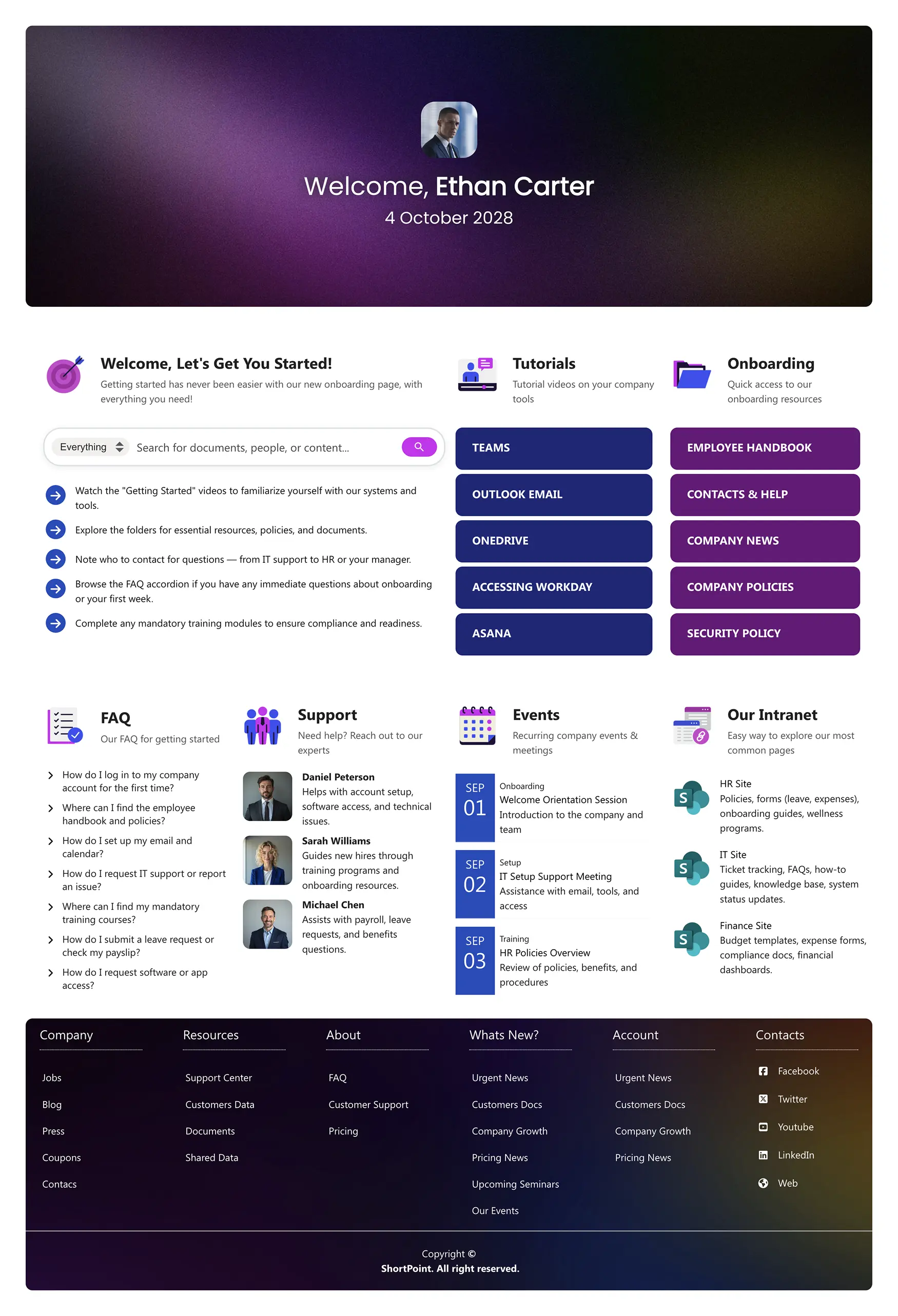
A guided, friendly hub to welcome new hires and manage their first 90-day journey step-by-step. Replaces the email chain of "here are the documents you need" with a single, structured intranet experience.
Key Feature: A "First 90 Days" journey with checklists that introduce culture, key contacts, and required tasks.
Best For: HR teams creating a consistent, engaging, and professional onboarding experience.
Employee Benefit: A clear, organized roadmap for the first weeks, helping new employees feel supported and productive faster.
Why It Works: HR intranet pages with clear structure and consistent design get used; dense, unbranded pages get ignored. The Welcome Space applies the same visual discipline to HR content that consumer apps apply to their products — hierarchy, whitespace, and logical grouping. HR professionals shouldn't have to be designers to produce pages employees trust.
See Example -
HR, Onboarding & Teams
The Welcome Hub: Staff Onboarding Template
Onboarding Template Preview
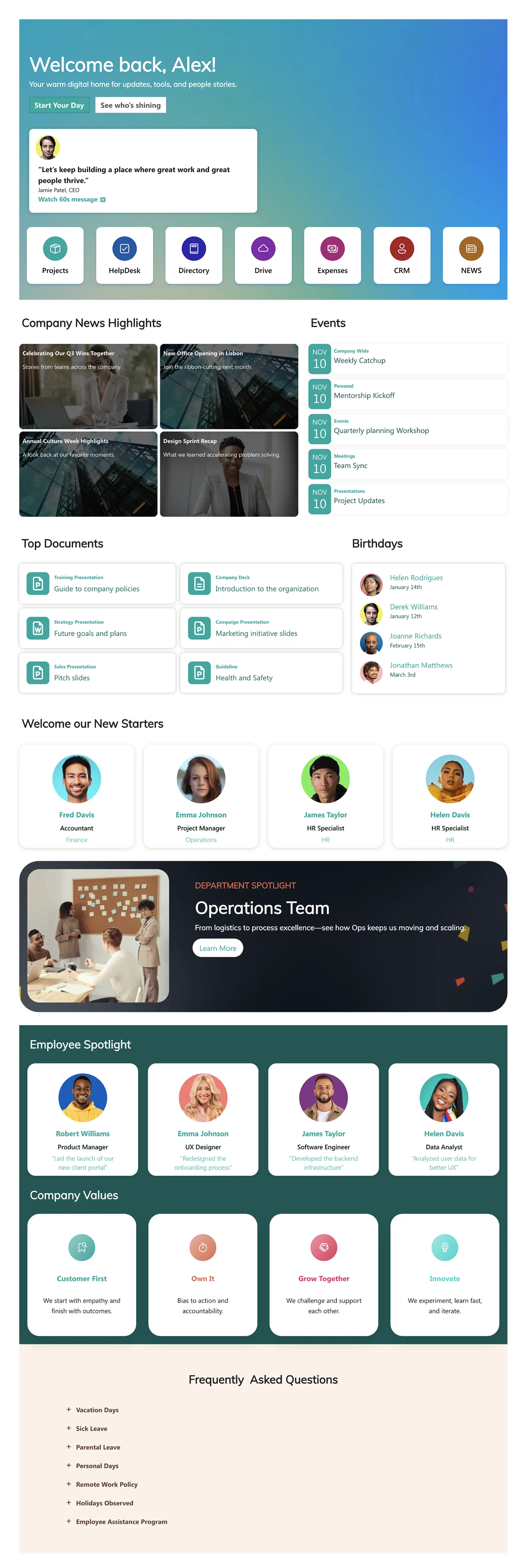
A centralized, engaging welcome hub that transforms a standard SharePoint site into a navigable resource center for every new hire. Consolidates documents, team introductions, and company culture in one place.
Key Feature: A consolidated resource center combining documents, team introductions, and company culture content — all accessible from a single, navigable intranet page.
Best For: Companies that want onboarding to feel intentional and professional, especially for remote or hybrid employees who can't rely on in-person guidance.
Employee Benefit: New hires feel welcomed and oriented immediately — reducing reliance on managers to answer the same setup questions repeatedly.
Why It Works: The Welcome Hub solves the single biggest onboarding failure: fragmentation. When onboarding information is spread across emails, shared drives, and verbal handovers, new hires spend their first week feeling lost rather than productive. A single hub with everything in order turns the first day from anxious to confident.
See Example -
HR, Onboarding & Teams
Onboarding Essentials: Employee Onboarding Template
Onboarding Template Preview
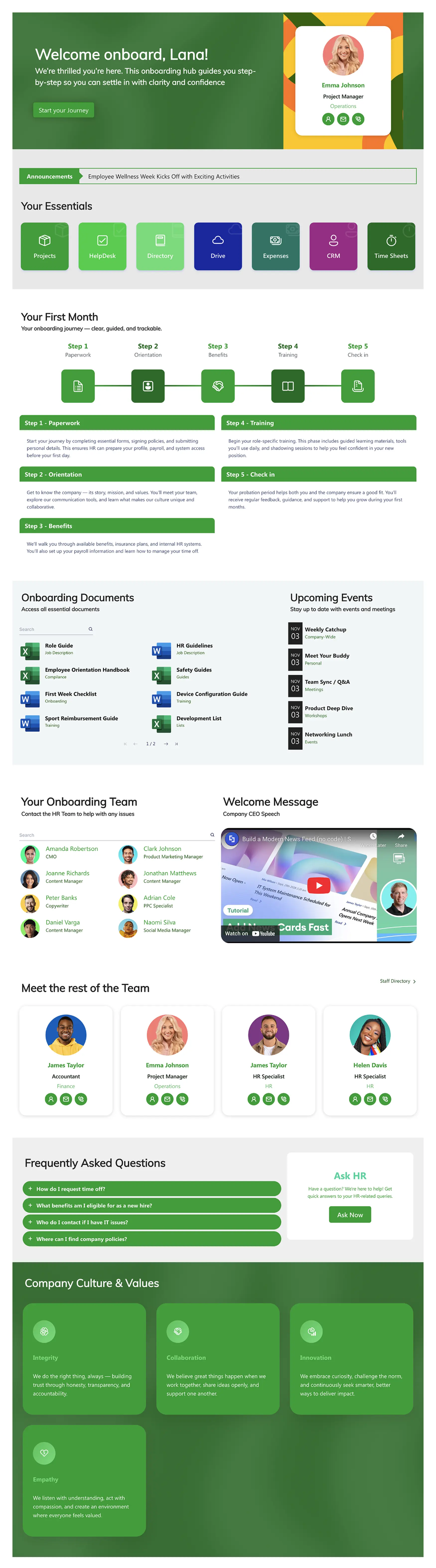
A structured onboarding journey that guides new employees through their first weeks with clarity and purpose. Includes essential resources, training schedules, team introductions, and company culture — all centralized in one intranet hub with live M365 data integration.
Key Feature: Built-in timelines and checklists that break the onboarding process into manageable steps, with live data from Planner, Outlook, and other M365 apps.
Best For: HR teams and SharePoint Admins who want to standardize onboarding across departments and roll it out quickly at scale.
Employee Benefit: Get productive faster — everything is laid out in order, so new employees know exactly what's expected, what they've done, and what's coming next.
Why It Works: Consistency is the thing most onboarding programs lack. When every new hire goes through the same structured experience — regardless of department, location, or start date — the organization gets faster ramp-up times and fewer first-week support escalations. Onboarding Essentials makes consistency the default, not the exception.
See Example -
HR, Onboarding & Teams
HR 12: HR Intranet Page
Onboarding Template Preview
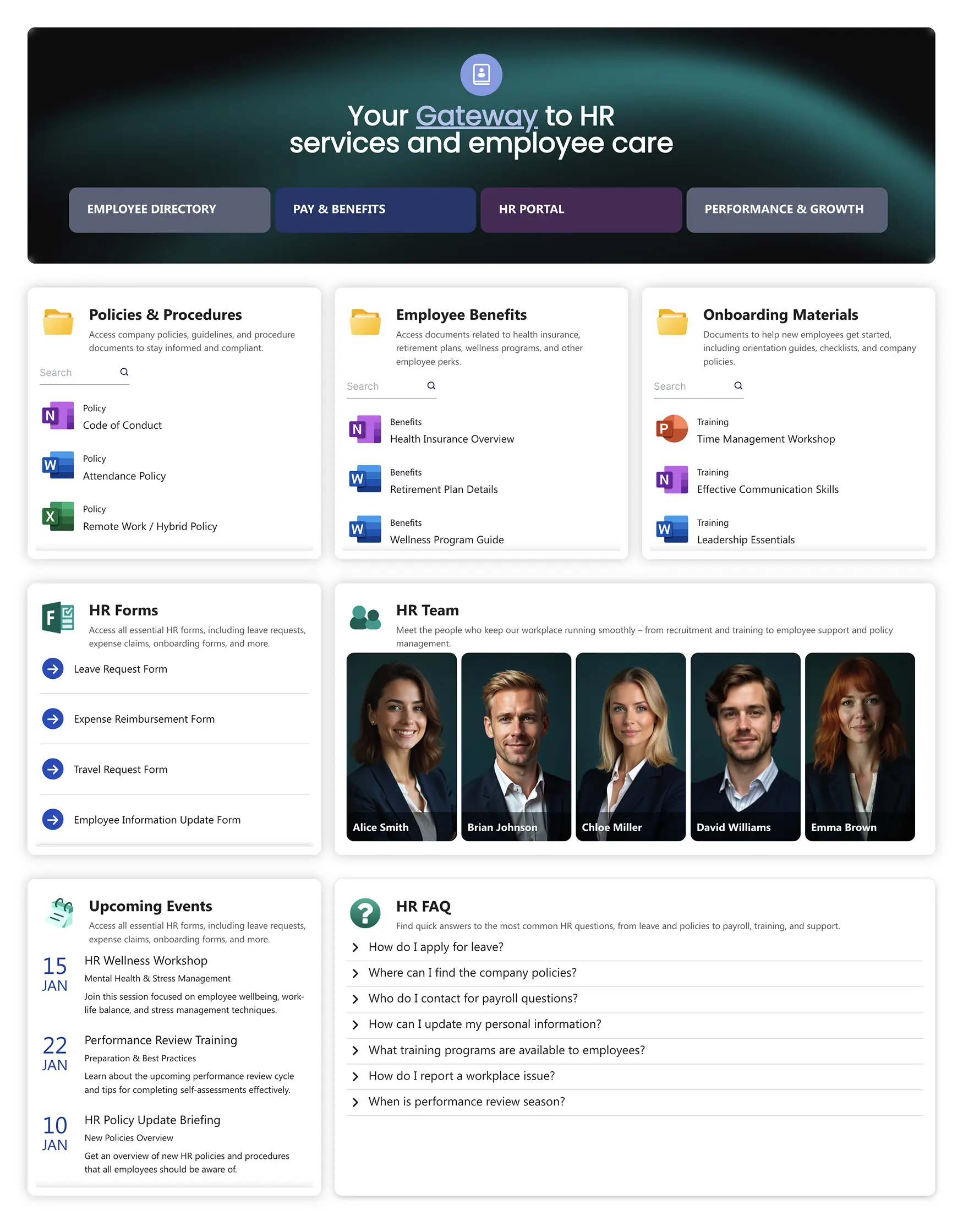
A single, central gateway for all essential employee resources — from payroll to benefits and leave requests. The definitive self-service HR intranet example: one page, every HR link, no hunting required.
Key Feature: A "Getting Things Done" focus, putting tasks and forms at the user's fingertips rather than buried in navigation menus.
Best For: Companies with multiple HR systems that need one page to unite them — reducing the "which URL do I use?" problem.
Employee Benefit: Eliminates the need to remember multiple HR system URLs or search through emails for the right link.
Why It Works: HR 12 solves a problem every multi-system HR team faces: employees don't remember which platform is which. When payroll is in Workday, expenses are in Concur, and holidays are booked in a third system, the cognitive overhead is real. HR 12 functions as a universal remote control — one page that knows where everything is so employees don't have to.
See Example
Document Management Intranet Examples
This category fixes the classic "document dumping ground" problem. These company intranet examples turn chaotic libraries into structured, searchable hubs for forms, policies, and knowledge base articles. For employees, that means faster answers, fewer "where is that file?" messages, and a meaningful boost to intranet adoption.
-
Knowledge Management
Documents 1: SharePoint Document Library Template
Document Hub Preview
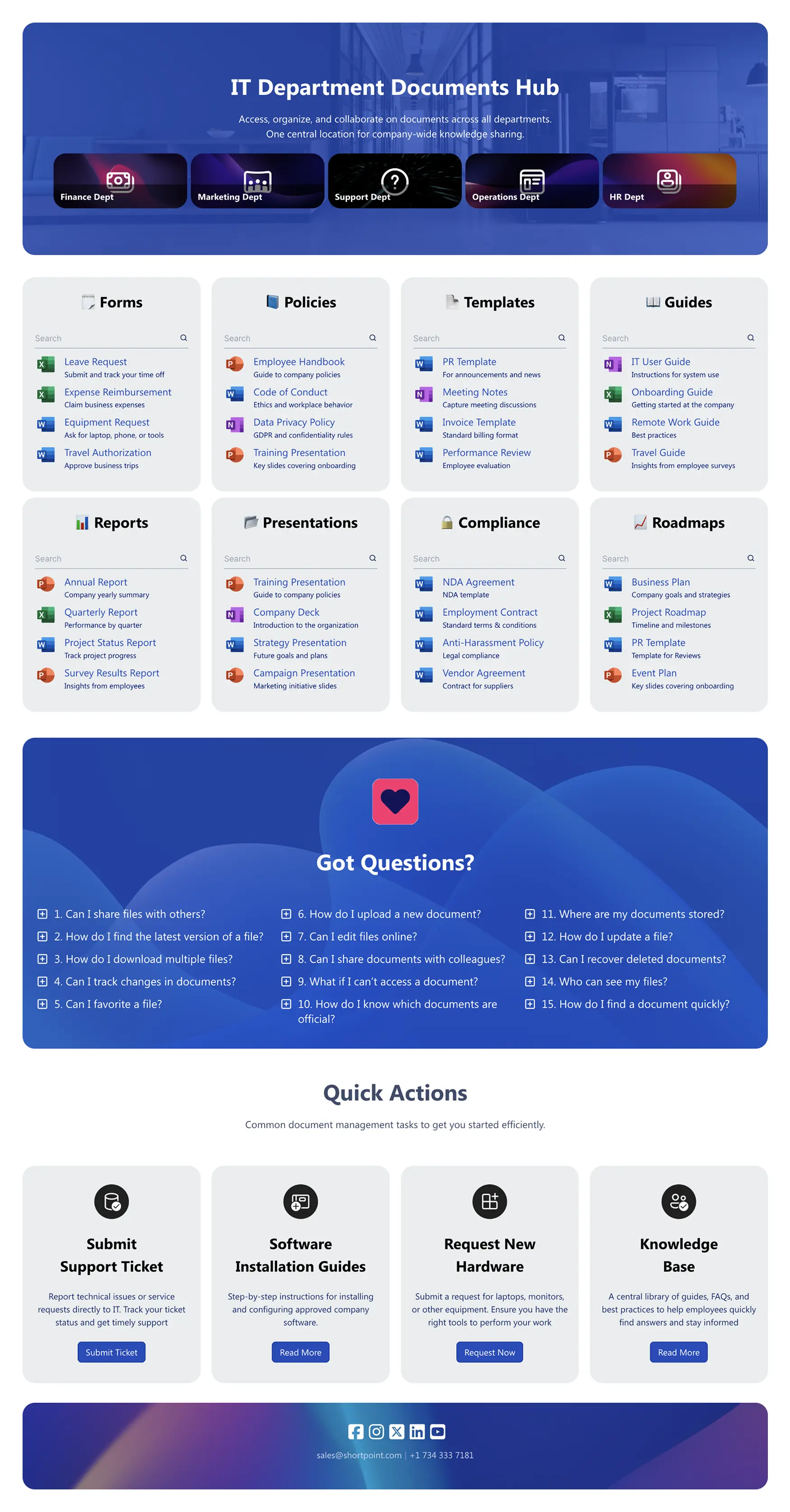
Drives faster document findability with a prominent search bar, smart filters, and clear categories. Built for the organization drowning in a maze of nested folders — turns chaos into a structured, searchable intranet resource.
Key Feature: A hero section with department shortcuts and integrated, filtered search to streamline access across intranet pages.
Best For: Any organization — especially finance, legal, or operations — with large, complex document libraries.
Employee Benefit: Eliminates frustration from searching through endless nested folders.
Why It Works: Document management intranets succeed when they solve findability, not just storage. Most document pages fail because they are organized around how the company thinks about its files rather than how employees search for them. Documents 1 uses metadata-driven navigation and prominent search to make the right document findable in one step — regardless of where it lives in the underlying library structure.
See Example -
Knowledge Management
Documents 2: SharePoint Document Management Template
Document Hub Preview
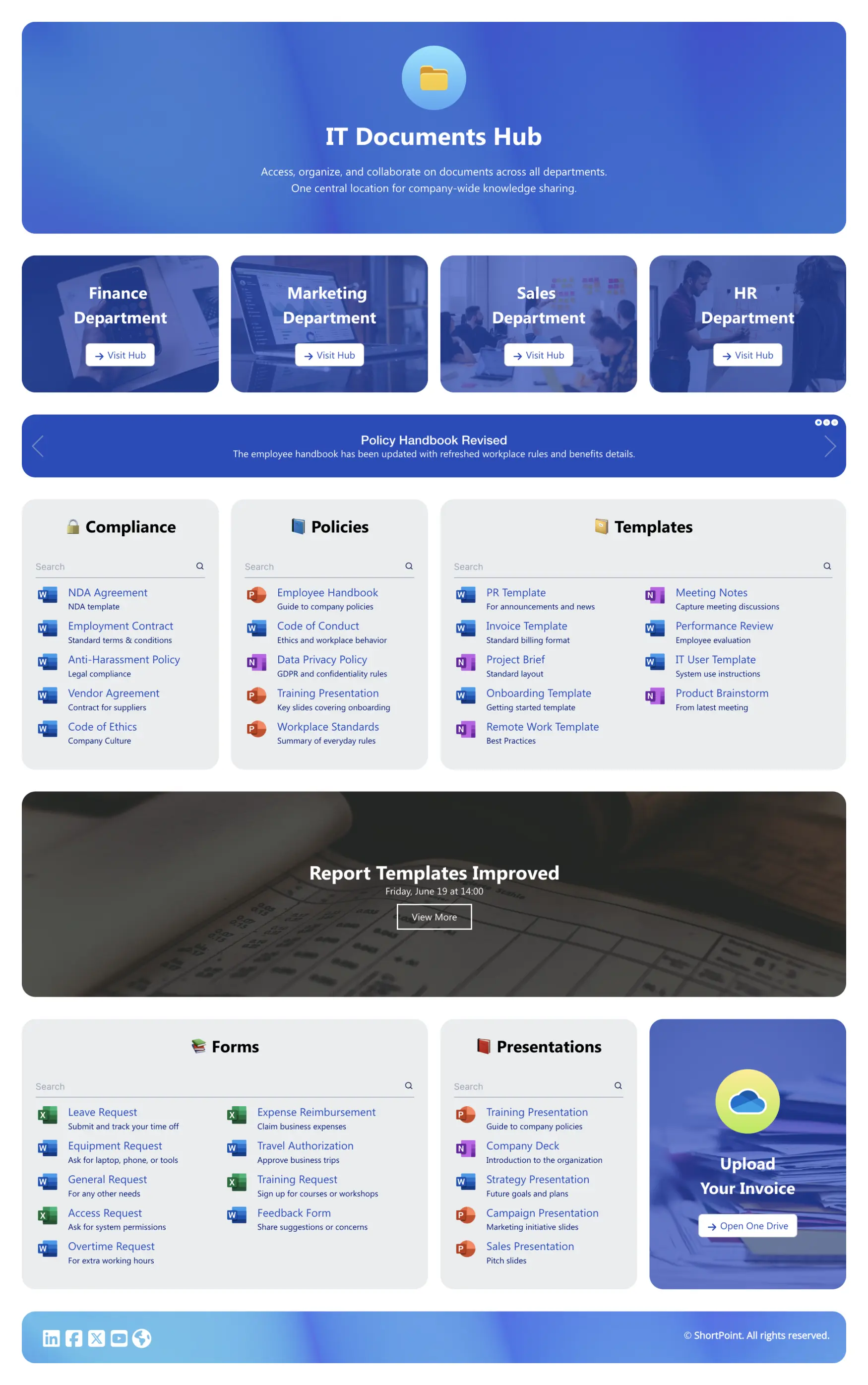
A central document hub with alerts for new and updated policies, search, and quick actions. Designed for compliance-heavy environments where policy changes cannot be missed.
Key Feature: An "alerts" or "newly updated" web part that surfaces critical policy changes automatically.
Best For: Compliance-heavy industries — healthcare, finance, legal — where policy updates are critical and missing one has consequences.
Employee Benefit: Employees never miss critical policy updates that affect their work or benefits.
Why It Works: The biggest failure in document management is not storage — it is awareness. Employees don't know when a policy has changed because nothing tells them. Documents 2 flips this: updated documents surface automatically at the top of the page, so the most important content is also the most visible content. Compliance teams stop sending "please read the updated policy" emails because the intranet handles the communication.
See Example -
Knowledge Management
Knowledge Portal: SharePoint Knowledge Base Template
Document Hub Preview
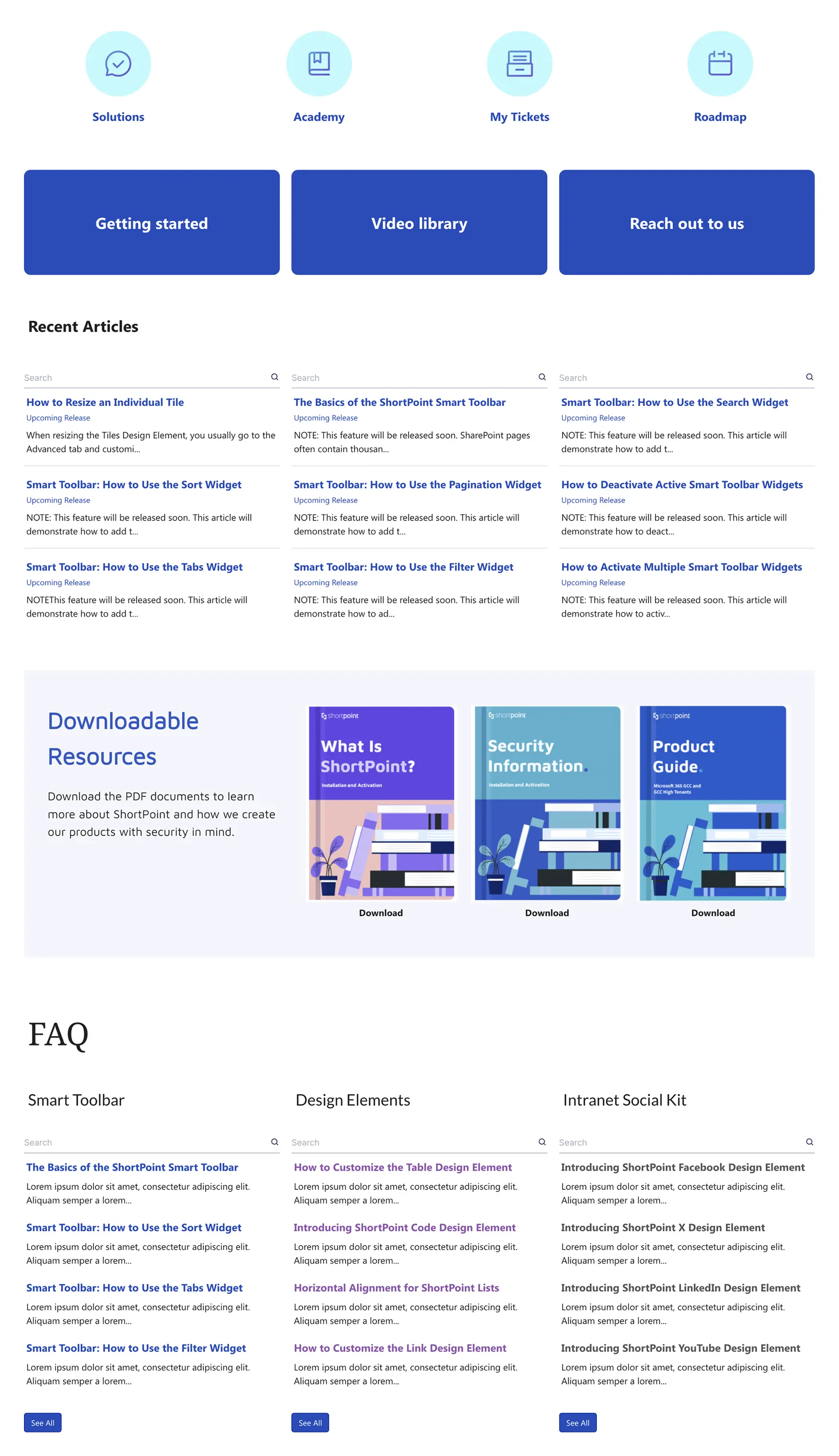
A departmental knowledge base to centralize documents, FAQs, and service updates for any team — IT, Finance, Operations. Turns the IT department's most-asked questions into a self-service resource that works around the clock.
Key Feature: A flexible hub for FAQs, how-to guides, and help resources, organized by topic.
Best For: IT, Finance, or Operations teams that receive a high volume of repetitive support questions.
Employee Benefit: Employees get answers to common questions 24/7 without waiting for a support ticket response.
Why It Works: Every support ticket answered by a knowledge base article is a support ticket that was never opened. The Knowledge Portal template creates a virtuous cycle: employees self-serve, IT and HR teams spend less time on repetitive queries, and the knowledge base improves over time because gaps become visible. The ROI is measurable within weeks of launch.
See Example
Internal Communications Intranet Site Examples
This is how you reduce email noise and build a connected culture. These intranet site examples make company news engaging and give everyone a place to connect, share wins, and stay informed. By consolidating multiple communication channels into a single, cohesive platform, these templates help reduce fragmentation and streamline internal communication.
-
News & Announcements
News Portal 4: Intranet Feed Template
News Portal Preview
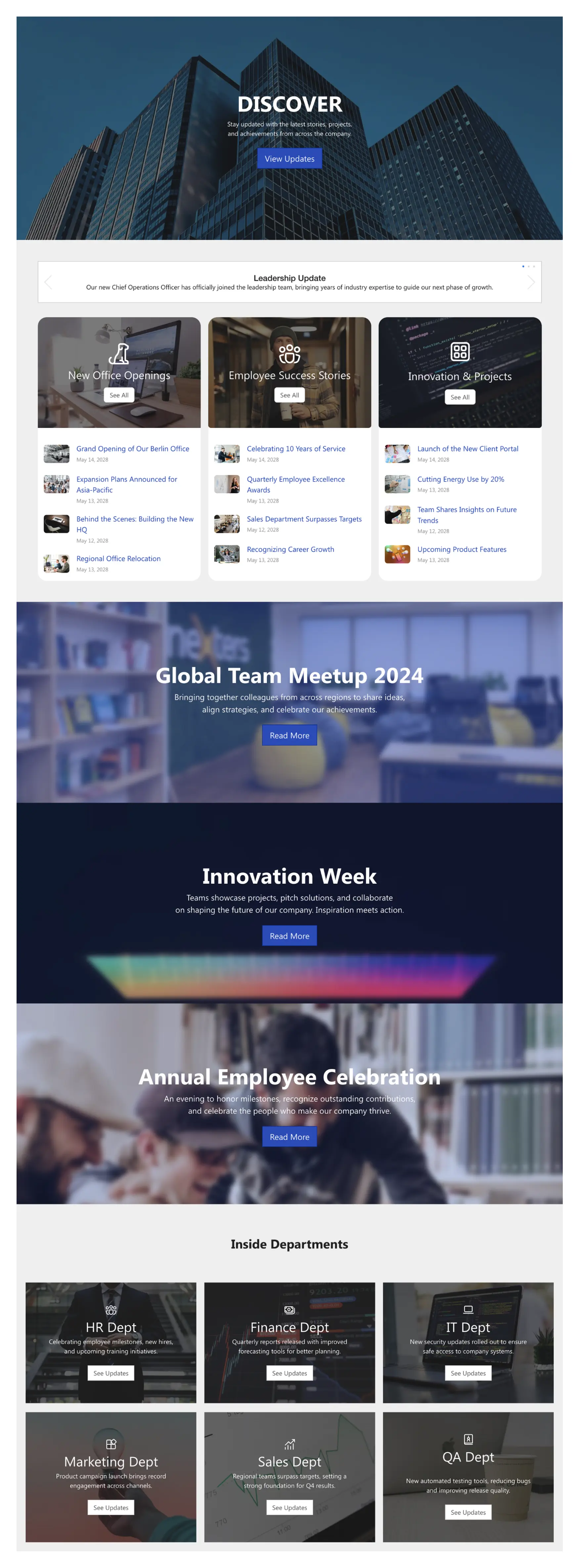
A dynamic company feed for news, upcoming events, and important updates from different departments. Replaces the all-staff email newsletter with an always-current, always-accessible intranet channel.
Key Feature: A multi-stream feed that can be organized by topic — company news, team updates, employee wins — giving employees a personalized view of what matters to them.
Best For: Internal communications teams who want a single, engaging source of truth for all company news.
Employee Benefit: Stay informed without drowning in email newsletters and all-staff messages.
Why It Works: Internal comms pages earn return visits when they feel like a news product, not a bulletin board. News Portal 4 applies editorial design principles — featured story, secondary items, scannable layout — that employees already understand from the news products they use personally. When the intranet looks like something worth reading, employees treat it like something worth reading.
See Example -
Culture & Engagement
Social Layout 2: SharePoint Community Site
News Portal Preview
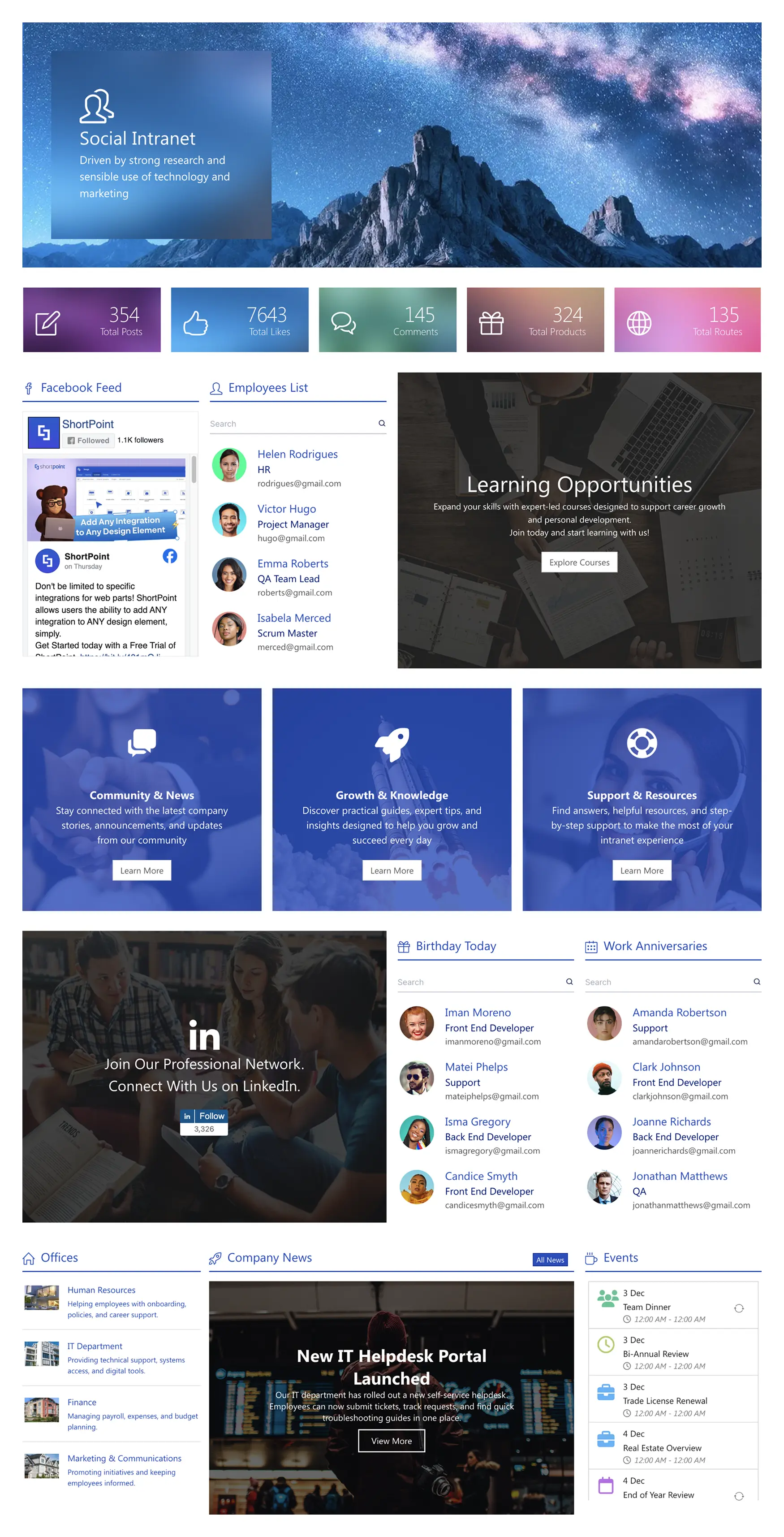
A community hub that features news, learning modules, employee profiles, and social events. Prioritizes peer-to-peer communication and engagement — transforming internal communication into a more interactive, human-centered experience.
Key Feature: Social feeds, employee recognition ("wall of fame"), and event calendars that make the intranet feel like a place where culture lives.
Best For: Companies focused on building a remote or hybrid culture and increasing employee engagement scores.
Employee Benefit: Feel connected to colleagues and company culture — especially important for remote workers who lack in-person touchpoints.
Why It Works: Remote and hybrid employees are at genuine risk of feeling disconnected from the company they work for. Social Layout 2 creates the digital equivalent of the office corridor — a place where informal recognition, shared achievements, and upcoming events make employees feel part of something rather than just completing tasks in isolation.
See Example -
News & Announcements
News Portal 5: Intranet Company News Template
News Portal Preview
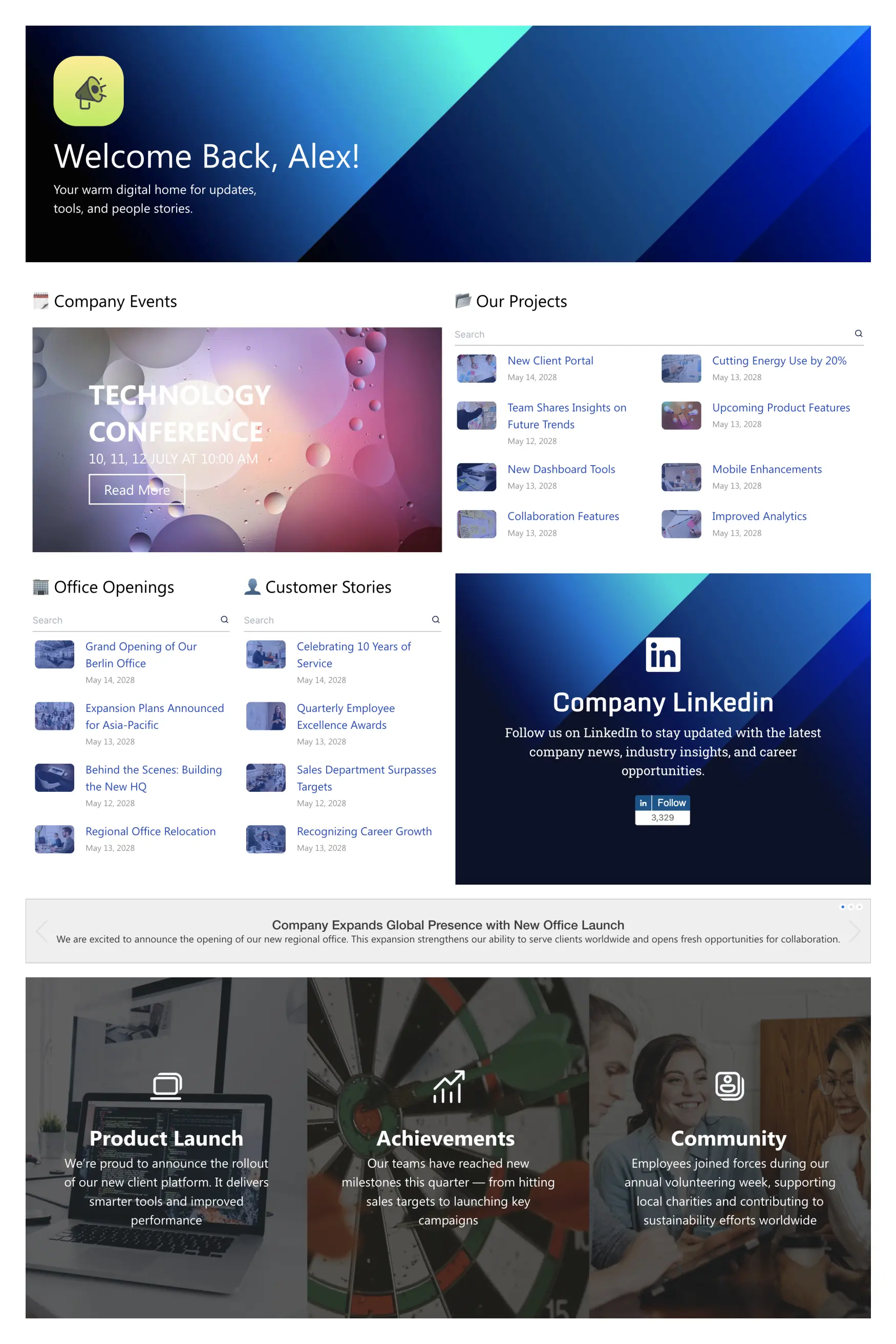
A company news hub designed to showcase events, innovation projects, and employee stories. Built for large organizations that need to align hundreds or thousands of employees on key corporate initiatives.
Key Feature: A large hero banner for major announcements paired with an Innovation Projects section that surfaces strategic work across the organization.
Best For: Large companies aligning employees on key corporate initiatives and major product or strategy launches.
Employee Benefit: Employees understand the bigger picture and see how their work contributes to company goals.
Why It Works: News Portal 5 solves the communication cascade problem at scale. In large organizations, information that matters to everyone — product launches, strategic shifts, leadership changes — often reaches front-line employees last and least clearly. The hero banner and innovation section make priority communication unmissable, so the intranet becomes the reliable place employees go first when something important happens.
See Example
What if You Don't Want to Start From a Template?
Templates are the fastest starting point for most teams — but sometimes the right intranet page is one that doesn't exist in a library yet. That's what ShortPoint AI Designer is built for.
Describe what you need in plain text — your department, your content structure, your brand colors — and AI Designer generates a working SharePoint intranet page layout in minutes. Not a wireframe or a mockup: a real, editable ShortPoint design ready to customize and publish.
For teams that know exactly what they want but don't have the design resources to build it, AI Designer is a third option beyond templates and custom development.
See ShortPoint AI Designer →How to Use Employee Surveys and Feedback to Improve Your Intranet Site
Employee surveys and feedback tools are an important part of a healthy company intranet. They help teams understand whether employees can actually find what they need, how effective internal communications are, and where the digital workplace can improve. Regular pulse surveys, quick feedback forms, and page-level "Was this helpful?" prompts give you real intranet insights — not assumptions.
Adding simple feedback mechanisms also increases intranet engagement. When employees can easily share ideas, highlight issues, or request new content, your intranet evolves around real needs rather than internal assumptions.
How to Build a Company Intranet on SharePoint
When you build a new company intranet, leveraging your existing infrastructure is the fastest and most cost-effective path. Microsoft SharePoint — included in most Microsoft 365 business plans — is already available to the majority of organizations. Here's the approach that works:
- Plan before you build. Decide your primary use cases, site structure, and content ownership before creating a single page. Reorganizing after the fact is expensive.
- Start from a template, not a blank site. The blank canvas is where intranet projects go to stall. ShortPoint templates give you a professional starting point that you customize, not a blank page you design from scratch.
- Build the high-traffic pages first. Homepage, HR portal, document center. These drive 80% of intranet visits. Get these right before building out department sites.
- Measure adoption from day one. Set up page analytics before launch. Traffic, search queries, and feedback data tell you what to improve — and what to stop building.
Need implementation help? See our guide: What to know before hiring a SharePoint consulting company .
Follow Intranet Design Best Practices
The best intranet design examples share common traits: clean visual hierarchy, mobile-first layouts, and personalization. A modern intranet's success is not just about the technology; it's about the design. Today, employees expect digital experiences that are intuitive, mobile-friendly, and personalized, mirroring the quality of the best consumer apps they use every day. Below are the design principles behind every successful intranet site.
1. Design for Personas, Not Org Charts
The fastest way to build an intranet that fails is to design your navigation around your company's internal org chart. Employees don't think in terms of business units; they think in terms of tasks and needs. Create 3-5 simple user personas (e.g., "New Hire," "Frontline Worker," "Team Manager") and design the intranet to solve their specific problems.
2. Embrace Personalization
A one-size-fits-all intranet is a one-size-fits-none intranet. The most critical shift in modern intranet design is the move toward personalization. The platform should dynamically tailor content to each user's role, department, and even location. Modern intranet solutions enable targeted content delivery and advanced personalization, helping organizations boost engagement and relevance for every employee.
3. Prioritize Mobile-First Accessibility
The "digital workplace" is no longer confined to a desk. Your intranet site must be fully functional and easy to use on a mobile device, whether for frontline workers on the go or for employees checking in from home. Ensure the intranet is optimized for mobile devices such as smartphones and tablets to support remote and deskless workers and maximize usability.
4. Avoid "Cognitive Overload"
Many well-intentioned intranets fail because they try to show everything at once, resulting in a cluttered, overwhelming homepage that causes users to abandon the site. A great intranet design uses clear visual hierarchy to guide the user's attention.
Improve Adoption with Intranet Must-Haves
1. A Dynamic Employee Directory
An employee directory is consistently one of the top three most-used resources on any intranet. Employees need to find colleagues, put a face to a name, and understand the organizational structure. Analyzing the needs and behaviors of intranet users helps organizations improve adoption by ensuring the directory and other features align with what employees are actually searching for.
2. Quick Links & App Launcher
Your intranet homepage should serve as the central "gateway" to your digital ecosystem. By providing a prominent "Quick Links" section with clear icons for the most-used applications, you train employees to start their day on the intranet.
3. Targeted News & Events
To solve the relevance problem, news and events must be targeted. A modern company intranet allows you to target content to different employee groups based on their location, role, or department.
4. Employee Recognition & Social Tools
To move from a "top-down" noticeboard to a true "bottom-up" community, you must give employees a voice. Features that allow for employee recognition and celebrating achievements are critical for building culture. Measuring how employees interact with intranet pages — using analytics and feedback — can inform improvements and ensure these tools are engaging and effective.
5. A Powerful, Unified Search
There is nothing more frustrating for an employee than searching for a form or policy and not finding it. A robust, "smart" search function is non-negotiable.
By focusing on these must-have features and continuously analyzing how intranet users engage with the platform, organizations can drive increased employee engagement and ensure their intranet site becomes an essential part of the digital workplace.
How to Choose the Right Corporate Intranet Platform (Build vs Buy)
When evaluating corporate intranet platforms, it's important to consider the different types of intranet solutions available and how they impact user experience and employee engagement. Effective intranet software can enhance information architecture, boost adoption, and provide real value to employees:
| Platform Type | Best For | Key Tradeoff |
|---|---|---|
| Native (Microsoft 365) | M365-committed organizations with technical resources | Included with license but requires technical expertise |
| Standalone SaaS | Quick deployment, simple needs | Fast to deploy but creates digital silos |
| Enhancement Layer | M365 users wanting design flexibility | Best of both worlds: M365 integration + modern design |
How Real Companies Use ShortPoint to Transform Their Intranets
World Acceptance Corp
Challenge: Clunky SharePoint taking 6-12 months to build
Solution: Used ShortPoint for modern design
Result: Launched in 1.5 weeks (90% faster)
BCN
Challenge: No developer resources
Solution: Empowered team with no-code tools
Result: Saved $100,000+ in development
Dubai Silicon Oasis
Challenge: Outdated, not mobile-friendly
Solution: Built responsive portal
Result: 70% increase in adoption
Frequently Asked Questions
A company intranet is a private internal website accessible only to employees — typically through a company login or VPN. Modern intranets go beyond simple document storage: they serve as the central digital workplace where employees access company news, HR resources, IT tools, team collaboration spaces, and internal communications from a single starting point. Most are built on Microsoft SharePoint or standalone platforms such as Workvivo or Staffbase.
Every company intranet should include: a personalized homepage that surfaces relevant news and quick links, an HR portal covering benefits, policies, and onboarding, department sites for team-specific tools and documents, a searchable knowledge base, a news and communications hub, and a document center for forms, templates, and policies. The most effective intranets also include a people directory and a mobile-optimized experience for deskless and remote workers.
The best intranet homepages have three things: personalization (the employee's name, their team's news, their most-used tools), self-service quick links positioned near the top of the page, and a design that works on mobile. Eighty percent of intranet page visits go to the homepage — which means it needs to function as a universal starting point, not a placeholder. Intranet homepage examples that drive daily return visits all prioritize findability over comprehensiveness.
The fastest way to build a company intranet is to start from a professionally designed template rather than a blank SharePoint site. Choose a platform (Microsoft SharePoint is the most widely deployed), select a template that matches your primary use case — homepage, HR portal, document center — and customize it to your brand. ShortPoint's no-code design layer adds professional templates and an AI Designer to existing SharePoint environments, reducing a typical intranet build from months to weeks.
The best HR intranet examples share a common structure: clear self-service navigation to benefits, payroll, policies, and onboarding; a searchable document library; a pay and holiday calendar; and a feedback mechanism so the page evolves with employee needs. HR intranet pages with attractive, consistent design are used significantly more than plain, unbranded alternatives — because employees trust well-designed pages more and are more likely to bookmark them as a daily resource.
Next Steps
Ready to build a company intranet employees actually use? ShortPoint gives you 200+ professionally designed intranet templates for SharePoint — or use AI Designer to generate a custom page layout from a plain-text description. No developer required.

Luisa Silva
Growth Manager, ShortPoint
Luisa is the Growth Manager at ShortPoint. She translates customer insights and ShortPoint solutions into practical, no-code guides for SharePoint and Microsoft 365 intranets. Focusing on intranet design, HR, knowledge hubs, and internal comms, her work is all about helping you achieve faster launches and higher adoption rates.
Ignite your vision. Install ShortPoint directly on your site, or play in sandbox mode. No credit card required.