Best SharePoint Templates in 2026: 11 Intranet Examples With Live Demos
Unlock the full potential of your SharePoint environment. This guide covers the 11 best SharePoint template examples for 2026 — each with a live demo — plus strategic insights on building a digital workplace employees actually want to use.
Looking for template examples?
Browse our gallery of 250+
SharePoint templates
with live demos!
By Luisa Silva, Growth Manager at ShortPoint • Last Updated: June 17, 2026 • 10 min read
Introduction
Finding the right SharePoint template can be the difference between an intranet people rely on every day and one that collects dust. This guide isn't a catalog — it's an editor's pick of 11 standout intranet designs for 2026, plus the strategic framework you need to choose the right starting point for your organization.
Whether you're browsing free designs from the Microsoft Lookbook, looking for SharePoint design ideas to refresh an outdated site, or planning a full intranet overhaul, we'll break down what works, where standard SharePoint site templates fall short, and how to build branded pages without writing code.
The bar has risen. Microsoft's continued investment in SharePoint Online and AI experiences means employees now expect consumer-grade intranet design — fast, polished, and personalized. Page layouts that looked modern in 2024 may already feel dated, and a poorly designed intranet is not just an aesthetic problem; it's a productivity and adoption problem.
In 2026, the next wave is also clear: teams want an AI intranet workflow — where you can generate pages faster, iterate without IT bottlenecks, and keep content structured and discoverable. That's where ShortPoint AI Designer — now live — fits in as an AI-powered intranet page builder for SharePoint: generate full pages from a prompt, refine them through conversation, and update specific sections without rebuilding layouts.
What Are SharePoint Page Templates? (OOTB vs. Custom in 2026)
A SharePoint template is a pre-built framework for a page or site that defines layout, features, and structure — giving teams a consistent, rapid starting point for building. Microsoft offers various site and page designs for common uses, from team sites to communication hubs.
The most common mistake? Viewing a template as a finished product instead of a starting point. While a template gets you roughly 60% of the way there, the remaining 40% — customization, branding, integration, and user experience refinement — is what drives adoption and ROI. Relying solely on basic Microsoft designs often results in a "sea of sameness" and low engagement, because every site looks the same and lacks the personality and functionality teams need.
Out-of-the-Box vs. Custom Templates
Your first decision is between out-of-the-box (OOTB) designs and custom ones.
OOTB Templates
Like those in the SharePoint Look Book, are great for rapid, simple deployments.
Pros:
- No additional cost
- Easy to apply
- Supported by Microsoft
Cons:
- Limited design flexibility
- Minimal branding options
- May not fit complex business processes
Custom Templates
Built from scratch or with advanced frameworks like SPFx for exact specifications.
Pros:
- Complete design control
- Tailored to your workflows
- Reflects your unique corporate brand
Cons:
- Requires significant developer resources
- Longer development time
- Higher initial cost and ongoing maintenance
Both approaches are designed to deliver a structured intranet experience, ensuring information is organized and easy to navigate.
Fortunately, you don't have to choose between rigid solutions and costly development. A third option exists: using a design platform such as ShortPoint to enhance OOTB designs without writing a single line of code — and to move faster with an AI-assisted workflow powered by ShortPoint AI Designer, now live.
SharePoint Site Templates vs. SharePoint Page Templates: A Critical Distinction
Understanding the difference between site templates and page templates is key to effective governance and design.
Site templates are blueprints for an entire site, including homepage, lists, libraries, structure, and navigation (e.g., "Team Site" or "Communication Site").
Page templates are layouts for a single page within a site (e.g., a "Project Update" page template for consistent updates).
Strategically using both is key: use SharePoint communication site templates for main hubs and departmental pages, then empower content creators with well-designed page templates for consistency. It's a "both/and" approach for a well-managed intranet.
How to Choose the Right SharePoint Template
Choosing the right SharePoint template is a foundational step in building an intranet that truly serves your organization's needs. With a wide array of options available, it's essential to start by clarifying the primary purpose of your pages.
Are you looking to share company news and updates? A communications-focused layout is ideal for broadcasting announcements, events, and leadership messages. If your goal is to support onboarding, an employee onboarding template provides the structure new hires need.
Think about the type of content you'll be sharing — news, resources, forms, or project updates — and how users will interact with the pages. Intranet designs can be tailored to match your company's brand, creating a consistent and professional look across all pages. This not only reinforces your brand identity but also makes navigation intuitive for users.
A Simple Decision Framework
Before you pick a design, answer four questions:
- Audience. Who is this page for — all employees, a specific department, new hires, leadership?
- Primary action. What should the visitor do after landing on the page — read news, find a document, complete onboarding, contact someone?
- Content cadence. Is the content evergreen, weekly, or daily?
- Governance owner. Who keeps the page accurate, and how often will they update it?
If you can't answer all four cleanly, the template won't save you — pick the page purpose first, then the design.
Why Your SharePoint Intranet Design Matters More Than Ever
Strategic use of intranet designs goes far beyond launching a page — it's about building a digital workplace that empowers your people and accelerates your business. Thoughtfully designed page layouts create a unified, professional intranet that's easy to navigate and supports seamless communication.
Modern intranet designs help establish a strong brand presence internally, ensuring every page reflects your company's identity. This consistency is crucial for building trust and making your intranet the go-to destination employees visit each day.
Boosting Employee Engagement and Adoption
An unusable, unappealing, or irrelevant intranet will be ignored, hindering engagement and profitability. Strategic page layouts help by:
- Creating a consumer-grade experience. Employees gravitate toward intranets that feel as polished and easy to use as their favorite personal apps.
- Delivering personalized, relevant content. Site pages can surface information relevant to a user's role, department, or location, making the intranet an indispensable resource.
Cool SharePoint site designs inspire employees and transform static intranets into dynamic, interactive hubs. They're the perfect space to launch initiatives and keep everyone aligned with company updates.
Ensuring Brand Consistency and Governance
Your intranet is a powerful internal branding tool that should reflect your company. Uncontrolled departmental site creation leads to chaos and diluted brand identity. Pre-built designs are your first line of defense for governance:
- Brand enforcement. Pre-configured layouts ensure new sites automatically include your logo, colors, and fonts, creating a cohesive digital environment. Want full control? Explore the ShortPoint Theme Builder — a powerful tool to design, customize, and enforce brand consistency across all your SharePoint sites.
- Content structure. Defining layout and web parts in a template guides content creators to standardize information, improving quality and predictability.
Accelerating Deployment and Reducing IT Overhead
For IT leaders, constant "build me a site" requests are a bottleneck. A robust library of pre-approved, feature-rich designs empowers departments to self-serve, drastically reducing IT burden.
- Faster time-to-value. A Project Manager can spin up a project site from a template in minutes, complete with pre-configured document libraries, task lists, and Teams integration.
- Reduced support tickets. Intuitive, well-designed sites lead to fewer "how-to" questions. Standardizing with templates makes support teams experts on fewer configurations.
Investing in a strategic template library pays exponential dividends in saved IT hours and accelerated business agility.

ShortPoint: From Months to Weeks for Intranet Deployment
3 Months
Traditional Build
2 Weeks
With ShortPoint
From vision to launch in a fraction of the time—ShortPoint empowers any team to create beautiful, branded intranet experiences without writing a single line of code.
Small Businesses
Quick to launch, easy to maintain
Mid-sized Teams
More complexity, more collaboration
Enterprises
Fully governed, highly scalable
11 Best SharePoint Template Examples (With Live Demos)
Below are 11 standout intranet designs for 2026. The first five get a deep editorial breakdown — what works, who it's for, and how to extend it. The remaining six are quick picks worth knowing, each linked to its full preview in our intranet template gallery.
Editor's Picks: 5 Designs Worth a Deep Look
1. SharePoint Employee Onboarding Template
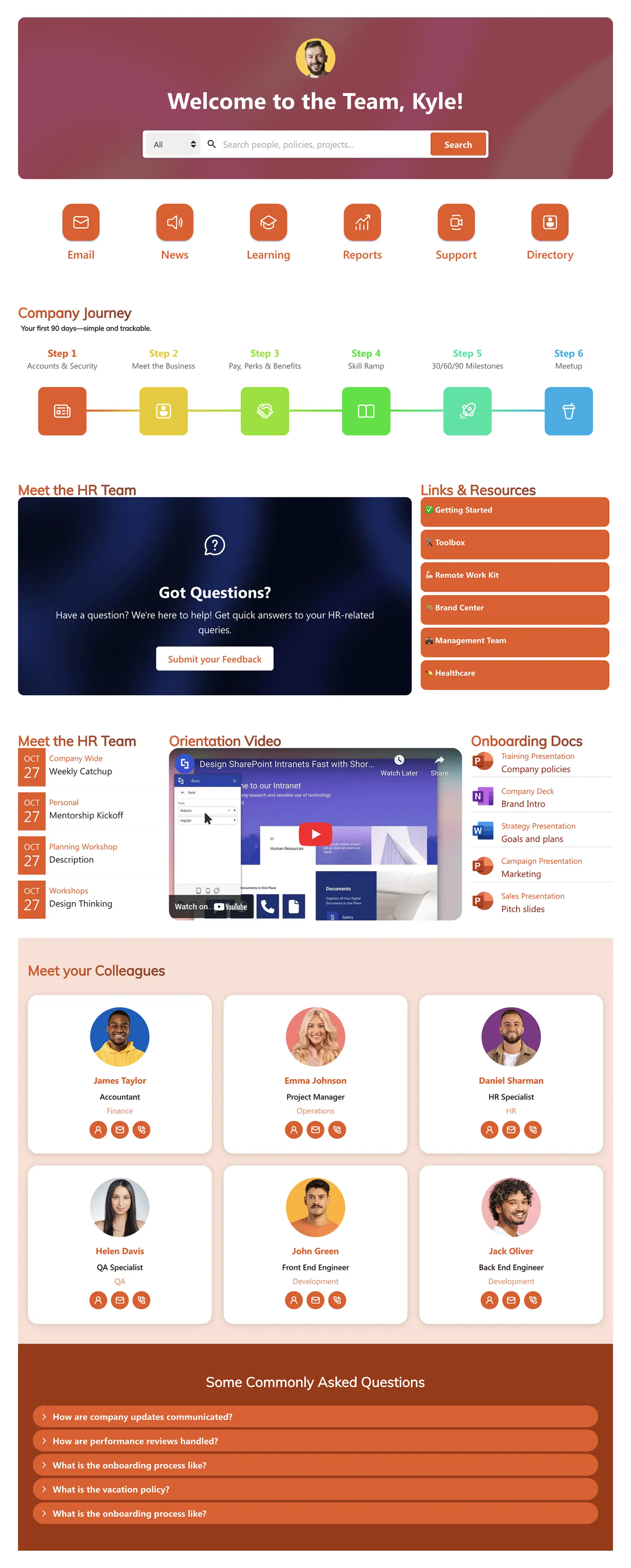
Why it wins: Onboarding is where most intranets quietly fail — content is scattered across email, Teams, HR portals, and shared drives, and new hires spend their first week hunting instead of contributing. This design fixes that by giving HR a single hub where roadmaps, team contacts, documents, and resources live in one navigable layout.
Best for: HR teams supporting 5+ new hires per quarter, distributed companies, and anyone whose current onboarding is "we'll send you a Word doc."
Common pitfall to avoid: Treating it as a one-time setup. The strongest onboarding hubs are versioned by role (Sales Day 1 ≠ Engineering Day 1) and updated quarterly as the company evolves.
Improve with ShortPoint AI Designer: Generate a complete onboarding hub from a prompt ("Build a new hire portal with checklist + Week 1 schedule + key contacts"), refine it through follow-up edits ("add a Day 1 section"), and update only specific parts using element-level targeting.
View Template →2. SharePoint Intranet Homepage Template
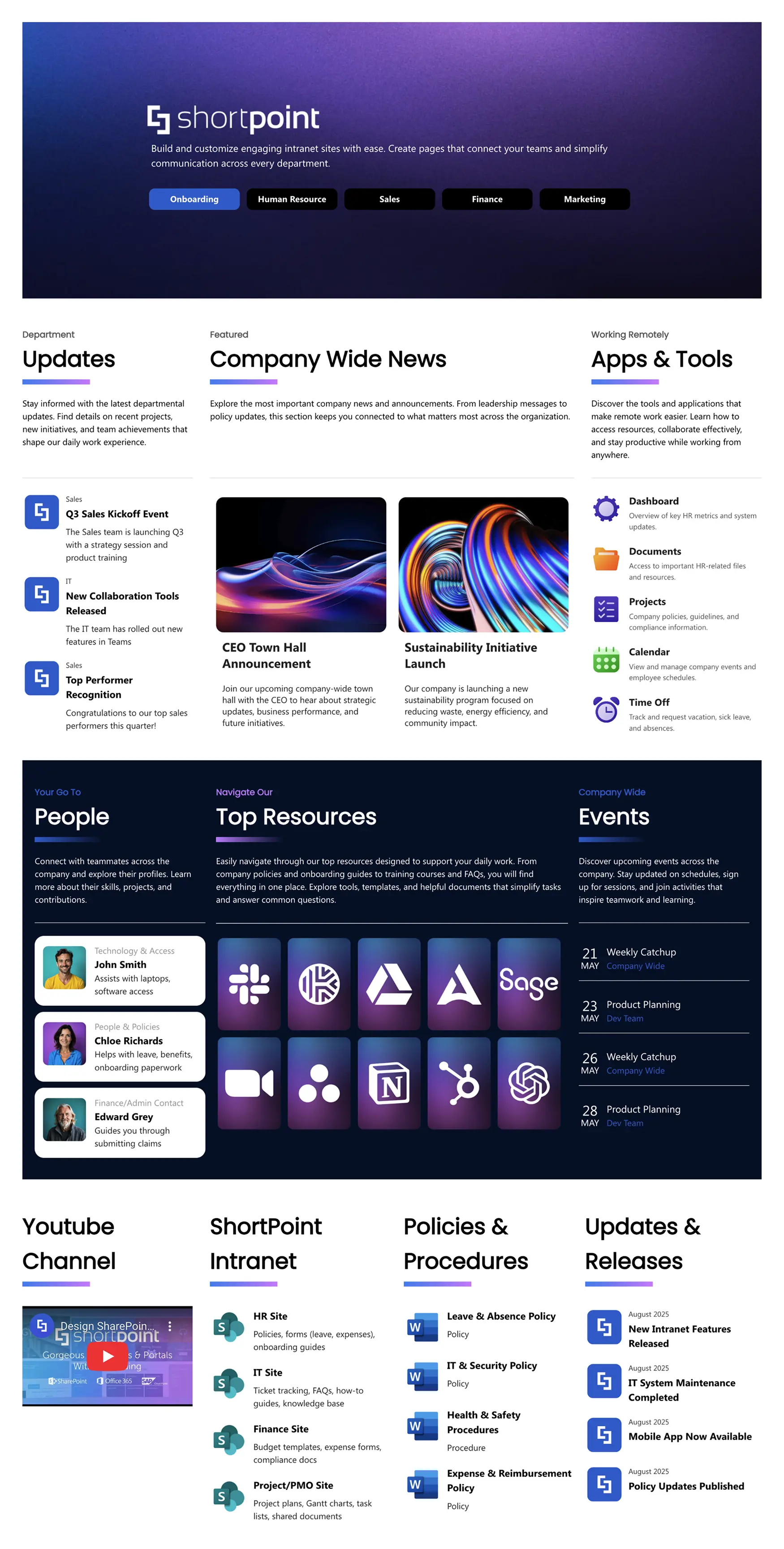
Why it wins: The homepage is the most expensive page on your intranet. If it loads slow, looks dated, or buries the news, employees stop coming back — and recovering that habit takes months. This design solves the homepage's hardest problem: balancing news, tools, people, and events without becoming visually noisy.
Best for: Companies with 200+ employees, hybrid teams that need fast access to apps, and any intranet where the current homepage is "a list of links."
Common pitfall to avoid: Trying to put everything above the fold. The best homepages are ruthless about hierarchy — one hero, one news stream, one events panel, then everything else.
Improve with ShortPoint AI Designer: Use an AI intranet workflow to generate a homepage structure from a prompt ("Create a homepage with department tabs + news + events + top tools"), then add interactivity like filtering, sorting, tabs, and pagination to keep the experience clean and searchable.
View Template →3. SharePoint HR Template
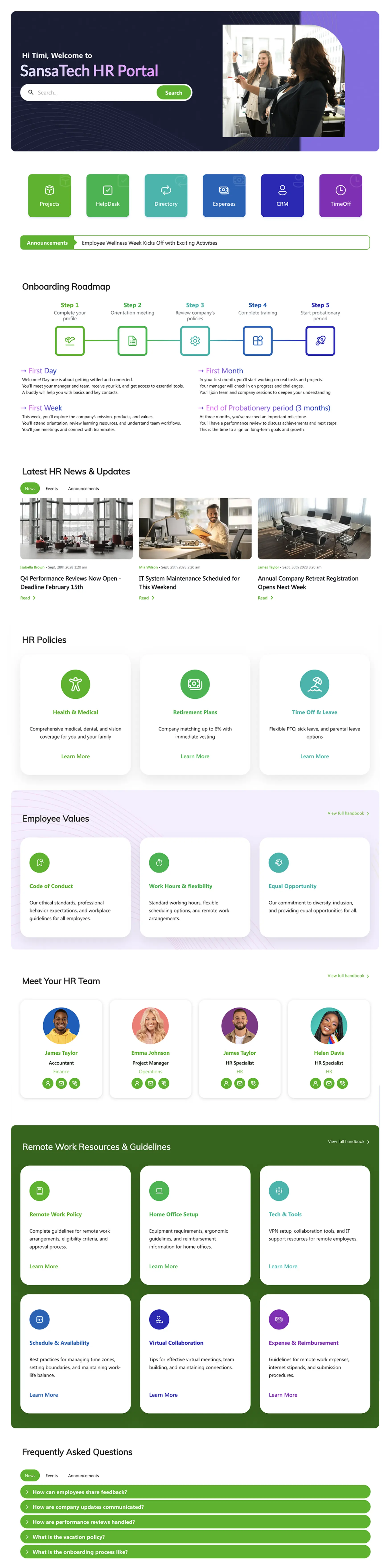
Why it wins: HR pages tend to fragment over time — policies in one place, benefits in another, the directory somewhere else. This design unifies them into a single all-in-one hub: visual onboarding roadmap, policy sections, HR team directory, and remote-work resources, all under one consistent navigation.
Best for: HR teams that field repeat questions, mid-size companies (100–1000 employees) where policies change often, and any organization where HR is currently operating across three+ tools.
Common pitfall to avoid: Letting the page become a document dump. The best HR hubs surface the answers (FAQs, quick links) above the documents themselves.
Improve with ShortPoint AI Designer: Generate new sections from a prompt ("Add a Benefits hub with FAQ + quick links"), refine the copy and layout through conversation, and apply on-brand updates automatically using Theme Builder settings.
View Template →4. SharePoint Document Library Template
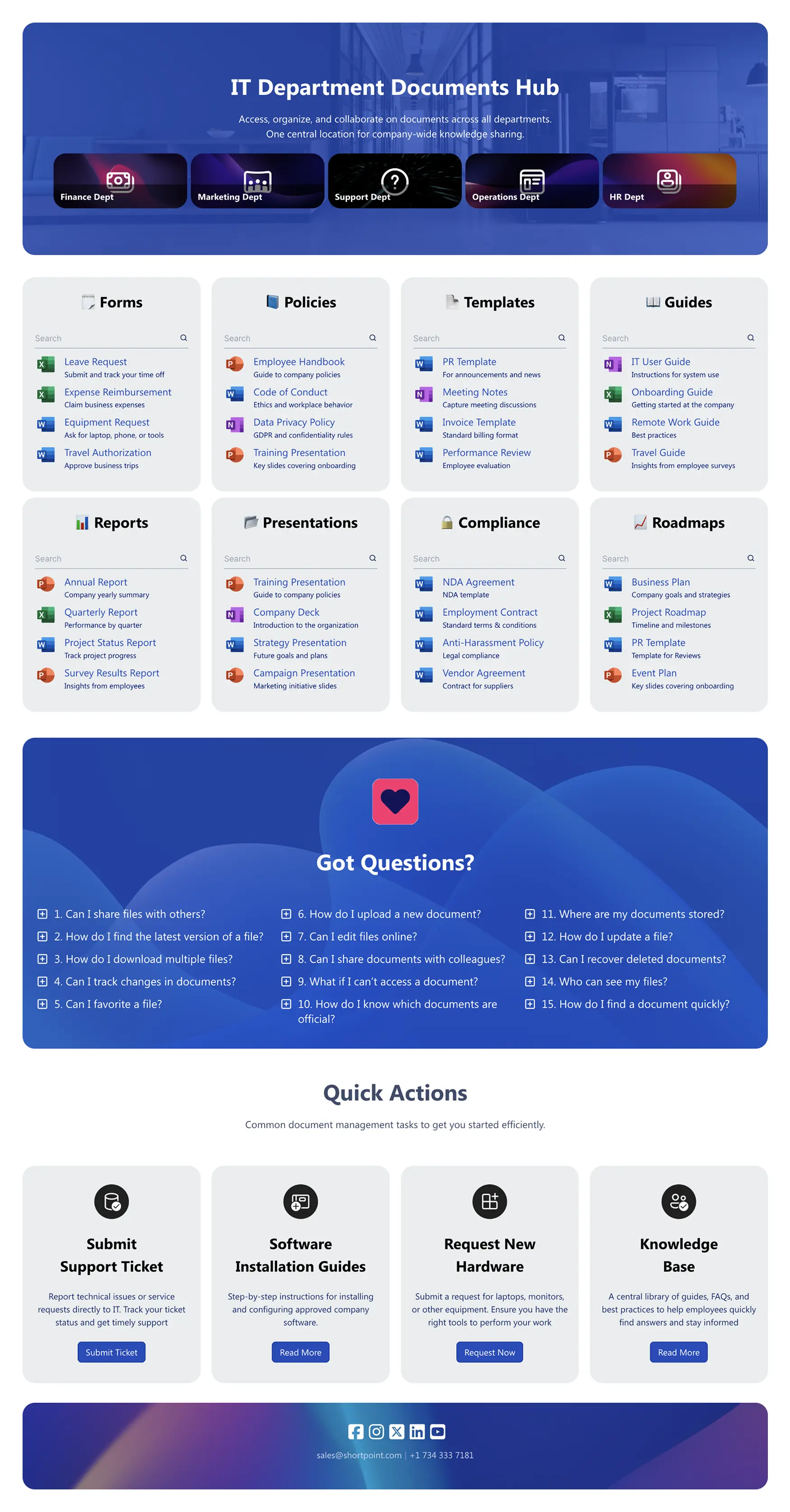
Why it wins: "I can't find the document" is the most common intranet complaint, and standard SharePoint document libraries don't help — they show folders, not answers. This design wraps the library in a discoverability layer: search, filters, categories, department shortcuts, and Quick Actions for the tasks employees actually do.
Best for: Teams managing forms, policies, templates, guides, and compliance documents at scale. Especially valuable for legal, finance, and operations.
Common pitfall to avoid: Adding categories without retiring old ones. Document hubs decay fast — schedule a quarterly cleanup or you'll be back to "I can't find it" within a year.
Improve with ShortPoint AI Designer: Turn a messy library into a clean, structured page by prompting the AI to create categories, tabs, and quick actions — then add SmartToolbar patterns like search, filtering, sorting, and pagination so employees can find documents without digging through folders.
View Template →5. SharePoint Knowledge Base Template
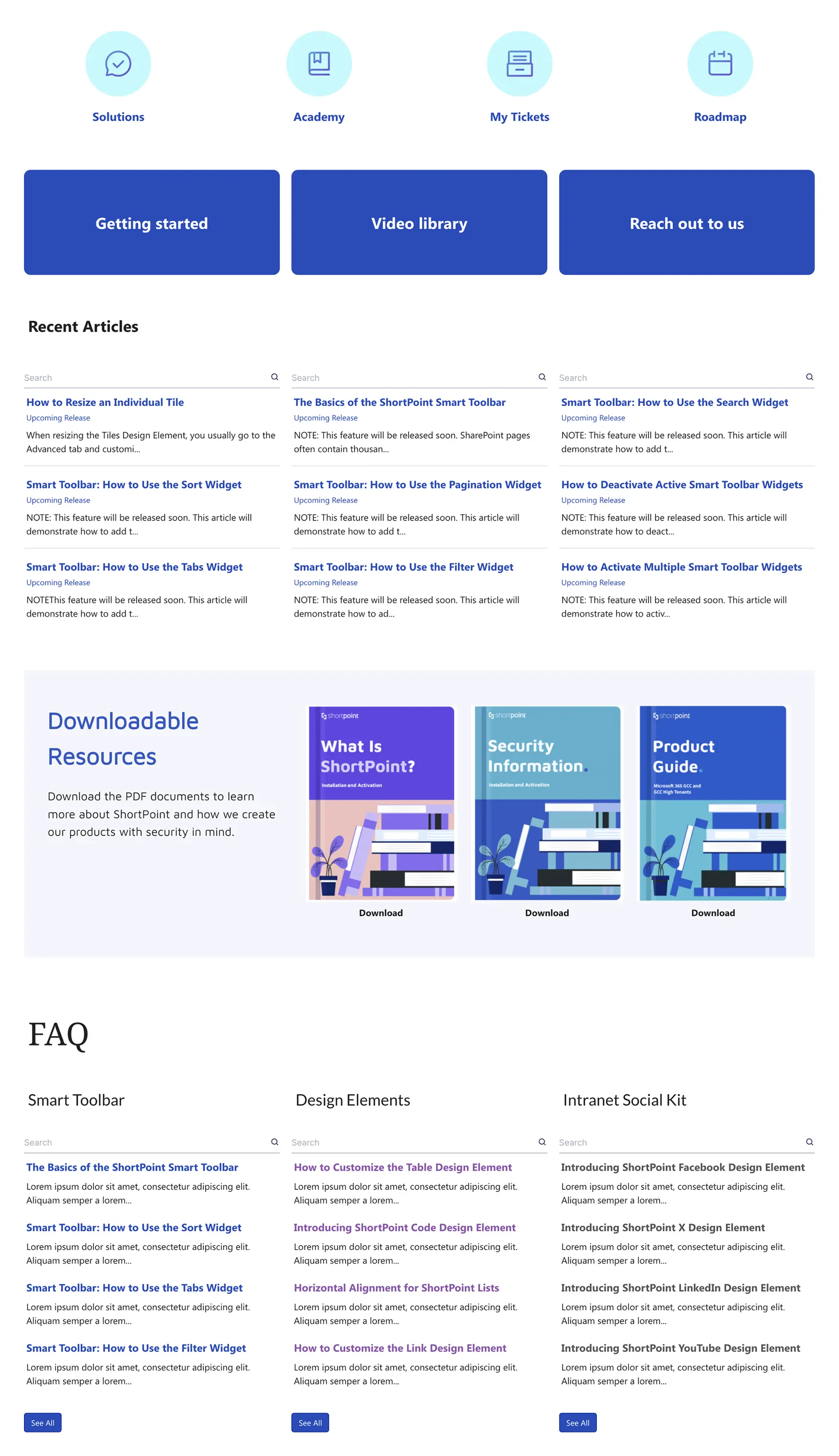
Why it wins: A knowledge base is only as good as its first 10 seconds — if a user can't find their answer fast, they ask in Slack instead, and the knowledge stays trapped in DMs. This design optimizes for speed: structured categories, FAQ patterns, escalation links, and a layout that works on any device.
Best for: IT support teams, Customer Success operations, internal product teams, and any organization where the same questions get asked weekly.
Common pitfall to avoid: Writing for the expert, not the asker. Effective knowledge bases mirror how employees actually phrase the question — not how the documentation team thinks about it.
Improve with ShortPoint AI Designer: Use an AI workflow to generate a complete knowledge base structure from a prompt ("Build a KB with categories + FAQs + escalation links"), then target individual sections to improve one article cluster at a time while keeping navigation consistent.
View Template →Skip the manual build — let AI do it
ShortPoint AI Designer generates full SharePoint pages from a prompt, then refines them through conversation. Try it on any of the templates above.
6 More Designs Worth Knowing
These six are popular picks across our customer base. Each links to a live demo and full preview in the template library.
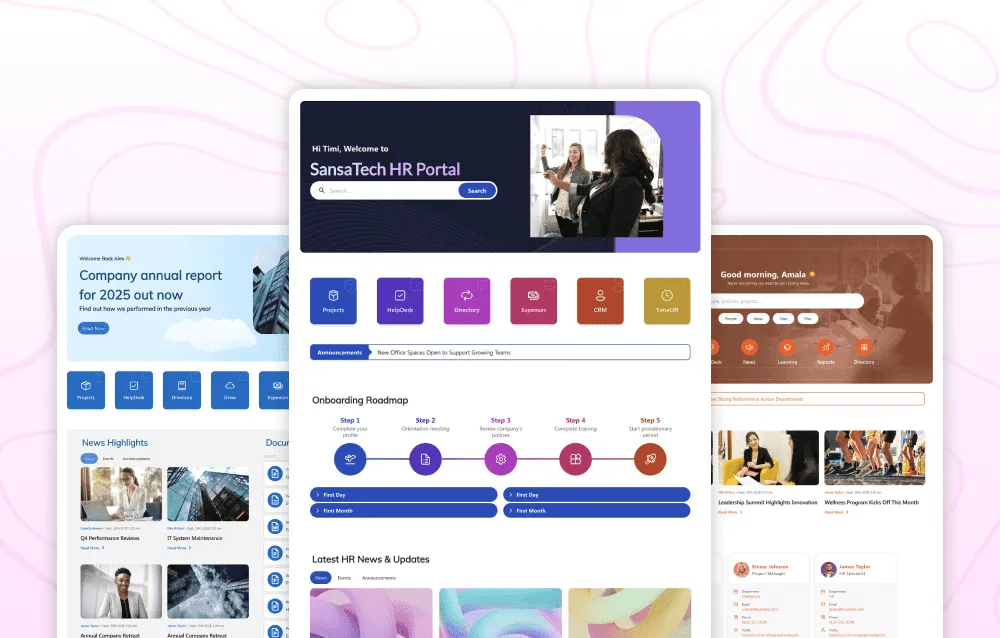
- 6. Best Onboarding SharePoint Template — A step-by-step visual roadmap variant of the onboarding hub. Better for companies that prefer a timeline-first layout over a hub-first layout.
- 7. Intranet Homepage Template (Annual Report Style) — Executive-focused homepage built for leadership updates, KPIs, and high-trust company news.
- 8. HR SharePoint Site Template — A search-first HR hub with universal search, tabbed document categories, and dynamic widgets for newest joiners and birthdays.
- 9. SharePoint Community Site Template — A community hub for news, learning, profiles, and events. Strong fit for ERGs and social-heavy cultures.
- 10. Staff Onboarding Template — A welcome hub variant that consolidates documents, team intros, and culture content into one navigable page.
- 11. SharePoint Company News Feed Template — A multi-stream news feed for projects, launches, and updates, with a leadership ticker and innovation spotlight.
Want more? Browse our full library of 250+ SharePoint templates — filterable by use case, industry, and category, with live demos for every design.
SharePoint Design Ideas Beyond Templates
Templates are a starting point — but the best SharePoint intranets go further. Here are some of the most popular SharePoint design ideas our customers are implementing in 2026 to create cool SharePoint site designs that stand out:
- Interactive Office Maps. Embed clickable floor plans or campus maps directly into SharePoint pages, letting employees find meeting rooms, desks, and facilities at a glance. Perfect for hybrid workplaces where space is booked dynamically.
- Dynamic Project Dashboards. Pull real-time data from Planner, Power BI, or project management tools and display progress, timelines, and KPIs directly on a SharePoint page — no separate login required.
- Personalized "My Hub" Pages. Give every employee a customized landing page that surfaces content relevant to their role, department, and location. Upcoming reviews, team announcements, assigned tasks — all in one view.
- Live Social Feeds From Viva Engage. Embed Viva Engage (formerly Yammer) feeds directly onto your homepage or community page, keeping the social pulse of your organization visible and encouraging participation.
- CEO & Leadership Communication Hubs. Create a dedicated space for executive messages, town hall recordings, strategic updates, and Q&A — making leadership visible and accessible across the organization.
- Department Microsites. Go beyond a single department page. Build mini-intranets for Marketing, Engineering, Sales, or any team — each with its own branded look, resource library, and news feed, all governed by a consistent site template.
These ideas work best when paired with a design platform like ShortPoint that lets non-technical teams build and iterate without developer dependencies. Learn how ShortPoint Connect integrates with your existing systems →
SharePoint Lookbook Limitations: Why Free Templates Fall Short
The SharePoint Lookbook offers inspiration and shows what's possible — but it's not a strategy. For leaders, it presents a paradox: it shows a beautiful destination but doesn't give you a practical vehicle to get there. Its designs are often rigid, difficult to brand, and miss the deep integration modern intranets demand.
The "Good Enough" Intranet Problem
Relying solely on free Lookbook designs often creates a "good enough" intranet. It functions. It checks a box. But it fails to inspire or engage. This approach saves time upfront but costs dearly in the long run through low adoption, missed productivity gains, and a disengaged workforce. Your digital workplace should be a competitive advantage, not just a utility.
The Hidden Costs of Custom Development
When standard designs fall short, custom SharePoint development is often the next consideration. While it offers flexibility, it carries significant hidden costs for CIOs and IT Directors:
- High initial outlay. Custom SharePoint Framework (SPFx) development is expensive, requiring specialized, in-demand skills.
- Long timelines. Custom intranet projects can take months, delaying time-to-value.
- Maintenance burden. Custom solutions require ongoing maintenance, updates, and testing with every SharePoint update, creating a permanent developer dependency.
- Lack of agility. Business changes become new development requests, leading to more sprints and delays. Marketing and HR can't make simple design changes independently.
This creates a dilemma: standard options are too rigid, and custom options are too slow and expensive.
Shortpoint: Intranet Design Comparison
| Feature | Out-of-the-Box | ShortPoint | Custom Development |
|---|---|---|---|
| Cost | $$ | $$$ | $$$$ |
| Time to Implement | ✓ Fast | ✓ Fast | ✗ Slow |
| Design Flexibility | ✗ Limited | ✓ Full | ✓ Full |
| Ease of Use | ✓ Simple | ✓ Simple | ✗ Complex |
| Low Maintenance | ✓ | ✓ | ✗ |
| No-Code Updates | ✗ | ✓ | ✗ |
| Copilot Compatible | ✓ | ✓ Embed via Theme Builder | ✓ |
Want to add Copilot to your intranet? See how to embed a Copilot Agent on any SharePoint site using ShortPoint Theme Builder →
ShortPoint: Build Custom SharePoint Designs Without Code
ShortPoint is a design platform that sits on top of SharePoint, bridging the gap between limiting OOTB designs and expensive custom development. It transforms any standard SharePoint page into a fully-branded, interactive, and deeply integrated digital experience. With ShortPoint AI Designer, it becomes an AI-powered intranet page builder for SharePoint that accelerates page creation and iteration even further.
Design Without Developers
With ShortPoint, your IT, communications, and marketing teams can become master site designers without writing code:
- Live-Mode Editor. Instantly see real-time design updates as you build. Use a visual, drag-and-drop editor to add pre-built design elements like image sliders, tabs, and accordions — without writing a single line of code.
- Theme Builder for SharePoint. Gain full control over site branding — from fonts and colors to layout styles — ensuring every intranet page reflects your company's identity.
- Reusable templates. Design once, use everywhere. Save any page as a template and instantly apply it across departments, ensuring consistent design and faster deployment.
- Accessibility built in. ShortPoint includes accessibility features with customizable widgets that help your intranet meet modern compliance standards — including screen reader-friendly layouts and both free and paid accessibility options.
Connect Everything: Seamless Integrations
A modern intranet needs to pull data and content from the systems employees use daily. ShortPoint's Connect feature allows you to:
- Surface data from multiple sources. Connect to SharePoint lists, document libraries, Microsoft Graph API, Power BI reports, and external systems via REST API. Display real-time data directly on your intranet pages.
- Extend with Microsoft Graph API. Pull data from across the Microsoft 365 ecosystem — Teams, Outlook, OneDrive, Azure AD — and display it directly on your SharePoint Online pages.
- Keep content dynamic. By connecting to live data sources, your intranet content is always fresh and relevant, encouraging users to return frequently.
Quick Takeaways
- Templates are a start, not an end. View page layouts as a foundation to build upon, not a finished product.
- Focus on business value. A strategic template approach boosts employee engagement, ensures brand consistency, and reduces IT overhead.
- Free templates have limits. The Microsoft SharePoint Lookbook is inspirational, but OOTB designs are often too rigid for the unique needs of your business.
- Custom code is costly. Full custom development is expensive, slow, and creates a long-term maintenance burden for IT.
- A design platform is the bridge. Tools like ShortPoint empower you to create custom, branded experiences without the need for developers.
- Your intranet is an experience. The ultimate goal is to move beyond static pages and create a dynamic, engaging digital workplace that employees love.
Conclusion: Your Intranet Is More Than a Page — It's an Experience
We've covered SharePoint templates from basic definitions to strategic imperatives for intranet design. As a leader, you know technology's true value lies in adoption and problem-solving. A generic, out-of-the-box intranet won't cut it in 2026 — it won't inspire teams, reflect culture, or deliver the productivity gains expected from your Microsoft 365 investment.
The limitations of standard designs and the prohibitive costs of custom development have long forced compromise. But you no longer have to choose between a rigid system and a resource-draining project.
By leveraging a design platform like ShortPoint, you gain control. Empower your creative teams to build beautiful, on-brand pages while freeing IT for strategic initiatives. Transform your SharePoint foundation into a truly connected, dynamic, and engaging digital employee experience.
Don't settle for "good enough" — build the intranet your employees deserve.
Frequently Asked Questions About SharePoint Templates
Yes. Microsoft provides free designs through the SharePoint Lookbook and built into SharePoint Online. These OOTB layouts cover common use cases like team sites, communication sites, and department pages. However, free designs offer limited flexibility and minimal branding options — which is why many organizations pair them with a design platform like ShortPoint to customize the look, feel, and functionality without starting from scratch.
The best page layouts for 2026 cover the core needs of modern digital workplaces: an intranet homepage, employee onboarding hub, HR resource center, document library, knowledge base, internal newsletter, communication site, community hub, landing page, company news feed, and department site. The most effective designs also support faster iteration and an AI intranet workflow — such as generating pages from prompts and improving them through conversation with ShortPoint AI Designer.
The SharePoint Lookbook (also called the SharePoint Look Book) is Microsoft's gallery of site design inspiration and templates for SharePoint Online. It showcases what's possible with SharePoint's modern experience, including designs for departments, events, learning, and more. While it's a great source of inspiration, the Lookbook's designs are static starting points — they offer limited customization and can be difficult to brand to your company's specific identity.
In SharePoint Online, you can create a page from a template by navigating to your site, clicking "New" > "Page," and selecting from available templates. Microsoft provides several built-in page layouts, or your organization may have custom designs saved. For more advanced templates with custom branding and interactive elements, ShortPoint lets you save any page design as a reusable template that anyone in your organization can apply — without needing developer skills.
Absolutely. ShortPoint works seamlessly with your existing SharePoint environment. You can start with a blank page or an existing page and use ShortPoint to redesign and enhance it without losing any content.
Not at all. ShortPoint is designed for business users. If you can use PowerPoint or Word, you can use ShortPoint. Its intuitive, drag-and-drop interface empowers users in Communications, HR, and Marketing to create and edit pages without writing any code or submitting an IT ticket.
The Lookbook provides static, inspirational images and basic designs. ShortPoint is a dynamic, hands-on design platform. With ShortPoint, you can take the idea of a Lookbook design and actually build it, brand it perfectly to your company, connect it to live data from other systems, and save your creations as new, reusable templates for your organization.
SharePoint site templates define the overall structure of an entire site — including navigation, default pages, web parts, and permissions. Page templates define the layout and content structure of a single page within a site. You typically start with a site template (like a team site or communication site) and then use page templates to build individual pages within that site. Both can be customized with ShortPoint.
Some popular ideas our customers implement include creating interactive office maps, building dynamic project dashboards that pull data from Planner and Power BI, designing personalized "My Hub" pages for employees, embedding live social media feeds from Viva Engage directly onto their homepage, and building dedicated leadership communication hubs.

Luisa Silva
Growth Manager, ShortPoint
Luisa is the Growth Manager at ShortPoint. She translates customer insights and ShortPoint solutions into practical, no-code guides for SharePoint and Microsoft 365 intranets. Focusing on intranet design, HR, knowledge hubs, and internal comms, her work is all about helping you achieve faster launches and higher adoption rates.
Ignite your vision. Install ShortPoint directly on your site, or play in sandbox mode. No credit card required.